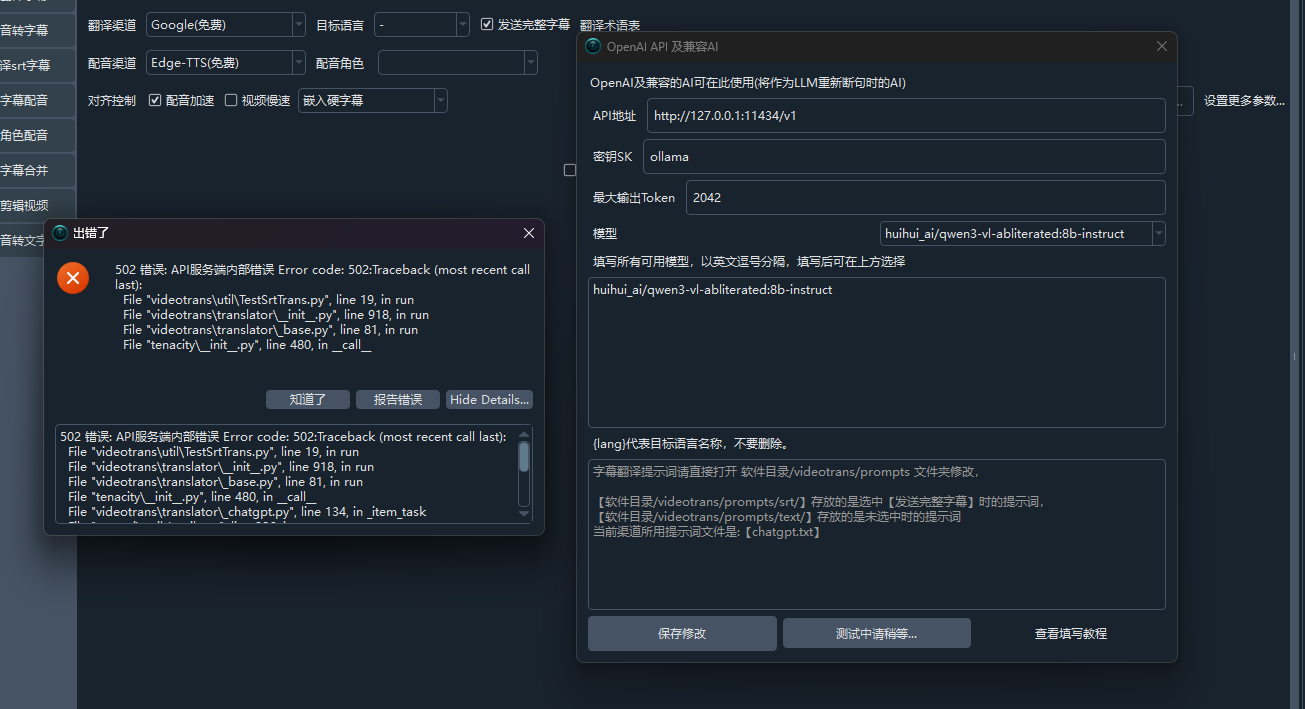
#2411 配置本地ollama测试时报错

188.253* Posted at: 2 hours ago 👁7

image

1 Replies

根据错误信息,问题在于您配置的 本地 Ollama 模型地址 格式不正确。

核心原因:您输入的地址 http://192.168.31.100:11434/v1 末尾多了一个 /v1。Ollama 的 OpenAI 兼容 API 端点通常为 http://主机IP:端口,而 /v1 路径是 OpenAI 格式,Ollama 会自动处理。

解决方案

  1. 在软件主界面,点击 翻译设置
  2. 在“翻译渠道”中选择 LocalLLM
  3. 在“LocalLLM 接口地址”中,将地址修改为:http://192.168.31.100:11434去掉末尾的 /v1)。
  4. 在“模型名称”中填入您 Ollama 中已拉取的模型名(例如 qwen2.5:7b)。
  5. 点击“测试”按钮,确认连接成功。

如果修改后仍报错,请检查:

  • Ollama 服务是否在 192.168.31.100:11434 正常运行(可在浏览器访问该地址查看)。
  • 防火墙是否阻止了软件与 Ollama 服务的通信。

请查看更多参考文档:

Post Your Reply
Open source and free maintenance is not easy. If this project is helpful to you, please consider making a small donation to help the project continue to maintain and update.

Donate: https://ko-fi.com/jianchang512

Trending Questions