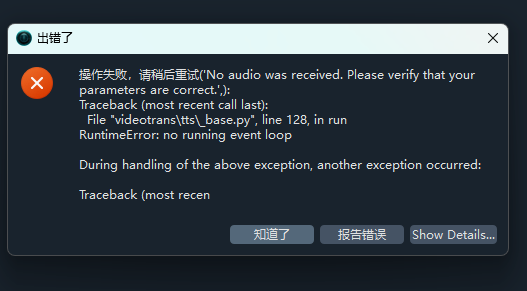
#2478 这是什么问题鸭

2408:8221* Posted at: 1 day ago 👁16

image
这是什么问题鸭

1 Replies

根据截图中的错误信息,问题在于软件无法连接到 HuggingFace 以下载所需的模型文件。这通常是由于网络连接问题导致的。

核心解决方法:手动下载模型文件并放置到正确目录。

具体操作步骤如下:

  1. 确定缺失的模型:
    错误信息中提到了 models--Systran--faster-distil-whisper-large-v3,这是您需要下载的模型。
  2. 手动下载模型:

    • 访问 HuggingFace 模型页面:https://huggingface.co/Systran/faster-distil-whisper-large-v3
    • 点击页面上的 “Files and versions” 选项卡。
    • 下载整个仓库(通常有“Clone repository”或下载按钮),或者至少下载 model.binconfig.json 等核心文件。
  3. 放置模型文件:

    • 找到 pyVideoTrans 的模型缓存目录。通常位于:

      • Windows (预打包版): 软件解压目录/models/
      • Mac/Linux (源码版): ~/.cache/huggingface/hub/
    • 在缓存目录中,创建对应的文件夹结构:models--Systran--faster-distil-whisper-large-v3,然后将下载的文件放入其中。
    • 更简单的方法(推荐): 直接将下载的模型文件夹(例如 faster-distil-whisper-large-v3)重命名为 models--Systran--faster-distil-whisper-large-v3,然后整个复制到上述缓存目录。
  4. 重启软件:
    完成文件放置后,重新启动 pyVideoTrans,它应该能识别到本地已存在的模型并跳过下载。

备用方案(如果手动下载困难):

  • 更换模型: 在软件的语言识别设置中,尝试选择一个更小或更常见的模型(例如 large-v3medium),这些模型可能已预下载或更容易获取。
  • 使用代理: 如果您处于网络受限环境,请在软件主界面第5行的“网络代理”中填写可用的代理地址(格式如 http://127.0.0.1:10809)。

请查看更多参考文档:

Post Your Reply
Open source and free maintenance is not easy. If this project is helpful to you, please consider making a small donation to help the project continue to maintain and update.

Donate: https://ko-fi.com/jianchang512

Trending Questions