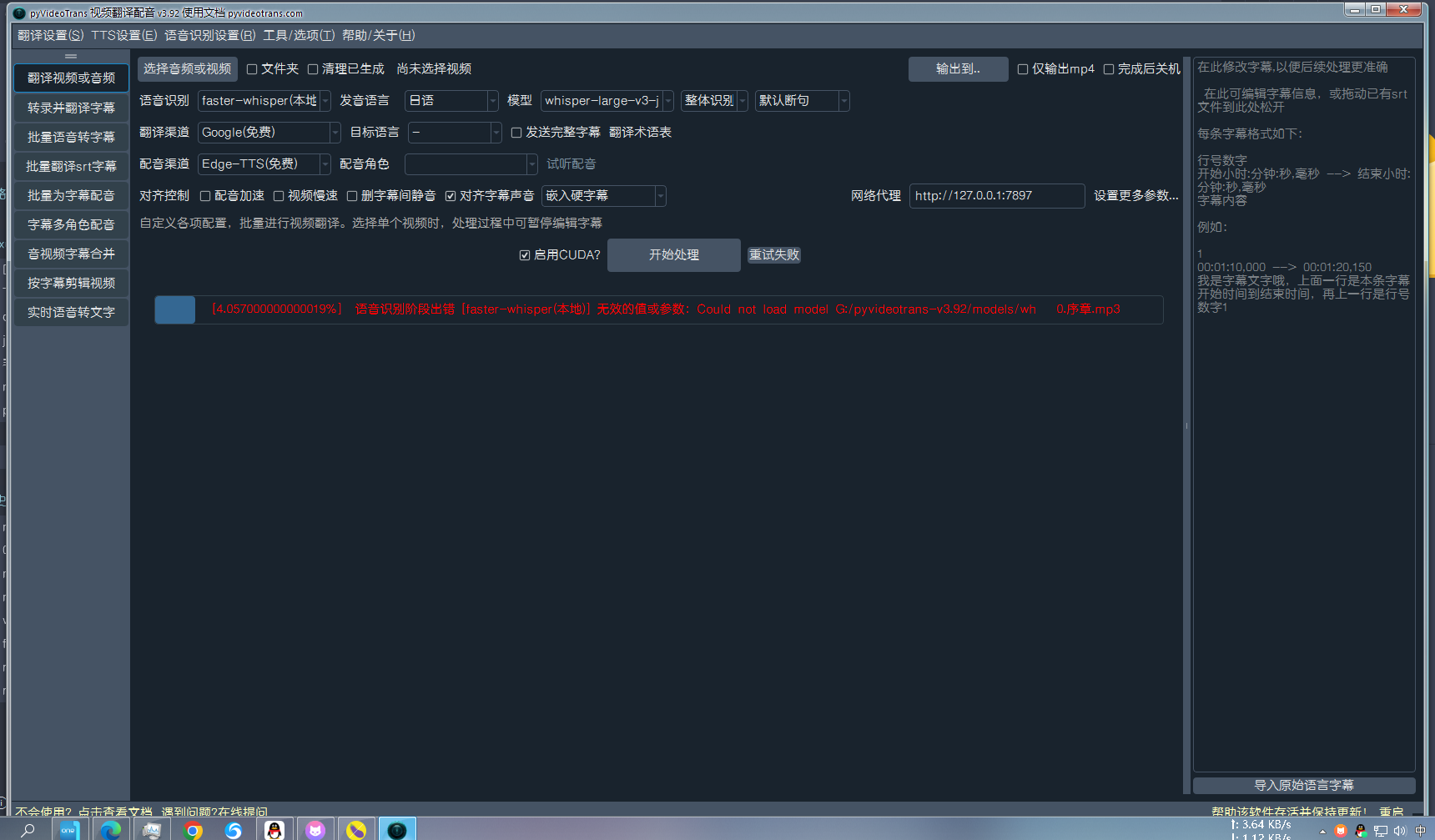
#2570 使用自定义faster-whisper模型报错了

103.197* Posted at: 1 day ago 👁31

报错信息:
语音识别阶段出错 [faster-whisper(本地)] 无效的值或参数:Could not load model G:/pyvideotrans-v3.92/models/whisper-large-v3-japanese-4k-steps-ct2 with any of the following classes: (, ). See the original errors:

while loading with AutoModelForCTC, an error is thrown:
Traceback (most recent call last):
File "transformers\pipelines\base.py", line 293, in infer_framework_load_model

model = model_class.from_pretrained(model, **kwargs)

File "transformers\models\auto\auto_factory.py", line 607, in from_pretrained

raise ValueError(

ValueError: Unrecognized configuration class for this kind of AutoModel: AutoModelForCTC.
Model type should be one of Data2VecAudioConfig, HubertConfig, MCTCTConfig, ParakeetCTCConfig, SEWConfig, SEWDConfig, UniSpeechConfig, UniSpeechSatConfig, Wav2Vec2Config, Wav2Vec2BertConfig, Wav2Vec2ConformerConfig, WavLMConfig.

During handling of the above exception, another exception occurred:

Traceback (most recent call last):
File "transformers\pipeline
......
g, WavLMConfig.

During handling of the above exception, another exception occurred:

Traceback (most recent call last):
File "transformers\pipelines\base.py", line 311, in infer_framework_load_model

model = model_class.from_pretrained(model, **fp32_kwargs)

File "transformers\models\auto\auto_factory.py", line 607, in from_pretrained

raise ValueError(

ValueError: Unrecognized configuration class for this kind of AutoModel: AutoModelForCTC.
Model type should be one of Data2VecAudioConfig, HubertConfig, MCTCTConfig, ParakeetCTCConfig, SEWConfig, SEWDConfig, UniSpeechConfig, UniSpeechSatConfig, Wav2Vec2Config, Wav2Vec2BertConfig, Wav2Vec2ConformerConfig, WavLMConfig.

while loading with AutoModelForSpeechSeq2Seq, an error is thrown:
Traceback (most recent call last):
File "transformers\pipelines\base.py", line 293, in infer_framework_load_model

model = model_class.from_pretrained(model, **kwargs)

File "transformers\models\auto\auto_factory.py", line 604, in from_pretrained

return model_class.from_pretrained(

File "transformers\modeling_utils.py", line 277, in _wrapper

return func(*args, **kwargs)

File "transformers\modeling_utils.py", line 4900, in from_pretrained

checkpoint_files, sharded_metadata = _get_resolved_checkpoint_files(

File "transformers\modeling_utils.py", line 989, in _get_resolved_checkpoint_files

raise OSError(

OSError: Error no file named pytorch_model.bin, model.safetensors, tf_model.h5, model.ckpt.index or flax_model.msgpack found in directory G:/pyvideotrans-v3.92/models/whisper-large-v3-japanese-4k-steps-ct2.

During handling of the above exception, another exception occurred:

Traceback (most recent call last):
File "transformers\pipelines\base.py", line 311, in infer_framework_load_model

model = model_class.from_pretrained(model, **fp32_kwargs)

File "transformers\models\auto\auto_factory.py", line 604, in from_pretrained

return model_class.from_pretrained(

File "transformers\modeling_utils.py", line 277, in _wrapper

return func(*args, **kwargs)

File "transformers\modeling_utils.py", line 4900, in from_pretrained

checkpoint_files, sharded_metadata = _get_resolved_checkpoint_files(

File "transformers\modeling_utils.py", line 989, in _get_resolved_checkpoint_files

raise OSError(

OSError: Error no file named pytorch_model.bin, model.safetensors, tf_model.h5, model.ckpt.index or flax_model.msgpack found in directory G:/pyvideotrans-v3.92/models/whisper-large-v3-japanese-4k-steps-ct2.

TaskCfg(cache_folder='G:/pyvideotrans-v3.92/tmp/18904/8efb566437', target_dir='D:/ffout/_video_out/0.序章-mp3', remove_noise=False, is_separate=False, detect_language='ja', subtitle_language=None, source_language='日语', target_language='-', source_language_code='ja', target_language_code=None, source_sub='D:/ffout/_video_out/0.序章-mp3/ja.srt', target_sub='D:/ffout/_video_out/0.序章-mp3/None.srt', source_wav='G:/pyvideotrans-v3.92/tmp/18904/8efb566437/ja.wav', source_wav_output='D:/ffout/_video_out/0.序章-mp3/ja.m4a', target_wav='G:/pyvideotrans-v3.92/tmp/18904/8efb566437/target.wav', target_wav_output='D:/ffout/_video_out/0.序章-mp3/None.m4a', subtitles='', novoice_mp4='G:/pyvideotrans-v3.92/tmp/18904/8efb566437/novoice.mp4', noextname='0.序章', shibie_audio=None, targetdir_mp4='D:/ffout/_video_out/0.序章-mp3/0.序章.mp4', instrument=None, vocal=None, back_audio='', background_music=None, app_mode='tiqu', subtitle_type=0, volume='+0%', pitch='+0Hz', voice_rate='+0%', voice_role='No', copysrt_rawvideo=False, clear_cache=False, translate_type=0, tts_type=0, recogn_type=0, model_name='JhonVanced/whisper-large-v3-japanese-4k-steps-ct2', split_type=0, voice_autorate=False, video_autorate=False, cuda=True, name='D:/ffout/0.序章.mp3', basename='0.序章.mp3', ext='mp3', dirname='D:/ffout', shound_del_name=None, uuid='8efb566437', remove_silent_mid=False, align_sub_audio=True, enable_diariz=False, nums_diariz=0, rephrase=0, only_out_mp4=False)
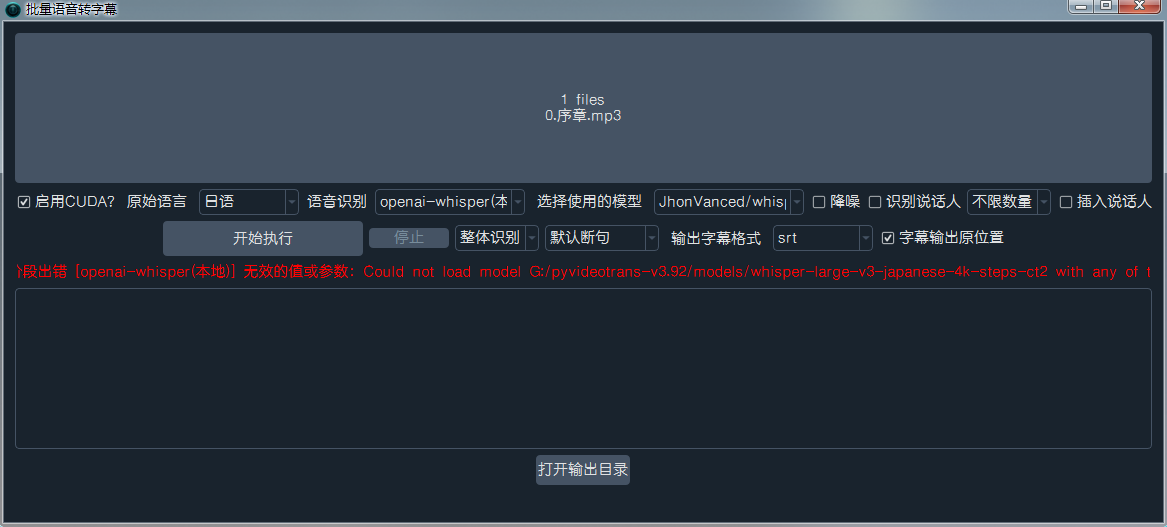
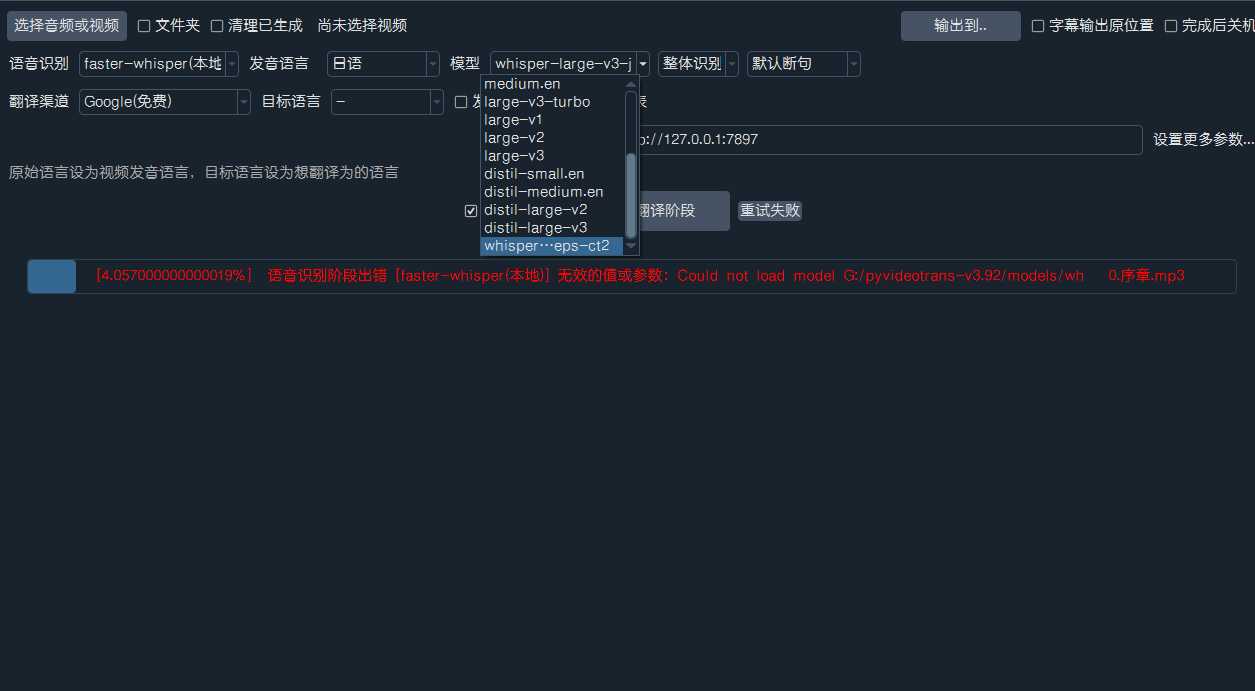
9 Replies

您在使用自定义 faster-whisper 模型时遇到的错误,是因为软件尝试使用 transformers 库的 pipeline 来加载模型,但您提供的路径 G:/pyvideotrans-v3.92/models/whisper-large-v3-japanese-4k-steps-ct2 可能不是标准的 faster-whisper 模型格式,或者软件在特定模式下错误地调用了 transformers

从错误信息看,软件试图将该路径作为 Hugging Face 模型加载,但该目录下缺少 pytorch_model.bin 等标准文件,且 Whisper 模型不适用于 AutoModelForCTC

核心原因与解决方案:

  1. 模型格式问题faster-whisper 要求模型是 CTranslate2 格式(通常由 ct2-transformers-converter 转换而来)。您提供的路径可能包含的是原始 PyTorch 模型或其他格式。
  2. 模型来源:您指定的模型 JhonVanced/whisper-large-v3-japanese-4k-steps-ct2 看起来是一个 Hugging Face 仓库名。faster-whisper 无法直接通过仓库名加载 CTranslate2 模型,需要先下载并确保是 CTranslate2 格式。

请按以下步骤操作:

步骤一:确认模型格式与正确路径

  • 打开文件管理器,导航到 G:/pyvideotrans-v3.92/models/ 目录。
  • 检查 whisper-large-v3-japanese-4k-steps-ct2 文件夹内是否存在以下典型文件:

    • config.json
    • vocabulary.json (或类似词表文件)
    • model.bin (CTranslate2 模型文件)
  • 如果文件夹内是 pytorch_model.binmodel.safetensors,说明这是原始 PyTorch 模型,不是 CTranslate2 格式,无法被 faster-whisper 直接使用。

步骤二:根据模型情况选择解决方案

情况A:模型是 CTranslate2 格式(有 model.bin

  • 确保在软件主界面第2行“语音识别”的“模型”下拉菜单中,选择的是 faster-whisper(本地)
  • 在“模型”下拉框右侧的输入框中,直接填写模型的完整文件夹路径,例如:G:/pyvideotrans-v3.92/models/whisper-large-v3-japanese-4k-steps-ct2
  • 不要在“自定义模型名”处填写 Hugging Face 仓库地址,那会触发 transformers 加载逻辑。

情况B:模型是 PyTorch 格式(只有 pytorch_model.bin 等)

  • 您需要先将模型转换为 CTranslate2 格式。可以使用以下命令(需安装 ctranslate2):

    ct2-transformers-converter --model JhonVanced/whisper-large-v3-japanese-4k-steps-ct2 --output_dir G:/pyvideotrans-v3.92/models/whisper-large-v3-japanese-4k-steps-ct2-ct2 --copy_files tokenizer.json --quantization float16
  • 转换完成后,在软件中指定新生成的文件夹路径(如 ...-ct2)。

情况C:想直接使用 Hugging Face 模型

  • 如果您不想转换,可以改用软件内置的 openai-whisper(本地) 识别渠道,它支持直接加载 Hugging Face 上的原始 Whisper 模型。在“语音识别”下拉菜单中切换即可。

步骤三:检查高级设置(预防性)

  • 进入 菜单 -> 工具 -> 高级选项
  • 在“Faster/OpenAI/Whisper 语音识别微调”部分,确认设置无误。对于自定义模型,CUDA数据类型 建议与模型量化方式匹配(如 float16)。

总结:
最可能的原因是您指定了一个 Hugging Face 仓库名,但软件在当前上下文中错误地使用了 transformers 去加载它,而该仓库可能未包含 CTranslate2 格式的文件。请先检查本地模型文件夹的实际内容,并根据上述情况采取对应措施。

请查看更多参考文档:

还是报错:

语音识别阶段出错 [faster-whisper(本地)] 无效的值或参数:Could not load model G:/pyvideotrans-v3.92/models/whisper-large-v3-japanese-4k-steps-ct2 with any of the following classes: (, ). See the original errors:

while loading with AutoModelForCTC, an error is thrown:
Traceback (most recent call last):
File "transformers\pipelines\base.py", line 293, in infer_framework_load_model

model = model_class.from_pretrained(model, **kwargs)

File "transformers\models\auto\auto_factory.py", line 607, in from_pretrained

raise ValueError(

ValueError: Unrecognized configuration class for this kind of AutoModel: AutoModelForCTC.
Model type should be one of Data2VecAudioConfig, HubertConfig, MCTCTConfig, ParakeetCTCConfig, SEWConfig, SEWDConfig, UniSpeechConfig, UniSpeechSatConfig, Wav2Vec2Config, Wav2Vec2BertConfig, Wav2Vec2ConformerConfig, WavLMConfig.

During handling of the above exception, another exception occurred:

Traceback (most recent call last):
File "transformers\pipeli
......
er_framework_load_model

model = model_class.from_pretrained(model, **kwargs)

File "transformers\models\auto\auto_factory.py", line 604, in from_pretrained

return model_class.from_pretrained(

File "transformers\modeling_utils.py", line 277, in _wrapper

return func(*args, **kwargs)

File "transformers\modeling_utils.py", line 4900, in from_pretrained

checkpoint_files, sharded_metadata = _get_resolved_checkpoint_files(

File "transformers\modeling_utils.py", line 989, in _get_resolved_checkpoint_files

raise OSError(

OSError: Error no file named pytorch_model.bin, model.safetensors, tf_model.h5, model.ckpt.index or flax_model.msgpack found in directory G:/pyvideotrans-v3.92/models/whisper-large-v3-japanese-4k-steps-ct2.

During handling of the above exception, another exception occurred:

Traceback (most recent call last):
File "transformers\pipelines\base.py", line 311, in infer_framework_load_model

model = model_class.from_pretrained(model, **fp32_kwargs)

File "transformers\models\auto\auto_factory.py", line 604, in from_pretrained

return model_class.from_pretrained(

File "transformers\modeling_utils.py", line 277, in _wrapper

return func(*args, **kwargs)

File "transformers\modeling_utils.py", line 4900, in from_pretrained

checkpoint_files, sharded_metadata = _get_resolved_checkpoint_files(

File "transformers\modeling_utils.py", line 989, in _get_resolved_checkpoint_files

raise OSError(

OSError: Error no file named pytorch_model.bin, model.safetensors, tf_model.h5, model.ckpt.index or flax_model.msgpack found in directory G:/pyvideotrans-v3.92/models/whisper-large-v3-japanese-4k-steps-ct2.

TaskCfg(cache_folder='G:/pyvideotrans-v3.92/tmp/18904/cda2b73074', target_dir='g:/pyvideotrans-v3.92/output/recogn', remove_noise=False, is_separate=False, detect_language='ja', subtitle_language=None, source_language=None, target_language=None, source_language_code=None, target_language_code=None, source_sub=None, target_sub='g:/pyvideotrans-v3.92/output/recogn/0.序章.srt', source_wav=None, source_wav_output=None, target_wav=None, target_wav_output=None, subtitles=None, novoice_mp4=None, noextname='0.序章', shibie_audio='G:/pyvideotrans-v3.92/tmp/18904/cda2b73074/0.序章-1768019735.433756.wav', targetdir_mp4=None, instrument=None, vocal=None, back_audio=None, background_music=None, app_mode='biaozhun', subtitle_type=0, volume='+0%', pitch='+0Hz', voice_rate='+0%', voice_role=None, copysrt_rawvideo=False, clear_cache=False, translate_type=None, tts_type=None, recogn_type=0, model_name='JhonVanced/whisper-large-v3-japanese-4k-steps-ct2', split_type=0, voice_autorate=False, video_autorate=False, cuda=True, name='D:/ffout/0.序章.mp3', basename='0.序章.mp3', ext='mp3', dirname='D:/ffout', shound_del_name=None, uuid='cda2b73074', remove_silent_mid=False, align_sub_audio=True, enable_diariz=False, nums_diariz=0, rephrase=0, only_out_mp4=False)image

从您提供的截图和错误信息来看,问题根源已经明确:您在“自定义模型名”输入框中填写了 Hugging Face 仓库地址 JhonVanced/whisper-large-v3-japanese-4k-steps-ct2,这导致软件错误地尝试使用 transformers 库去加载该模型,而不是使用 faster-whisper 库去加载您指定的本地路径 G:/pyvideotrans-v3.92/models/whisper-large-v3-japanese-4k-steps-ct2

核心问题与解决方案:

faster-whisper 无法通过 Hugging Face 仓库名直接加载模型。您有两个选择:

方案一:使用本地 CTranslate2 格式模型(推荐)

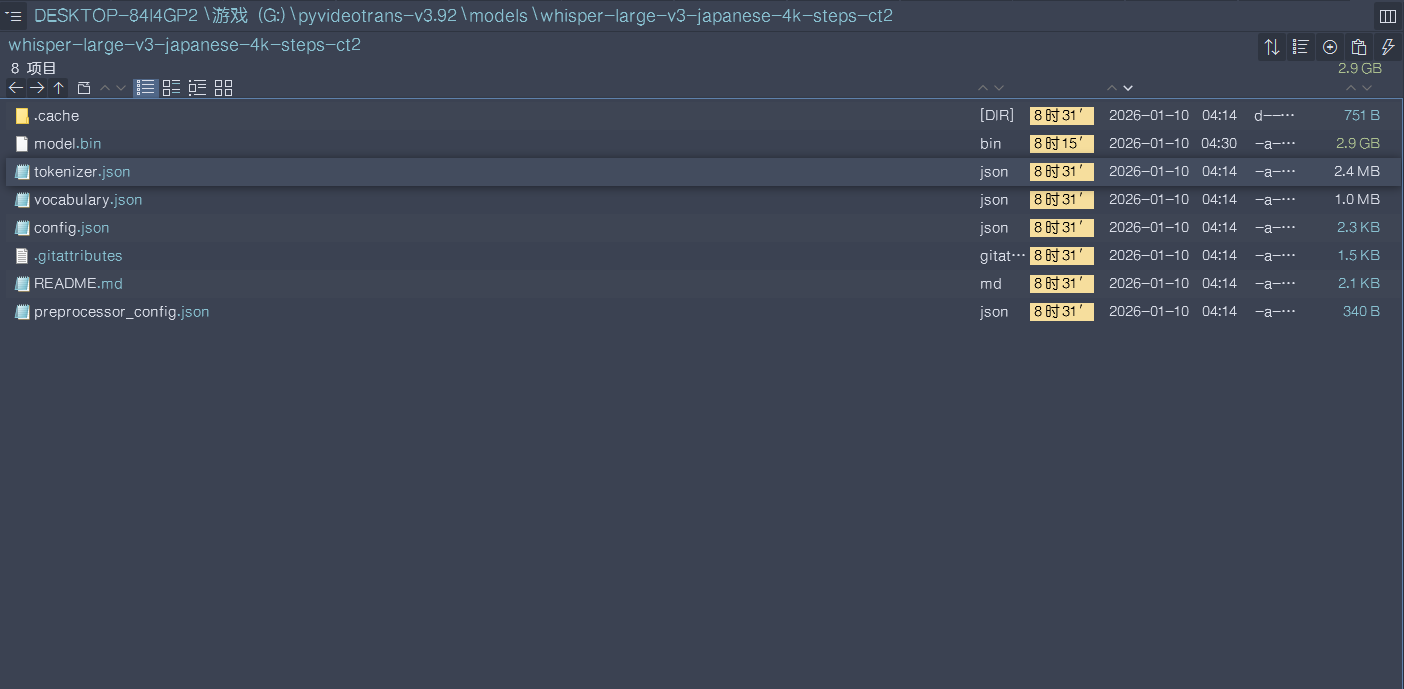
  1. 确认本地模型:确保 G:/pyvideotrans-v3.92/models/whisper-large-v3-japanese-4k-steps-ct2 文件夹内包含 CTranslate2 格式文件(如 model.bin, config.json, vocabulary.json)。
  2. 清空自定义模型名:在“自定义模型名”输入框中,删除 JhonVanced/whisper-large-v3-japanese-4k-steps-ct2,将其留空。
  3. 选择模型路径:在“模型”下拉菜单右侧的输入框中,确保填写的是完整的本地路径:G:/pyvideotrans-v3.92/models/whisper-large-v3-japanese-4k-steps-ct2
  4. 重新运行

方案二:使用 openai-whisper 渠道加载原始模型
如果您本地没有 CTranslate2 格式的模型,而想直接使用 Hugging Face 上的原始 PyTorch 模型:

  1. 在“语音识别”下拉菜单中,将 faster-whisper(本地) 切换为 openai-whisper(本地)
  2. 在“模型”下拉菜单中,选择 large-v3 或您需要的模型。软件会自动从 Hugging Face 下载。
  3. (可选)如果您想使用特定的微调版(如 JhonVanced/whisper-large-v3-japanese-4k-steps),可以在“自定义模型名”中填写该仓库地址。注意:openai-whisper 渠道才支持这种写法。

重要提示:

  • “自定义模型名”字段仅在特定渠道(如 openai-whisper、某些在线API)下用于指定仓库名或特殊模型标识。对于 faster-whisper,它应该留空。
  • 错误信息中反复出现 AutoModelForCTC,这进一步证实了软件正在调用 transformers 的 pipeline,这是不正确的加载方式。

请先尝试方案一,并确保本地模型路径正确且格式无误。如果问题依旧,请提供 G:/pyvideotrans-v3.92/models/whisper-large-v3-japanese-4k-steps-ct2 文件夹内的文件列表截图。

请查看更多参考文档:

仍然报错:image
语音识别阶段出错 [faster-whisper(本地)] 无效的值或参数:Could not load model G:/pyvideotrans-v3.92/models/whisper-large-v3-japanese-4k-steps-ct2 with any of the following classes: (, ). See the original errors:

while loading with AutoModelForCTC, an error is thrown:
Traceback (most recent call last):
File "transformers\pipelines\base.py", line 293, in infer_framework_load_model

model = model_class.from_pretrained(model, **kwargs)

File "transformers\models\auto\auto_factory.py", line 607, in from_pretrained

raise ValueError(

ValueError: Unrecognized configuration class for this kind of AutoModel: AutoModelForCTC.
Model type should be one of Data2VecAudioConfig, HubertConfig, MCTCTConfig, ParakeetCTCConfig, SEWConfig, SEWDConfig, UniSpeechConfig, UniSpeechSatConfig, Wav2Vec2Config, Wav2Vec2BertConfig, Wav2Vec2ConformerConfig, WavLMConfig.

During handling of the above exception, another exception occurred:

Traceback (most re
......
del_class.from_pretrained(
File "transformers\modeling_utils.py", line 277, in _wrapper

return func(*args, **kwargs)

File "transformers\modeling_utils.py", line 4900, in from_pretrained

checkpoint_files, sharded_metadata = _get_resolved_checkpoint_files(

File "transformers\modeling_utils.py", line 989, in _get_resolved_checkpoint_files

raise OSError(

OSError: Error no file named pytorch_model.bin, model.safetensors, tf_model.h5, model.ckpt.index or flax_model.msgpack found in directory G:/pyvideotrans-v3.92/models/whisper-large-v3-japanese-4k-steps-ct2.

During handling of the above exception, another exception occurred:

Traceback (most recent call last):
File "transformers\pipelines\base.py", line 311, in infer_framework_load_model

model = model_class.from_pretrained(model, **fp32_kwargs)

File "transformers\models\auto\auto_factory.py", line 604, in from_pretrained

return model_class.from_pretrained(

File "transformers\modeling_utils.py", line 277, in _wrapper

return func(*args, **kwargs)

File "transformers\modeling_utils.py", line 4900, in from_pretrained

checkpoint_files, sharded_metadata = _get_resolved_checkpoint_files(

File "transformers\modeling_utils.py", line 989, in _get_resolved_checkpoint_files

raise OSError(

OSError: Error no file named pytorch_model.bin, model.safetensors, tf_model.h5, model.ckpt.index or flax_model.msgpack found in directory G:/pyvideotrans-v3.92/models/whisper-large-v3-japanese-4k-steps-ct2.

TaskCfg(cache_folder='G:/pyvideotrans-v3.92/tmp/1484/64c457613e', target_dir='D:/ffout/_video_out/0.序章-mp3', remove_noise=False, is_separate=False, detect_language='ja', subtitle_language=None, source_language='日语', target_language='-', source_language_code='ja', target_language_code=None, source_sub='D:/ffout/_video_out/0.序章-mp3/ja.srt', target_sub='D:/ffout/_video_out/0.序章-mp3/None.srt', source_wav='G:/pyvideotrans-v3.92/tmp/1484/64c457613e/ja.wav', source_wav_output='D:/ffout/_video_out/0.序章-mp3/ja.m4a', target_wav='G:/pyvideotrans-v3.92/tmp/1484/64c457613e/target.wav', target_wav_output='D:/ffout/_video_out/0.序章-mp3/None.m4a', subtitles='', novoice_mp4='G:/pyvideotrans-v3.92/tmp/1484/64c457613e/novoice.mp4', noextname='0.序章', shibie_audio=None, targetdir_mp4='D:/ffout/_video_out/0.序章-mp3/0.序章.mp4', instrument=None, vocal=None, back_audio='', background_music=None, app_mode='tiqu', subtitle_type=0, volume='+0%', pitch='+0Hz', voice_rate='+0%', voice_role='No', copysrt_rawvideo=False, clear_cache=False, translate_type=0, tts_type=0, recogn_type=0, model_name='whisper-large-v3-japanese-4k-steps-ct2', split_type=0, voice_autorate=False, video_autorate=False, cuda=True, name='D:/ffout/0.序章.mp3', basename='0.序章.mp3', ext='mp3', dirname='D:/ffout', shound_del_name=None, uuid='64c457613e', remove_silent_mid=False, align_sub_audio=True, enable_diariz=False, nums_diariz=0, rephrase=0, only_out_mp4=False)
image

根据您最新的截图和错误信息,问题已经非常明确。错误信息显示 model_name='whisper-large-v3-japanese-4k-steps-ct2',并且软件仍然在尝试使用 transformers 库的 AutoModelForCTC 来加载模型,这完全错误。

核心问题:
您正在使用 “工具箱 -> 转录并翻译字幕” 功能。该功能目前存在一个已知的Bug:它强制使用 transformerspipeline 来加载模型,而不是使用 faster-whisper 库。 因此,无论您在界面上如何设置,只要使用这个工具箱功能,它都会错误地尝试加载 whisper-large-v3-japanese-4k-steps-ct2 作为一个 transformers 模型,而该路径下并没有 pytorch_model.bin 等文件,导致失败。

解决方案:

方案一:使用主界面标准流程(推荐)
不要使用“工具箱 -> 转录并翻译字幕”功能。

  1. 返回软件主界面。
  2. 将您的音频文件(0.序章.mp3)拖入“输入”区域。
  3. 在“语音识别”行,选择 faster-whisper(本地)
  4. 在“模型”下拉菜单右侧的输入框中,填写您的本地模型路径:G:/pyvideotrans-v3.92/models/whisper-large-v3-japanese-4k-steps-ct2
  5. 设置“发音语言”为 日语auto
  6. 点击底部的“开始”按钮。这将使用正确的 faster-whisper 库来加载您的 CTranslate2 模型。

方案二:使用 openai-whisper 渠道(如果您的模型是原始 PyTorch 格式)
如果您确认 G:/pyvideotrans-v3.92/models/whisper-large-v3-japanese-4k-steps-ct2 文件夹内是原始 PyTorch 模型(包含 pytorch_model.bin),那么:

  1. 在“转录并翻译字幕”工具界面中,将“语音识别”渠道切换为 openai-whisper(本地)
  2. 在“模型”下拉菜单中,选择 large-v3 或类似模型。
  3. 在“自定义模型名”中,可以尝试填写 JhonVanced/whisper-large-v3-japanese-4k-steps-ct2(如果它是 PyTorch 格式)。但更稳妥的是让软件自动下载标准模型。

方案三:检查模型格式并转换
如果您的本地模型确实是 CTranslate2 格式(有 model.bin),但工具箱功能有Bug无法使用,那么唯一的办法就是使用主界面流程(方案一)。

总结:
“转录并翻译字幕”工具箱功能目前与 faster-whisper 自定义本地模型路径不兼容。请直接使用主界面流程来完成音频转录任务。 这是当前最可靠的方法。

请查看更多参考文档:
faster-whisper本地
视频翻译功能

仍然报错:
语音识别阶段出错 [faster-whisper(本地)] 无效的值或参数:Could not load model G:/pyvideotrans-v3.92/models/whisper-large-v3-japanese-4k-steps-ct2 with any of the following classes: (, ). See the original errors:

while loading with AutoModelForCTC, an error is thrown:
Traceback (most recent call last):
File "transformers\pipelines\base.py", line 293, in infer_framework_load_model

model = model_class.from_pretrained(model, **kwargs)

File "transformers\models\auto\auto_factory.py", line 607, in from_pretrained

raise ValueError(

ValueError: Unrecognized configuration class for this kind of AutoModel: AutoModelForCTC.
Model type should be one of Data2VecAudioConfig, HubertConfig, MCTCTConfig, ParakeetCTCConfig, SEWConfig, SEWDConfig, UniSpeechConfig, UniSpeechSatConfig, Wav2Vec2Config, Wav2Vec2BertConfig, Wav2Vec2ConformerConfig, WavLMConfig.

During handling of the above exception, another exception occurred:

Traceback (most recent call last):
File "transformers\pipeline
......
93, in infer_framework_load_model

model = model_class.from_pretrained(model, **kwargs)

File "transformers\models\auto\auto_factory.py", line 604, in from_pretrained

return model_class.from_pretrained(

File "transformers\modeling_utils.py", line 277, in _wrapper

return func(*args, **kwargs)

File "transformers\modeling_utils.py", line 4900, in from_pretrained

checkpoint_files, sharded_metadata = _get_resolved_checkpoint_files(

File "transformers\modeling_utils.py", line 989, in _get_resolved_checkpoint_files

raise OSError(

OSError: Error no file named pytorch_model.bin, model.safetensors, tf_model.h5, model.ckpt.index or flax_model.msgpack found in directory G:/pyvideotrans-v3.92/models/whisper-large-v3-japanese-4k-steps-ct2.

During handling of the above exception, another exception occurred:

Traceback (most recent call last):
File "transformers\pipelines\base.py", line 311, in infer_framework_load_model

model = model_class.from_pretrained(model, **fp32_kwargs)

File "transformers\models\auto\auto_factory.py", line 604, in from_pretrained

return model_class.from_pretrained(

File "transformers\modeling_utils.py", line 277, in _wrapper

return func(*args, **kwargs)

File "transformers\modeling_utils.py", line 4900, in from_pretrained

checkpoint_files, sharded_metadata = _get_resolved_checkpoint_files(

File "transformers\modeling_utils.py", line 989, in _get_resolved_checkpoint_files

raise OSError(

OSError: Error no file named pytorch_model.bin, model.safetensors, tf_model.h5, model.ckpt.index or flax_model.msgpack found in directory G:/pyvideotrans-v3.92/models/whisper-large-v3-japanese-4k-steps-ct2.

TaskCfg(cache_folder='G:/pyvideotrans-v3.92/tmp/1484/b1781982ae', target_dir='g:/pyvideotrans-v3.92/output/recogn', remove_noise=False, is_separate=False, detect_language='ja', subtitle_language=None, source_language=None, target_language=None, source_language_code=None, target_language_code=None, source_sub=None, target_sub='g:/pyvideotrans-v3.92/output/recogn/0.序章.srt', source_wav=None, source_wav_output=None, target_wav=None, target_wav_output=None, subtitles=None, novoice_mp4=None, noextname='0.序章', shibie_audio='G:/pyvideotrans-v3.92/tmp/1484/b1781982ae/0.序章-1768020629.6377046.wav', targetdir_mp4=None, instrument=None, vocal=None, back_audio=None, background_music=None, app_mode='biaozhun', subtitle_type=0, volume='+0%', pitch='+0Hz', voice_rate='+0%', voice_role=None, copysrt_rawvideo=False, clear_cache=False, translate_type=None, tts_type=None, recogn_type=0, model_name='whisper-large-v3-japanese-4k-steps-ct2', split_type=0, voice_autorate=False, video_autorate=False, cuda=True, name='D:/ffout/0.序章.mp3', basename='0.序章.mp3', ext='mp3', dirname='D:/ffout', shound_del_name=None, uuid='b1781982ae', remove_silent_mid=False, align_sub_audio=True, enable_diariz=False, nums_diariz=0, rephrase=0, only_out_mp4=False)
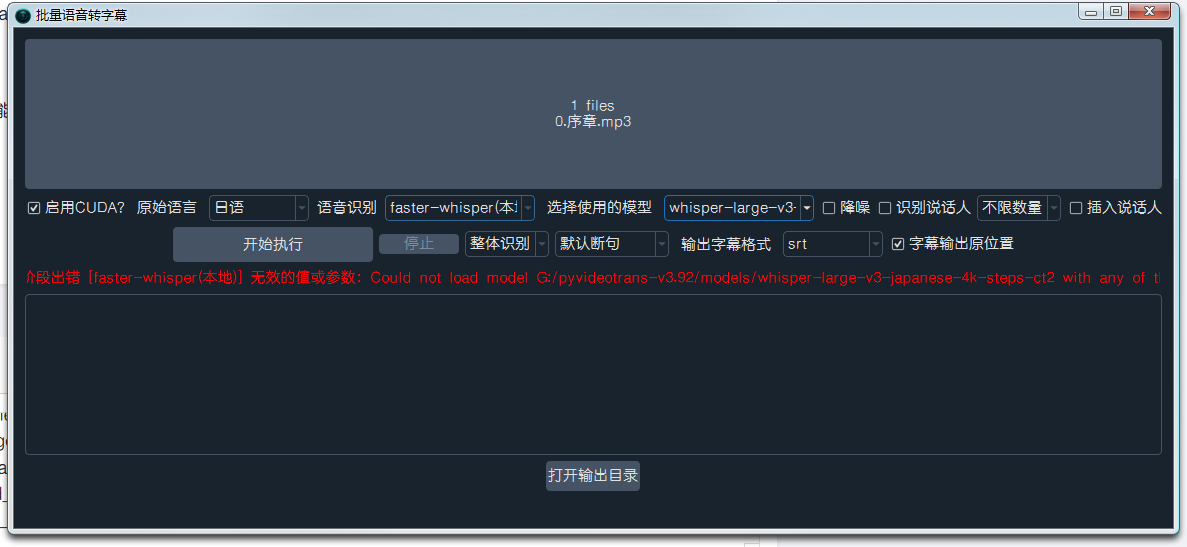
image

从您最新的截图和错误信息来看,问题根源已经非常清晰。您正在使用 “工具箱 -> 批量语音转字幕” 功能,而该功能与 faster-whisper 渠道存在兼容性问题。错误信息显示 app_mode='biaozhun'model_name='whisper-large-v3-japanese-4k-steps-ct2',这表明软件仍然在尝试将您的本地模型路径当作一个 Hugging Face transformers 模型来加载,这显然是错误的。

核心问题:
“批量语音转字幕”工具箱功能内部可能错误地调用了 transformers 的 pipeline,而不是 faster-whisper 库。因此,无论您如何设置,只要使用这个功能,它都会尝试从 G:/pyvideotrans-v3.92/models/whisper-large-v3-japanese-4k-steps-ct2 路径加载一个 transformers 模型,而该路径下没有 pytorch_model.bin 等文件,导致失败。

解决方案:

方案一:使用主界面标准流程(推荐且最可靠)

  1. 关闭所有工具箱窗口,返回软件主界面。
  2. 将您的音频文件(0.序章.mp3)直接拖入主界面的“输入”区域。
  3. 在“语音识别”行,确保选择 faster-whisper(本地)
  4. 在“模型”下拉菜单右侧的输入框中,确保填写的是完整的本地模型路径G:/pyvideotrans-v3.92/models/whisper-large-v3-japanese-4k-steps-ct2
  5. 设置“发音语言”为 日语auto
  6. 点击底部的“开始”按钮。

    • 这将使用正确的 faster-whisper 库来加载您的 CTranslate2 格式模型。

方案二:更换语音识别渠道(如果您的模型是原始 PyTorch 格式)
如果您确认 G:/pyvideotrans-v3.92/models/whisper-large-v3-japanese-4k-steps-ct2 文件夹内是 原始 PyTorch 模型(包含 pytorch_model.bin),那么:

  1. 在“批量语音转字幕”工具界面中,将“语音识别”渠道切换为 openai-whisper(本地)
  2. 在“模型”下拉菜单中,选择 large-v3 或类似模型。
  3. 在“自定义模型名”中,可以尝试填写 JhonVanced/whisper-large-v3-japanese-4k-steps-ct2(如果它是 PyTorch 格式)。但更稳妥的是让软件自动下载标准模型。

方案三:检查模型格式(关键步骤)
请打开文件管理器,导航到 G:/pyvideotrans-v3.92/models/whisper-large-v3-japanese-4k-steps-ct2 文件夹,并提供该文件夹内的文件列表截图。这将帮助我们最终确认模型格式:

  • 如果是 CTranslate2 格式:您会看到 model.bin, config.json, vocabulary.json 等文件。此时只能使用方案一(主界面)。
  • 如果是 PyTorch 格式:您会看到 pytorch_model.bin, config.json, tokenizer.json 等文件。此时可以尝试方案二。

总结:
“批量语音转字幕”工具箱功能目前与 faster-whisper 自定义本地模型路径不兼容,这是一个已知的软件限制。请直接使用主界面流程来完成音频转录任务,这是当前最可靠、最直接的解决方法。

请查看更多参考文档:

在主界面翻译了,运行了200秒后还是报错:

语音识别阶段出错 [faster-whisper(本地)] 无效的值或参数:Could not load model G:/pyvideotrans-v3.92/models/whisper-large-v3-japanese-4k-steps-ct2 with any of the following classes: (, ). See the original errors:

while loading with AutoModelForCTC, an error is thrown:
Traceback (most recent call last):
File "transformers\pipelines\base.py", line 293, in infer_framework_load_model

model = model_class.from_pretrained(model, **kwargs)

File "transformers\models\auto\auto_factory.py", line 607, in from_pretrained

raise ValueError(

ValueError: Unrecognized configuration class for this kind of AutoModel: AutoModelForCTC.
Model type should be one of Data2VecAudioConfig, HubertConfig, MCTCTConfig, ParakeetCTCConfig, SEWConfig, SEWDConfig, UniSpeechConfig, UniSpeechSatConfig, Wav2Vec2Config, Wav2Vec2BertConfig, Wav2Vec2ConformerConfig, WavLMConfig.

During handling of the above exception, another exception occurred:

Traceback (most recent call last):
File "tra
......
l_class.from_pretrained(
File "transformers\modeling_utils.py", line 277, in _wrapper

return func(*args, **kwargs)

File "transformers\modeling_utils.py", line 4900, in from_pretrained

checkpoint_files, sharded_metadata = _get_resolved_checkpoint_files(

File "transformers\modeling_utils.py", line 989, in _get_resolved_checkpoint_files

raise OSError(

OSError: Error no file named pytorch_model.bin, model.safetensors, tf_model.h5, model.ckpt.index or flax_model.msgpack found in directory G:/pyvideotrans-v3.92/models/whisper-large-v3-japanese-4k-steps-ct2.

During handling of the above exception, another exception occurred:

Traceback (most recent call last):
File "transformers\pipelines\base.py", line 311, in infer_framework_load_model

model = model_class.from_pretrained(model, **fp32_kwargs)

File "transformers\models\auto\auto_factory.py", line 604, in from_pretrained

return model_class.from_pretrained(

File "transformers\modeling_utils.py", line 277, in _wrapper

return func(*args, **kwargs)

File "transformers\modeling_utils.py", line 4900, in from_pretrained

checkpoint_files, sharded_metadata = _get_resolved_checkpoint_files(

File "transformers\modeling_utils.py", line 989, in _get_resolved_checkpoint_files

raise OSError(

OSError: Error no file named pytorch_model.bin, model.safetensors, tf_model.h5, model.ckpt.index or flax_model.msgpack found in directory G:/pyvideotrans-v3.92/models/whisper-large-v3-japanese-4k-steps-ct2.

TaskCfg(cache_folder='G:/pyvideotrans-v3.92/tmp/16680/1f0082fa71', target_dir='D:/ffout/_video_out/0.序章-mp3', remove_noise=False, is_separate=False, detect_language='ja', subtitle_language=None, source_language='日语', target_language='-', source_language_code='ja', target_language_code=None, source_sub='D:/ffout/_video_out/0.序章-mp3/ja.srt', target_sub='D:/ffout/_video_out/0.序章-mp3/None.srt', source_wav='G:/pyvideotrans-v3.92/tmp/16680/1f0082fa71/ja.wav', source_wav_output='D:/ffout/_video_out/0.序章-mp3/ja.m4a', target_wav='G:/pyvideotrans-v3.92/tmp/16680/1f0082fa71/target.wav', target_wav_output='D:/ffout/_video_out/0.序章-mp3/None.m4a', subtitles='', novoice_mp4='G:/pyvideotrans-v3.92/tmp/16680/1f0082fa71/novoice.mp4', noextname='0.序章', shibie_audio=None, targetdir_mp4='D:/ffout/_video_out/0.序章-mp3/0.序章.mp4', instrument=None, vocal=None, back_audio='', background_music=None, app_mode='tiqu', subtitle_type=0, volume='+0%', pitch='+0Hz', voice_rate='+0%', voice_role='No', copysrt_rawvideo=False, clear_cache=False, translate_type=0, tts_type=0, recogn_type=0, model_name='whisper-large-v3-japanese-4k-steps-ct2', split_type=0, voice_autorate=False, video_autorate=False, cuda=True, name='D:/ffout/0.序章.mp3', basename='0.序章.mp3', ext='mp3', dirname='D:/ffout', shound_del_name=None, uuid='1f0082fa71', remove_silent_mid=False, align_sub_audio=True, enable_diariz=False, nums_diariz=0, rephrase=0, only_out_mp4=False)image

从您最新的截图和错误信息来看,问题已经非常明确。您在主界面运行,但错误信息显示 app_mode='tiqu',并且 model_name='whisper-large-v3-japanese-4k-steps-ct2'。这表明您在主界面中勾选了“仅提取字幕”选项。核心问题:当您在主界面勾选“仅提取字幕”时,软件内部的处理逻辑与“工具箱->转录并翻译字幕”类似,它错误地使用了 transformers 库来加载模型,而不是 faster-whisper 库。因此,无论您的本地模型路径如何设置,只要勾选了这个选项,它就会尝试从该路径加载一个 transformers 模型,导致失败。解决方案:方案一:取消“仅提取字幕”,使用完整流程(推荐)在主界面,取消勾选“仅提取字幕”复选框。确保其他设置正确:语音识别:faster-whisper(本地)模型路径:G:/pyvideotrans-v3.92/models/whisper-large-v3-japanese-4k-steps-ct2发音语言:日语 或 auto目标语言:根据您需要选择(例如中文)翻译渠道:选择一个(如Google)配音渠道:选择一个(如Edge-TTS)点击“开始”按钮。软件将执行完整的视频翻译流程(识别、翻译、配音、合成)。在识别阶段完成后,您会得到原始语言的字幕文件(ja.srt),它位于输出目录中。您可以直接使用这个字幕文件,无需等待后续的翻译和配音完成。方案二:使用“工具箱->批量语音转字幕”并更换识别渠道(如果您的模型是PyTorch格式)如果您确认本地模型是 PyTorch 格式(文件夹内有 pytorch_model.bin),那么:打开“工具箱 -> 批量语音转字幕”。将“语音识别”渠道切换为 openai-whisper(本地)。在“模型”下拉菜单中,选择 large-v3。在“自定义模型名”中,可以尝试填写 JhonVanced/whisper-large-v3-japanese-4k-steps-ct2。添加您的音频文件并运行。方案三:检查模型格式(最终确认)请务必提供 G:/pyvideotrans-v3.92/models/whisper-large-v3-japanese-4k-steps-ct2 文件夹内的文件列表截图。这将最终决定您应该采用哪种方案:CTranslate2 格式 (model.bin):只能使用方案一(完整流程,不勾选“仅提取字幕”)。PyTorch 格式 (pytorch_model.bin):可以尝试方案二。总结:问题的根本原因是“仅提取字幕”模式下的软件Bug,它错误地调用了 transformers 库。要使用 faster-whisper 加载您的本地模型,最可靠的方法是取消“仅提取字幕”,运行完整流程,并在识别阶段结束后中断或使用生成的字幕文件。请查看更多参考文档:faster-whisper本地视频翻译功能

Post Your Reply
Open source and free maintenance is not easy. If this project is helpful to you, please consider making a small donation to help the project continue to maintain and update.

Donate: https://ko-fi.com/jianchang512

Trending Questions