#3275 cuda not working

78.165* Posted at: 7 hours ago 👁23

Application started at 2026-02-16 18:27:38

[DEBUG] 返回缓存的编解码器 Windows-264: h264_nvenc
[DEBUG] 返回缓存的编解码器 Windows-265: hevc_nvenc
First searching GPU...
Found 1 GPUs, cost=1s
start workers...
NVIDIA_GPU_NUMS=1
process_max_gpu=0
multi_gpus=False
Concurrent task_nums=1
process_max=0
start 8 jobs
ended workers
[DEBUG] 最终配置信息:self.cfg=TaskCfg(cache_folder='C:/Users/User/Desktop/Business/AI V - 3.97/tmp/2464/cac8c390f8', target_dir='C:/Users/User/Desktop/OUTPUT/Ways to Use the For Loop in Delphi - 1-mp4/Ways to Use the While Do Loop in Delphi-mp4', remove_noise=True, is_separate=False, detect_language='en', subtitle_language=None, source_language='English', target_language='Spanish', source_language_code='en', target_language_code='es', source_sub='C:/Users/User/Desktop/OUTPUT/Ways to Use the For Loop in Delphi - 1-mp4/Ways to Use the While Do Loop in Delphi-mp4/en.srt', target_sub='C:/Users/User/Desktop/OUTPUT/Ways to Use the For Loop in Delphi - 1-mp4/Ways to Use the While Do Loop in Delphi-mp4/es.srt', source_wav='C:/Users/User/Desktop/Business/AI V - 3.97/tmp/2464/cac8c390f8/en.wav', source_wav_output='C:/Users/User/Desktop/OUTPUT/Ways to Use the For Loop in Delphi - 1-mp4/Ways to Use the While Do Loop in Delphi-mp4/en.m4a', target_wav='C:/Users/User/Desktop/Business/AI V - 3.97/tmp/2464/cac8c390f8/target.wav', target_wav_output='C:/Users/User/Desktop/OUTPUT/Ways to Use the For Loop in Delphi - 1-mp4/Ways to Use the While Do Loop in Delphi-mp4/es.m4a', subtitles='', novoice_mp4='C:/Users/User/Desktop/Business/AI V - 3.97/tmp/2464/cac8c390f8/novoice.mp4', noextname='Ways to Use the While Do Loop in Delphi', shibie_audio=None, targetdir_mp4='C:/Users/User/Desktop/OUTPUT/Ways to Use the For Loop in Delphi - 1-mp4/Ways to Use the While Do Loop in Delphi-mp4/Ways to Use the While Do Loop in Delphi.mp4', instrument=None, vocal=None, back_audio='', background_music=None, app_mode='biaozhun', subtitle_type=0, volume='+0%', pitch='+0Hz', voice_rate='+0%', voice_role='clone', copysrt_rawvideo=False, clear_cache=False, translate_type=1, tts_type=1, recogn_type=0, model_name='large-v3-turbo', voice_autorate=False, video_autorate=True, is_cuda=True, name='C:/Users/User/Desktop/Delphi ES Project/EN/06-) Day 5 - Loops/06-) Ways to Use the While Do Loop in Delphi/Ways to Use the While Do Loop in Delphi.mp4', basename='Ways to Use the While Do Loop in Delphi.mp4', ext='mp4', dirname='C:/Users/User/Desktop/Delphi ES Project/EN/06-) Day 5 - Loops/06-) Ways to Use the While Do Loop in Delphi', shound_del_name=None, uuid='cac8c390f8', remove_silent_mid=False, align_sub_audio=True, enable_diariz=False, nums_diariz=0, rephrase=0, only_out_mp4=False, fix_punc=False, recogn2pass=True)
[DEBUG] cmd=['C:/Users/User/Desktop/Business/AI V - 3.97/ffmpeg/ffmpeg.exe', '-hide_banner', '-ignore_unknown', '-threads', '0', '-y', '-fflags', '+genpts', '-i', 'C:/Users/User/Desktop/Delphi ES Project/EN/06-) Day 5 - Loops/06-) Ways to Use the While Do Loop in Delphi/Ways to Use the While Do Loop in Delphi.mp4', '-an', '-c:v', 'libx264', '-crf', '20', '-preset', 'veryfast', 'novoice.mp4']
[DEBUG] cmd=['C:/Users/User/Desktop/Business/AI V - 3.97/ffmpeg/ffmpeg.exe', '-hide_banner', '-ignore_unknown', '-threads', '0', '-y', '-i', 'C:/Users/User/Desktop/Delphi ES Project/EN/06-) Day 5 - Loops/06-) Ways to Use the While Do Loop in Delphi/Ways to Use the While Do Loop in Delphi.mp4', '-vn', '-ac', '1', '-ar', '16000', '-c:a', 'pcm_s16le', 'C:/Users/User/Desktop/Business/AI V - 3.97/tmp/2464/cac8c390f8/en.wav']
11 Replies

CUDA 未被调用,可能是因为环境变量未正确配置或 CUDA 版本不匹配。

从日志中可以看到 is_cuda=True,但软件在启动时检测到 NVIDIA_GPU_NUMS=1 后,后续的语音识别(faster-whisper)可能并未使用 GPU。请按以下步骤排查:

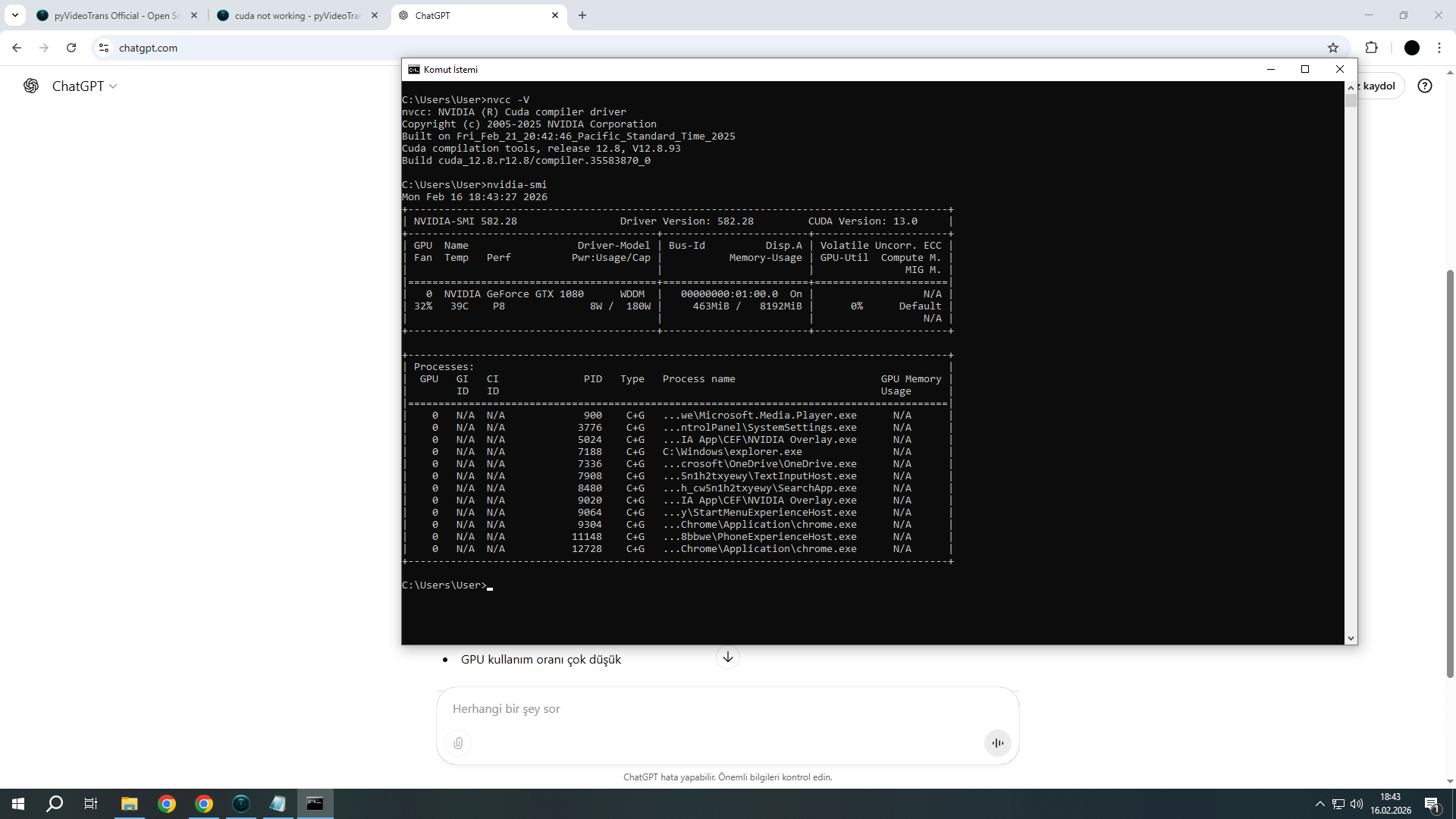
  1. 验证 CUDA 安装:在 CMD 或 PowerShell 中运行 nvcc -Vnvidia-smi,确认 CUDA 版本是否为 12.8,并检查显卡驱动是否支持该版本。
  2. 检查环境变量:确保系统环境变量 Path 中包含 CUDA 的 binlib 目录(例如 C:\Program Files\NVIDIA GPU Computing Toolkit\CUDA\v12.8\binC:\Program Files\NVIDIA GPU Computing Toolkit\CUDA\v12.8\lib\x64)。修改后需要重启电脑或至少重启所有 CMD/PowerShell 窗口。
  3. 检查 cuDNN:确认已安装 cuDNN 9.11 或更高版本,并且其文件已正确复制到 CUDA 的安装目录中。
  4. 检查软件路径:您的软件解压路径 C:/Users/User/Desktop/Business/AI V - 3.97/ 包含空格,这可能导致某些依赖库加载异常。请将软件移动到无空格、无中文的路径下,例如 D:\pyVideoTrans,然后重新尝试。
  5. 查看详细日志:如果问题依旧,请检查 logs 文件夹中当天的日志文件,搜索 CUDAcudaGPU 等关键词,查看是否有更具体的错误信息。

请查阅相关文档:


Application started at 2026-02-16 08:21:53

load subtitles area...
Set ui text...
Set style...
Set controls style...
Set menu...
Load function window...
Set default params
Bind signal...
2026-02-16 08:21:56,457 - INFO - 返回缓存的编解码器 Windows-264: h264_nvenc
2026-02-16 08:21:56,457 - INFO - 返回缓存的编解码器 Windows-265: hevc_nvenc
Import torch...
end
self.proxy_str=None,self.uuid=None
2026-02-16 08:31:18,906 - INFO - 最终配置信息:self.cfg=TaskCfg(cache_folder='C:/Users/User/Desktop/Business/AI/tmp/10248/77a402722d', target_dir='C:/Users/User/Desktop/OUTPUT/Create Wonders with HTML5-mp4', remove_noise=False, is_separate=False, detect_language='en', subtitle_language=None, source_language='English', target_language='Spanish', source_language_code='en', target_language_code='es', source_sub='C:/Users/User/Desktop/OUTPUT/Create Wonders with HTML5-mp4/en.srt', target_sub='C:/Users/User/Desktop/OUTPUT/Create Wonders with HTML5-mp4/es.srt', source_wav='C:/Users/User/Desktop/Business/AI
......
-16 18:40:25,164 - INFO - 最终配置信息:self.cfg=TaskCfg(cache_folder='C:/Users/User/Desktop/Business/ai/tmp/3888/a2a6ffbecd', target_dir='C:/Users/User/Desktop/OUTPUT/About Loop Control Statements-mp4/Consts (Constants)-mp4', remove_noise=False, is_separate=False, detect_language='en', subtitle_language=None, source_language='English', target_language='Spanish', source_language_code='en', target_language_code='es', source_sub='C:/Users/User/Desktop/OUTPUT/About Loop Control Statements-mp4/Consts (Constants)-mp4/en.srt', target_sub='C:/Users/User/Desktop/OUTPUT/About Loop Control Statements-mp4/Consts (Constants)-mp4/es.srt', source_wav='C:/Users/User/Desktop/Business/ai/tmp/3888/a2a6ffbecd/en.wav', source_wav_output='C:/Users/User/Desktop/OUTPUT/About Loop Control Statements-mp4/Consts (Constants)-mp4/en.m4a', target_wav='C:/Users/User/Desktop/Business/ai/tmp/3888/a2a6ffbecd/target.wav', target_wav_output='C:/Users/User/Desktop/OUTPUT/About Loop Control Statements-mp4/Consts (Constants)-mp4/es.m4a', subtitles='', novoice_mp4='C:/Users/User/Desktop/Business/ai/tmp/3888/a2a6ffbecd/novoice.mp4', noextname='Consts (Constants)', shibie_audio=None, targetdir_mp4='C:/Users/User/Desktop/OUTPUT/About Loop Control Statements-mp4/Consts (Constants)-mp4/Consts (Constants).mp4', instrument=None, vocal=None, back_audio='', background_music=None, app_mode='biaozhun', subtitle_type=0, volume='+0%', pitch='+0Hz', voice_rate='+0%', voice_role='Alonso(Male/US)', copysrt_rawvideo=False, clear_cache=False, translate_type=1, tts_type=0, recogn_type=1, model_name='large-v3-turbo', split_type=0, voice_autorate=False, video_autorate=True, cuda=True, name='C:/Users/User/Desktop/Delphi ES Project/EN/03-) Day 2 - Fundamentals of Delphi/20-) Consts (Constants)/Consts (Constants).mp4', basename='Consts (Constants).mp4', ext='mp4', dirname='C:/Users/User/Desktop/Delphi ES Project/EN/03-) Day 2 - Fundamentals of Delphi/20-) Consts (Constants)', shound_del_name=None, uuid='a2a6ffbecd', remove_silent_mid=False, align_sub_audio=True, enable_diariz=False, nums_diariz=0, rephrase=0, only_out_mp4=False)
2026-02-16 18:40:25,648 - INFO - cmd=['ffmpeg', '-hide_banner', '-ignore_unknown', '-threads', '0', '-y', '-fflags', '+genpts', '-i', 'C:/Users/User/Desktop/Delphi ES Project/EN/03-) Day 2 - Fundamentals of Delphi/20-) Consts (Constants)/Consts (Constants).mp4', '-an', '-c:v', 'libx264', '-crf', '20', '-preset', 'veryfast', 'C:/Users/User/Desktop/Business/ai/tmp/3888/a2a6ffbecd/novoice.mp4']
2026-02-16 18:40:25,648 - INFO - cmd=['ffmpeg', '-hide_banner', '-ignore_unknown', '-threads', '0', '-y', '-i', 'C:/Users/User/Desktop/Delphi ES Project/EN/03-) Day 2 - Fundamentals of Delphi/20-) Consts (Constants)/Consts (Constants).mp4', '-vn', '-ar', '16000', '-c:a', 'pcm_s16le', 'C:/Users/User/Desktop/Business/ai/tmp/3888/a2a6ffbecd/en.wav']
self.proxy_str=None,self.uuid='a2a6ffbecd'
2026-02-16 18:40:32,538 - INFO - 开始创建 pid:self.pidfile='C:/Users/User/Desktop/Business/ai/tmp/3888/13176.lock'

日志显示软件启动正常,检测到 NVIDIA 编码器 (h264_nvenc/hevc_nvenc),并且配置中 cuda=True。当前任务正在进行视频预处理(提取无声视频和音频)。没有出现错误信息。

如果您的问题是软件运行缓慢或未使用 GPU 加速,请检查后续语音识别阶段是否调用了 GPU。您可以等待任务进入语音识别阶段,然后查看日志中是否有关于 faster-whisperCUDA 的加载信息。如果确认 GPU 未被调用,请按以下步骤排查:

  1. 验证 CUDA 环境:在 CMD 中运行 nvcc -Vnvidia-smi,确认 CUDA 版本为 12.8,并检查显卡驱动是否支持。
  2. 检查软件路径:您的软件路径 C:/Users/User/Desktop/Business/ai/ 包含空格,这可能导致依赖库加载问题。请将软件移动到无空格、无中文的路径,例如 D:\pyVideoTrans
  3. 查看完整日志:如果任务失败或速度异常,请提供 logs 文件夹中最新日志文件的底部约30行报错信息。

请查阅相关文档:

image

根据现有文档无法确定具体原因。请提供软件安装目录下的 logs/ 文件夹中最新的日志文件(复制底部约30行报错信息)以便分析。


Application started at 2026-02-16 08:21:53

load subtitles area...
Set ui text...
Set style...
Set controls style...
Set menu...
Load function window...
Set default params
Bind signal...
2026-02-16 08:21:56,457 - INFO - 返回缓存的编解码器 Windows-264: h264_nvenc
2026-02-16 08:21:56,457 - INFO - 返回缓存的编解码器 Windows-265: hevc_nvenc
Import torch...
end
self.proxy_str=None,self.uuid=None
2026-02-16 08:31:18,906 - INFO - 最终配置信息:self.cfg=TaskCfg(cache_folder='C:/Users/User/Desktop/Business/AI/tmp/10248/77a402722d', target_dir='C:/Users/User/Desktop/OUTPUT/Create Wonders with HTML5-mp4', remove_noise=False, is_separate=False, detect_language='en', subtitle_language=None, source_language='English', target_language='Spanish', source_language_code='en', target_language_code='es', source_sub='C:/Users/User/Desktop/OUTPUT/Create Wonders with HTML5-mp4/en.srt', target_sub='C:/Users/User/Desktop/OUTPUT/Create Wonders with HTML5-mp4/es.srt', source_wav='C:/Users/User/Desktop/Business/AI
......
-16 18:40:25,164 - INFO - 最终配置信息:self.cfg=TaskCfg(cache_folder='C:/Users/User/Desktop/Business/ai/tmp/3888/a2a6ffbecd', target_dir='C:/Users/User/Desktop/OUTPUT/About Loop Control Statements-mp4/Consts (Constants)-mp4', remove_noise=False, is_separate=False, detect_language='en', subtitle_language=None, source_language='English', target_language='Spanish', source_language_code='en', target_language_code='es', source_sub='C:/Users/User/Desktop/OUTPUT/About Loop Control Statements-mp4/Consts (Constants)-mp4/en.srt', target_sub='C:/Users/User/Desktop/OUTPUT/About Loop Control Statements-mp4/Consts (Constants)-mp4/es.srt', source_wav='C:/Users/User/Desktop/Business/ai/tmp/3888/a2a6ffbecd/en.wav', source_wav_output='C:/Users/User/Desktop/OUTPUT/About Loop Control Statements-mp4/Consts (Constants)-mp4/en.m4a', target_wav='C:/Users/User/Desktop/Business/ai/tmp/3888/a2a6ffbecd/target.wav', target_wav_output='C:/Users/User/Desktop/OUTPUT/About Loop Control Statements-mp4/Consts (Constants)-mp4/es.m4a', subtitles='', novoice_mp4='C:/Users/User/Desktop/Business/ai/tmp/3888/a2a6ffbecd/novoice.mp4', noextname='Consts (Constants)', shibie_audio=None, targetdir_mp4='C:/Users/User/Desktop/OUTPUT/About Loop Control Statements-mp4/Consts (Constants)-mp4/Consts (Constants).mp4', instrument=None, vocal=None, back_audio='', background_music=None, app_mode='biaozhun', subtitle_type=0, volume='+0%', pitch='+0Hz', voice_rate='+0%', voice_role='Alonso(Male/US)', copysrt_rawvideo=False, clear_cache=False, translate_type=1, tts_type=0, recogn_type=1, model_name='large-v3-turbo', split_type=0, voice_autorate=False, video_autorate=True, cuda=True, name='C:/Users/User/Desktop/Delphi ES Project/EN/03-) Day 2 - Fundamentals of Delphi/20-) Consts (Constants)/Consts (Constants).mp4', basename='Consts (Constants).mp4', ext='mp4', dirname='C:/Users/User/Desktop/Delphi ES Project/EN/03-) Day 2 - Fundamentals of Delphi/20-) Consts (Constants)', shound_del_name=None, uuid='a2a6ffbecd', remove_silent_mid=False, align_sub_audio=True, enable_diariz=False, nums_diariz=0, rephrase=0, only_out_mp4=False)
2026-02-16 18:40:25,648 - INFO - cmd=['ffmpeg', '-hide_banner', '-ignore_unknown', '-threads', '0', '-y', '-fflags', '+genpts', '-i', 'C:/Users/User/Desktop/Delphi ES Project/EN/03-) Day 2 - Fundamentals of Delphi/20-) Consts (Constants)/Consts (Constants).mp4', '-an', '-c:v', 'libx264', '-crf', '20', '-preset', 'veryfast', 'C:/Users/User/Desktop/Business/ai/tmp/3888/a2a6ffbecd/novoice.mp4']
2026-02-16 18:40:25,648 - INFO - cmd=['ffmpeg', '-hide_banner', '-ignore_unknown', '-threads', '0', '-y', '-i', 'C:/Users/User/Desktop/Delphi ES Project/EN/03-) Day 2 - Fundamentals of Delphi/20-) Consts (Constants)/Consts (Constants).mp4', '-vn', '-ar', '16000', '-c:a', 'pcm_s16le', 'C:/Users/User/Desktop/Business/ai/tmp/3888/a2a6ffbecd/en.wav']
self.proxy_str=None,self.uuid='a2a6ffbecd'
2026-02-16 18:40:32,538 - INFO - 开始创建 pid:self.pidfile='C:/Users/User/Desktop/Business/ai/tmp/3888/13176.lock'

根据现有文档无法确定具体原因。您提供的日志片段显示任务已开始(创建了进程锁文件),但没有后续的错误信息。要诊断问题,需要查看任务执行过程中或失败时产生的日志。请提供软件安装目录下 logs/ 文件夹中最新日志文件的底部约30行报错信息。


Application started at 2026-02-16 19:10:21

load subtitles area...
Set ui text...
Set style...
Set controls style...
Set menu...
Load function window...
Set default params
Bind signal...
Import torch...
2026-02-16 19:10:25,862 - INFO - 返回缓存的编解码器 Windows-264: h264_nvenc
2026-02-16 19:10:25,862 - INFO - 返回缓存的编解码器 Windows-265: hevc_nvenc
end
self.proxy_str=None,self.uuid=None
2026-02-16 19:10:55,047 - INFO - 最终配置信息:self.cfg=TaskCfg(cache_folder='C:/Users/User/Desktop/Business/ai/tmp/12736/14f857b90d', target_dir='C:/Users/User/Desktop/OUTPUT/Logical Operators-mp4', remove_noise=False, is_separate=False, detect_language='en', subtitle_language=None, source_language='English', target_language='Spanish', source_language_code='en', target_language_code='es', source_sub='C:/Users/User/Desktop/OUTPUT/Logical Operators-mp4/en.srt', target_sub='C:/Users/User/Desktop/OUTPUT/Logical Operators-mp4/es.srt', source_wav='C:/Users/User/Desktop/Business/ai/tmp/12736/14f857b90d/en.wav', source_wav_output='C:/Users/User/Desktop/OUTPUT/Logical Operators-mp4/en.m4a', target_wav='C:/Users/User/Desktop/Business/ai/tmp/12736/14f857b90d/target.wav', target_wav_output='C:/Users/User/Desktop/OUTPUT/Logical Operators-mp4/es.m4a', subtitles='', novoice_mp4='C:/Users/User/Desktop/Business/ai/tmp/12736/14f857b90d/novoice.mp4', noextname='Logical Operators', shibie_audio=None, targetdir_mp4='C:/Users/User/Desktop/OUTPUT/Logical Operators-mp4/Logical Operators.mp4', instrument=None, vocal=None, back_audio='', background_music=None, app_mode='biaozhun', subtitle_type=0, volume='+0%', pitch='+0Hz', voice_rate='+0%', voice_role='Alonso(Male/US)', copysrt_rawvideo=False, clear_cache=False, translate_type=1, tts_type=0, recogn_type=1, model_name='large-v3-turbo', split_type=0, voice_autorate=False, video_autorate=True, cuda=True, name='C:/Users/User/Desktop/Delphi ES Project/EN/04-) Day 3 - Assignment Operations and Operators/04-) Logical Operators/Logical Operators.mp4', basename='Logical Operators.mp4', ext='mp4', dirname='C:/Users/User/Desktop/Delphi ES Project/EN/04-) Day 3 - Assignment Operations and Operators/04-) Logical Operators', shound_del_name=None, uuid='14f857b90d', remove_silent_mid=False, align_sub_audio=True, enable_diariz=False, nums_diariz=0, rephrase=0, only_out_mp4=False)
2026-02-16 19:10:55,515 - INFO - cmd=['ffmpeg', '-hide_banner', '-ignore_unknown', '-threads', '0', '-y', '-fflags', '+genpts', '-i', 'C:/Users/User/Desktop/Delphi ES Project/EN/04-) Day 3 - Assignment Operations and Operators/04-) Logical Operators/Logical Operators.mp4', '-an', '-c:v', 'libx264', '-crf', '20', '-preset', 'veryfast', 'C:/Users/User/Desktop/Business/ai/tmp/12736/14f857b90d/novoice.mp4']
2026-02-16 19:10:55,515 - INFO - cmd=['ffmpeg', '-hide_banner', '-ignore_unknown', '-threads', '0', '-y', '-i', 'C:/Users/User/Desktop/Delphi ES Project/EN/04-) Day 3 - Assignment Operations and Operators/04-) Logical Operators/Logical Operators.mp4', '-vn', '-ar', '16000', '-c:a', 'pcm_s16le', 'C:/Users/User/Desktop/Business/ai/tmp/12736/14f857b90d/en.wav']
self.proxy_str=None,self.uuid='14f857b90d'
2026-02-16 19:11:04,014 - INFO - 开始创建 pid:self.pidfile='C:/Users/User/Desktop/Business/ai/tmp/12736/6924.lock'

根据现有文档无法确定具体原因。您提供的日志片段显示任务已开始(创建了进程锁文件),但没有后续的错误信息。要诊断问题,需要查看任务执行过程中或失败时产生的日志。请提供软件安装目录下 logs/ 文件夹中最新日志文件的底部约30行报错信息。

Cuda is not working:


Application started at 2026-02-16 19:10:21

load subtitles area...
Set ui text...
Set style...
Set controls style...
Set menu...
Load function window...
Set default params
Bind signal...
Import torch...
2026-02-16 19:10:25,862 - INFO - 返回缓存的编解码器 Windows-264: h264_nvenc
2026-02-16 19:10:25,862 - INFO - 返回缓存的编解码器 Windows-265: hevc_nvenc
end
self.proxy_str=None,self.uuid=None
2026-02-16 19:10:55,047 - INFO - 最终配置信息:self.cfg=TaskCfg(cache_folder='C:/Users/User/Desktop/Business/ai/tmp/12736/14f857b90d', target_dir='C:/Users/User/Desktop/OUTPUT/Logical Operators-mp4', remove_noise=False, is_separate=False, detect_language='en', subtitle_language=None, source_language='English', target_language='Spanish', source_language_code='en', target_language_code='es', source_sub='C:/Users/User/Desktop/OUTPUT/Logical Operators-mp4/en.srt', target_sub='C:/Users/User/Desktop/OUTPUT/Logical Operators-mp4/es.srt', source_wav='C:/Users/User/Desktop/Business/ai/tmp/12736/14f857b90d/en.wav', source_wav_output='C:/Users/User/Desktop/OUTPUT/Logical Operators-mp4/en.m4a', target_wav='C:/Users/User/Desktop/Business/ai/tmp/12736/14f857b90d/target.wav', target_wav_output='C:/Users/User/Desktop/OUTPUT/Logical Operators-mp4/es.m4a', subtitles='', novoice_mp4='C:/Users/User/Desktop/Business/ai/tmp/12736/14f857b90d/novoice.mp4', noextname='Logical Operators', shibie_audio=None, targetdir_mp4='C:/Users/User/Desktop/OUTPUT/Logical Operators-mp4/Logical Operators.mp4', instrument=None, vocal=None, back_audio='', background_music=None, app_mode='biaozhun', subtitle_type=0, volume='+0%', pitch='+0Hz', voice_rate='+0%', voice_role='Alonso(Male/US)', copysrt_rawvideo=False, clear_cache=False, translate_type=1, tts_type=0, recogn_type=1, model_name='large-v3-turbo', split_type=0, voice_autorate=False, video_autorate=True, cuda=True, name='C:/Users/User/Desktop/Delphi ES Project/EN/04-) Day 3 - Assignment Operations and Operators/04-) Logical Operators/Logical Operators.mp4', basename='Logical Operators.mp4', ext='mp4', dirname='C:/Users/User/Desktop/Delphi ES Project/EN/04-) Day 3 - Assignment Operations and Operators/04-) Logical Operators', shound_del_name=None, uuid='14f857b90d', remove_silent_mid=False, align_sub_audio=True, enable_diariz=False, nums_diariz=0, rephrase=0, only_out_mp4=False)
2026-02-16 19:10:55,515 - INFO - cmd=['ffmpeg', '-hide_banner', '-ignore_unknown', '-threads', '0', '-y', '-fflags', '+genpts', '-i', 'C:/Users/User/Desktop/Delphi ES Project/EN/04-) Day 3 - Assignment Operations and Operators/04-) Logical Operators/Logical Operators.mp4', '-an', '-c:v', 'libx264', '-crf', '20', '-preset', 'veryfast', 'C:/Users/User/Desktop/Business/ai/tmp/12736/14f857b90d/novoice.mp4']
2026-02-16 19:10:55,515 - INFO - cmd=['ffmpeg', '-hide_banner', '-ignore_unknown', '-threads', '0', '-y', '-i', 'C:/Users/User/Desktop/Delphi ES Project/EN/04-) Day 3 - Assignment Operations and Operators/04-) Logical Operators/Logical Operators.mp4', '-vn', '-ar', '16000', '-c:a', 'pcm_s16le', 'C:/Users/User/Desktop/Business/ai/tmp/12736/14f857b90d/en.wav']
self.proxy_str=None,self.uuid='14f857b90d'
2026-02-16 19:11:04,014 - INFO - 开始创建 pid:self.pidfile='C:/Users/User/Desktop/Business/ai/tmp/12736/6924.lock'

CUDA 未被调用,可能是因为环境变量未正确配置或 CUDA 版本不匹配。从日志中可以看到 cuda=True,但软件在启动时检测到 NVIDIA 编码器 (h264_nvenc/hevc_nvenc) 后,后续的语音识别(faster-whisper)可能并未使用 GPU。请按以下步骤排查:验证 CUDA 安装:在 CMD 或 PowerShell 中运行 nvcc -V 和 nvidia-smi,确认 CUDA 版本是否为 12.8,并检查显卡驱动是否支持该版本。检查环境变量:确保系统环境变量 Path 中包含 CUDA 的 bin 和 lib 目录(例如 C:\Program Files\NVIDIA GPU Computing Toolkit\CUDA\v12.8\bin 和 C:\Program Files\NVIDIA GPU Computing Toolkit\CUDA\v12.8\lib\x64)。修改后需要重启电脑或至少重启所有 CMD/PowerShell 窗口。检查 cuDNN:确认已安装 cuDNN 9.11 或更高版本,并且其文件已正确复制到 CUDA 的安装目录中。检查软件路径:您的软件解压路径 C:/Users/User/Desktop/Business/ai/ 包含空格,这可能导致某些依赖库加载异常。请将软件移动到无空格、无中文的路径下,例如 D:\pyVideoTrans,然后重新尝试。查看详细日志:如果问题依旧,请检查 logs 文件夹中当天的日志文件,搜索 CUDA、cuda、GPU 等关键词,查看是否有更具体的错误信息。请查阅相关文档:windows上安装CUDA12.8和cuDNN9.11GPU 使用率太低

Post Your Reply
Open source and free maintenance is not easy. If this project is helpful to you, please consider making a small donation to help the project continue to maintain and update.

Related resource