#3543 invalid literal for int() with base 10: '1,048,576'

115.98* Posted at: 3 hours ago 👁16

invalid literal for int() with base 10: '1,048,576'


=
system:Windows-10-10.0.26200-SP0
version:v3.97
frozen:True
language:en
root_dir:C:/Users/Harshit/Downloads/pyvideotrans

5 Replies

This error occurs because the system's memory value contains a comma (e.g., "1,048,576"), which the software cannot parse as an integer.

Solution:

  1. Navigate to the software installation directory (e.g., C:/Users/Harshit/Downloads/pyvideotrans).
  2. Find and open the config.json file in a text editor.
  3. Locate the line containing "max_processes" or "gpu_task_num".
  4. Ensure the value for these settings is a plain number without any commas or thousand separators. For example, change "1,048,576" to "1048576" or simply "1".
  5. Save the file and restart pyVideoTrans.

If the issue persists or you cannot locate the problematic setting, please provide the latest log file from the logs/ folder (copy the bottom ~30 lines of the error log) for further analysis.

image
is this okay?

The configuration in the image is acceptable for basic usage, but it is not optimal for performance and quality.

Analysis:

  1. Speech Recognition (ASR): Using faster-whisper(本地) with the tiny model is the fastest but has the lowest accuracy. It is not recommended for serious work.
  2. Translation: Using Google translation requires a network proxy to work in many regions (like Mainland China). If you haven't configured a proxy, this will likely fail.
  3. Voice Synthesis (TTS): Edge-TTS(免费) is a good free choice.
  4. Synchronization: You have selected 配音加速 (audio speed-up) and 视频慢速 (video slow-down), which is a good combination for forcing synchronization.
  5. CUDA Acceleration: It is not checked. If you have an NVIDIA GPU, this will make local speech recognition extremely slow.

Recommended Adjustments for Better Results:

  1. Improve Speech Recognition:

    • Change the model from tiny to at least large-v3-turbo or preferably large-v3 for significantly better accuracy.
    • If you have an NVIDIA GPU, check the CUDA加速 box after ensuring you have CUDA 12.8 and cuDNN installed.
  2. Ensure Translation Works:

    • If you are in a region that blocks Google, you must configure a network proxy in the 网络代理 field (e.g., http://127.0.0.1:7890).
    • Alternatively, switch to a translation channel that doesn't require a proxy, such as Microsoft (free) or configure an AI channel like DeepSeek.
  3. (Optional) For higher quality translation and配音:

    • Consider using AI translation channels (e.g., DeepSeek, ChatGPT) for more natural translations.
    • For voice cloning to match the original speaker's tone, you could use F5-TTS or Qwen-TTS(本地) with the clone role (requires additional setup).

Summary of changes to make in your current setup:

  • ASR Model: tiny -> large-v3
  • Check CUDA加速 (if you have an NVIDIA GPU).
  • Verify/configure 网络代理 for Google Translate, or switch to Microsoft translate.

请查阅相关文档:

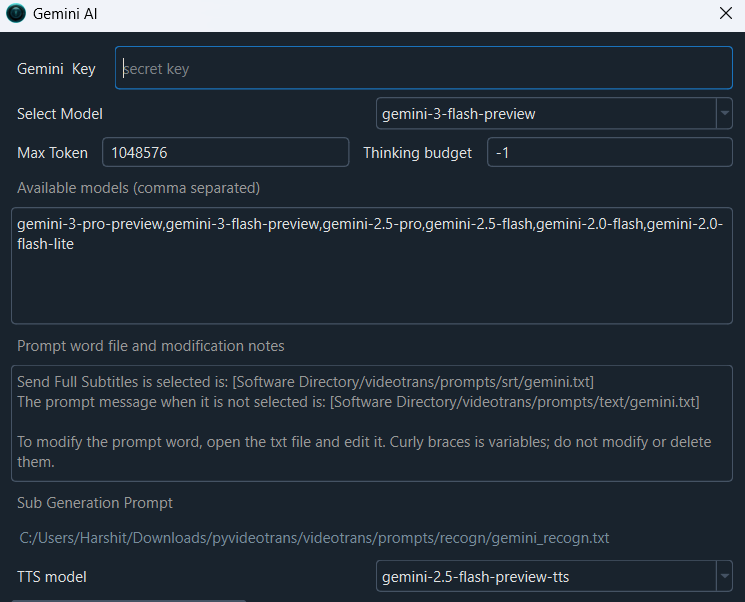
Oh no, I wanted to know about the thinking budget parameter in Gemini AI API Key settings. Is '-1' an accepted value?

The core knowledge base for pyVideoTrans does not contain specific information about the "thinking budget" parameter for the Gemini AI API or whether '-1' is an accepted value.

This is a configuration detail specific to the Gemini API service itself, not to its integration within pyVideoTrans. You should consult the official Gemini API documentation from Google for the correct parameter values and their meanings.

For configuring Gemini within pyVideoTrans, you only need to provide the API Key in the settings panel (菜单 -> 翻译设置 -> Gemini). The software handles the API call structure internally.

If you encounter an error specifically when using the Gemini channel in pyVideoTrans after setting this parameter elsewhere, please provide the latest log file from the logs/ folder (copy the bottom ~30 lines of the error log) for analysis.
Post Your Reply
Open source and free maintenance is not easy. If this project is helpful to you, please consider making a small donation to help the project continue to maintain and update.

Related resource