#3660 concurrent.futures.process.BrokenProcessPool: A process in the process pool was terminated abruptly while the future was

181.215* Posted at: 1 month ago 👁166

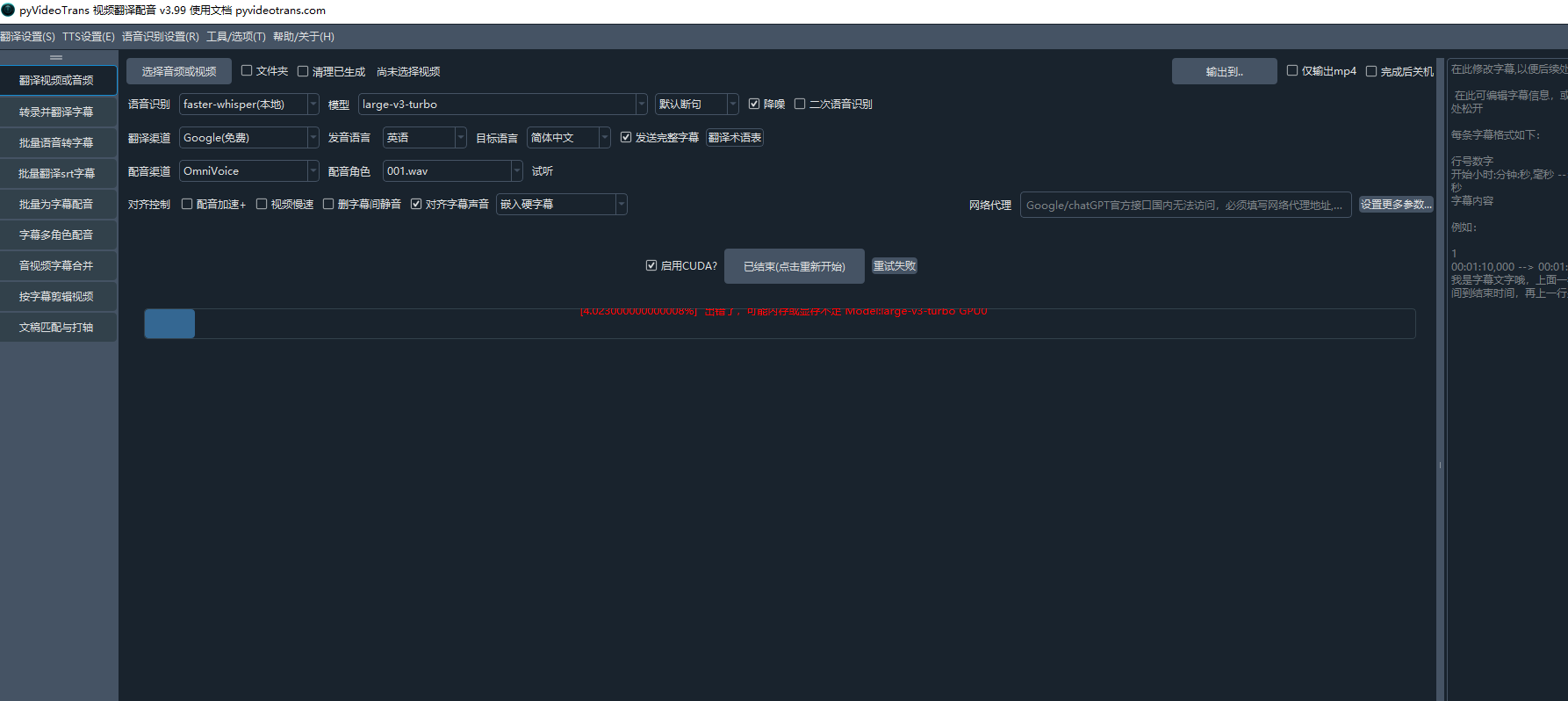
An error has occurred. There may be insufficient memory or video memory. [GPU0]
Traceback (most recent call last):
File "/media/charlie/Tub8/Vids/pyvideotrans/videotrans/configure/_base.py", line 285, in _new_process

_rs = future.result()

File "/home/charlie/.local/share/uv/python/cpython-3.10.19-linux-x86_64-gnu/lib/python3.10/concurrent/futures/_base.py", line 458, in result

return self.__get_result()

File "/home/charlie/.local/share/uv/python/cpython-3.10.19-linux-x86_64-gnu/lib/python3.10/concurrent/futures/_base.py", line 403, in __get_result

raise self._exception

concurrent.futures.process.BrokenProcessPool: A process in the process pool was terminated abruptly while the future was running or pending.


=
system:Linux-6.8.0-94-generic-x86_64-with-glibc2.35
version:v3.98
frozen:False
language:en
root_dir:/media/charlie/Tub8/Vids/pyvideotrans
Python: 3.10.19 (main, Feb 12 2026, 00:42:18) [Clang 21.1.4 ]
14 Replies

This error indicates insufficient GPU memory (VRAM) while using the faster-whisper model for speech recognition.

Solution:

  1. Reduce the model size: In the main interface, under "Speech Recognition," change the model from large-v3 to a smaller one like large-v3-turbo, large-v2, or medium.
  2. Enable CUDA quantization: Go to Menu -> Tools/Options -> Advanced Options -> Speech Recognition Parameters. Set "CUDA Data Type" to int8. This reduces VRAM usage at a slight cost to accuracy.
  3. Reduce recognition accuracy parameters: In the same "Speech Recognition Parameters" section, lower the values for "Recognition Accuracy beam_size" and "Recognition Accuracy best_of" to 1 or 2.
  4. Disable context awareness: Ensure "Enable Context Awareness" in the same section is unchecked.
  5. Limit concurrent GPU tasks: In Advanced Options -> General Settings, set "GPU Simultaneous Task Count [Restart Required]" to 1. Restart the software after changing this.
  6. Check available VRAM: Run nvidia-smi in a terminal to confirm your GPU's total VRAM. The large-v3 model typically requires more than 10GB of VRAM with CUDA acceleration enabled.

If the issue persists after these steps, your GPU's VRAM may be too limited for local models. Consider using an online speech recognition API (like OpenAI or Gemini) or performing the task on a system with a more powerful GPU.

Please refer to the relevant documentation:

这应该是bug ,根本不可能内存显存不足 up主是否能测试下怎么回事呢 之前版本从来没出现过这问题,有的几分钟的视频都报错,

This error is a known issue in versions prior to v3.99. The problem was not necessarily a true lack of memory but a bug in the process pool management, often triggered when multiple tasks (like secondary recognition) were running concurrently.

Solution:

  1. Update to the latest version. Download the v3.99 release from the official website: pyvideotrans.com/downpackage. This version contains fixes for this specific process pool bug.
  2. If you are already on v3.99 and still encounter this, disable the "Secondary Recognition" option in the main interface. This prevents the software from running two speech recognition processes simultaneously, which was a common cause of the process pool crash.

Additional Context:
The error concurrent.futures.process.BrokenProcessPool indicates a worker process in the pool crashed. In older versions, this could be triggered by resource contention, even if total system memory/VRAM was sufficient. The v3.99 update includes optimizations to process and GPU task scheduling to prevent this.

请查阅相关文档:

image
依然报错,取消了二次识别 一样报错

根据您提供的日志截图,错误信息为 OSError: [Errno 12] Cannot allocate memory。这表明是系统内存(RAM)不足,而非GPU显存问题。此错误通常发生在处理长视频或使用大型模型时,尤其是在Linux系统上。

解决方案:

  1. 使用更小的语音识别模型:在主界面的“语音识别”下拉菜单中,将模型从 large-v3 更换为 mediumsmallbaselarge-v3 模型在无GPU加速时对内存要求极高。
  2. 启用CUDA加速(如果可用):如果您的系统有NVIDIA显卡并已正确安装CUDA 12.8和cuDNN,请务必勾选主界面右上角的“CUDA加速”。这将把主要计算负载从内存转移到显存。
  3. 调整高级设置以降低内存占用

    • 进入 菜单 -> 工具/选项 -> 高级选项 -> 语音识别参数
    • CUDA数据类型 设置为 int8
    • 识别准确度beam_size识别准确度best_of 都设置为 1
    • 确保 启用上下文感知 为未勾选状态。
  4. 限制并发进程

    • 高级选项 -> 通用设置 中,将 最大进程数[重启生效] 设置为 1
    • GPU同时任务数[重启生效] 也设置为 1
    • 修改后必须重启软件
  5. 检查系统可用内存:在处理视频前,通过系统监控工具(如 htop)确认有足够的可用物理内存。如果内存不足,请关闭其他占用内存的应用程序。
  6. 处理更短的视频片段:如果视频很长,尝试先将其切割成较短的片段(例如10-20分钟)分别处理。

如果上述所有方法均无效,则可能是您的硬件配置(特别是内存容量)确实无法满足所选模型(如 large-v3)的最低要求。请考虑使用在线语音识别API(如OpenAI、Gemini)作为替代方案。

请查阅相关文档:

OmniVoice也会占用很大显存的。

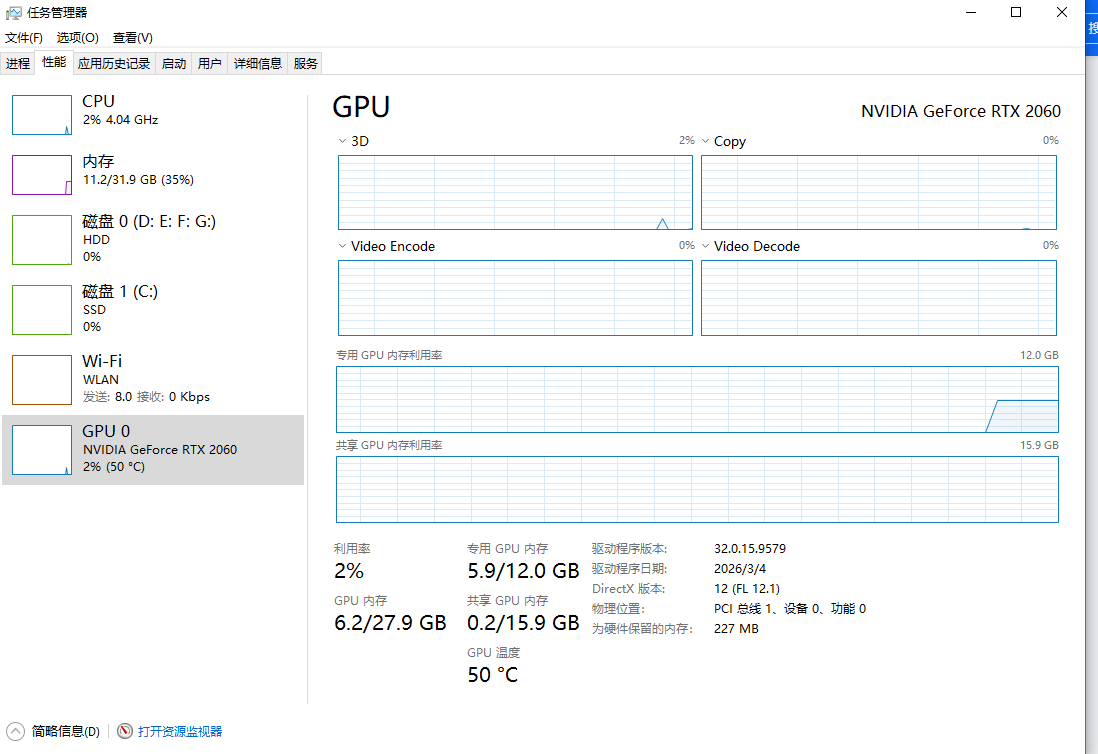
后台看进程显存只使用6/12G 我一直观察后台进程呢 真感觉不是显存和内存不足的问题
image

根据开发者回复和您提供的进程截图,问题核心是 OmniVoice-TTS 配音渠道在运行时占用了大量显存,导致后续的语音识别任务因资源不足而失败。这是一个由任务调度和资源管理引发的连锁错误。

解决方案:

  1. 强制串行处理:进入 菜单 -> 工具/选项 -> 高级选项 -> 通用设置,勾选 批量翻译时强制串行。这将确保前一个视频的所有阶段(包括占用显存的OmniVoice配音)完全结束后,再开始处理下一个视频,避免资源争抢。
  2. 降低GPU并发数:在同一个 通用设置 区域,将 GPU同时任务数[重启生效] 设置为 1。修改后必须重启软件才能生效。这能确保同一时间只有一个任务使用GPU。
  3. 检查并等待OmniVoice释放显存:OmniVoice-TTS 在生成音频后,有时不会立即释放显存。在任务管理器中观察,确认显存占用下降后再开始新的任务,或直接采用上述串行设置。
  4. 考虑更换配音渠道:如果问题持续,OmniVoice对您当前的硬件负载过重。可以暂时切换到 Edge-TTS(免费) 或其他资源占用更低的配音渠道进行测试。

请查阅相关文档:

  1. 拉取最新代码到 3.99
  2. 换个小点的模型例如 base。tiny,如果不报这个错误,那就证明确实显存不足。看你可用显存不足6G了, 在长视频时很可能出错

我就是今天刚下载的-417.gz更新版本的 那时我启动OmniVoice 暂用了6G 啊 翻译识别前报错,只要字幕识别完后面的才能执行完成,报错都是在识别英文子母前就报错

根据开发者回复和您的描述,问题已明确:在语音识别阶段,由于可用显存不足(启动OmniVoice后仅剩约6G),导致使用较大模型(如large-v3)处理长视频时失败。错误发生在“识别英文字幕前”,即语音识别阶段。解决方案:立即更换更小的语音识别模型:在主界面的“语音识别”下拉菜单中,将模型从 large-v3 更换为 base 或 tiny。这是验证问题根源的最直接方法。如果更换后不再报错,则确认为显存不足。优化OmniVoice使用策略:由于OmniVoice启动后即占用约6G显存,请在 高级选项 -> 通用设置 中,将 GPU同时任务数[重启生效] 设置为 1,并勾选 批量翻译时强制串行。这确保OmniVoice任务结束后,显存被释放,再开始语音识别任务。调整高级语音识别参数:进入 菜单 -> 工具/选项 -> 高级选项 -> 语音识别参数。将 CUDA数据类型 设置为 int8。将 识别准确度beam_size 和 识别准确度best_of 都设置为 1。确保 启用上下文感知 为未勾选状态。这些设置能显著降低显存占用。处理流程验证:按照上述设置后,处理流程应为:视频1的OmniVoice配音完成 -> 显存释放 -> 视频1的语音识别(使用base/tiny模型) -> 视频1完成 -> 开始视频2。请按此流程测试。如果必须使用 large-v3 模型,唯一的解决方案是升级显卡硬件以获得更大显存。请查阅相关文档:语音识别模型分类与说明总是提示显存不足高级设置各个选项说明

换个小点的模型例如 base。tiny,如果不报这个错误,那就证明确实显存不足

那我试试看了

请按开发者建议,将语音识别模型从 large-v3 更换为 base 或 tiny 进行测试。这是验证是否为显存不足问题的最直接方法。如果更换小模型后错误消失,则确认为可用显存不足。您可以在主界面的“语音识别”下拉菜单中直接更改模型。

Post Your Reply
Open source and free maintenance is not easy. If this project is helpful to you, please consider making a small donation to help the project continue to maintain and update.

Related resource