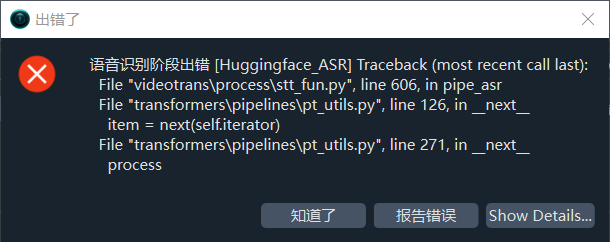
#4541 HuggingFace_ASR 语音识别渠道,模型kotoba-tech/kotoba-whisper-v2.0。是手动下载的放到sp.exe模型文件夹的,让后报错

111.194* Posted at: 2 hours ago 👁11

image

5 Replies

核心原因是手动下载的模型文件夹命名或存放位置不符合软件预期。

解决方案:

  1. 检查模型文件夹命名格式:必须严格按照 models--组织名--模型名 格式命名文件夹。对于 kotoba-tech/kotoba-whisper-v2.0,应重命名为:
    models--kotoba-tech--kotoba-whisper-v2.0
  2. 检查文件夹位置:该文件夹必须放在软件根目录下的 models/ 目录中(与 sp.exe 同级的 models 文件夹)。
  3. 确认模型文件完整性:确保文件夹内包含 config.json 和模型权重文件(如 model.binpytorch_model.bin)。
  4. 在软件中正确选择模型:在语音识别渠道选择 HuggingFace_ASR 后,模型列表应自动识别到你放置的模型,手动选择 kotoba-tech/kotoba-whisper-v2.0(注意路径输入为原格式)。
  5. 若仍报错,查看日志:打开软件根目录 logs/ 文件夹下最新的日志文件,复制底部约30行报错信息进一步分析。

请查阅相关文档:

语音识别阶段出错 [Huggingface_ASR] Traceback (most recent call last):
File "videotrans\process\stt_fun.py", line 606, in pipe_asr
File "transformers\pipelines\pt_utils.py", line 126, in next

item = next(self.iterator)

File "transformers\pipelines\pt_utils.py", line 271, in next

processed = self.infer(next(self.iterator), **self.params)

File "torch\utils\data\dataloader.py", line 733, in next

data = self._next_data()

File "torch\utils\data\dataloader.py", line 789, in _next_data

data = self._dataset_fetcher.fetch(index)  # may raise StopIteration

File "torch\utils\data\_utils\fetch.py", line 43, in fetch

return self.collate_fn(data)

File "transformers\pipelines\base.py", line 182, in inner

raise ValueError(

ValueError: The elements of the batch contain different keys. Cannot batch them ({'input_features', 'is_last', 'attention_mask'} != {'num_frames', 'input_features', 'is_last', 'attention_mask'})

Traceback (most recent call last):
File "videotrans\task\job.py", line 105, in run
File "videotrans\task\_speech2text.py", line 191, in recogn
File "videotrans\recognition\__init__.py", line 280, in run
File "videotrans\recognition\_base.py", line 143, in run
File "videotrans\recognition\_huggingface.py", line 38, in _exec
File "videotrans\recognition\_huggingface.py", line 63, in _pipe_asr
File "videotrans\configure\_base.py", line 289, in _new_process
RuntimeError: Traceback (most recent call last):
File "videotrans\process\stt_fun.py", line 606, in pipe_asr
File "transformers\pipelines\pt_utils.py", line 126, in next

item = next(self.iterator)

File "transformers\pipelines\pt_utils.py", line 271, in next

processed = self.infer(next(self.iterator), **self.params)

File "torch\utils\data\dataloader.py", line 733, in next

data = self._next_data()

File "torch\utils\data\dataloader.py", line 789, in _next_data

data = self._dataset_fetcher.fetch(index)  # may raise StopIteration

File "torch\utils\data\_utils\fetch.py", line 43, in fetch

return self.collate_fn(data)

File "transformers\pipelines\base.py", line 182, in inner

raise ValueError(

ValueError: The elements of the batch contain different keys. Cannot batch them ({'input_features', 'is_last', 'attention_mask'} != {'num_frames', 'input_features', 'is_last', 'attention_mask'})
TaskCfgSTT(is_cuda=True, uuid='ff8bdfce71', cache_folder='D:/win-pyvideotrans-v3.99-0508/tmp/13572/ff8bdfce71', target_dir='D:/翻译win-pyvideotrans-v3.99-0508/output/recogn', source_language=None, source_language_code=None, source_sub=None, source_wav=None, source_wav_output=None, target_language=None, target_language_code=None, target_sub='D:/翻译win-pyvideotrans-v3.99-0508/output/recogn/sdjs259.srt', target_wav=None, target_wav_output=None, name='C:/Users/7800X3D 7900XTX/Desktop/sdjs259.wav', noextname='sdjs259', basename='sdjs259.wav', ext='wav', dirname='C:/Users/7800X3D 7900XTX/Desktop', shound_del_name=None, detect_language='ja', recogn_type=4, model_name='kotoba-tech/kotoba-whisper-v2.0', shibie_audio='D:/win-pyvideotrans-v3.99-0508/tmp/13572/ff8bdfce71/sdjs259-1778647381.0989764.wav', remove_noise=False, enable_diariz=False, nums_diariz=0, rephrase=0, fix_punc=False)

该错误是由于 HuggingFace 的 pipeline 在处理批量音频片段时,不同片段的特征张量包含不相同的键(有的有 num_frames 键,有的没有),导致无法合并批处理,通常与模型预处理参数或片段长度不一致有关。

解决方案(按推荐顺序尝试):

  1. 在“高级选项”中启用“Whisper预分割音频”

    • 菜单 → 工具/选项 → 高级选项 → 语音识别参数 → 勾选 “Whisper预分割音频”(可确保输入特征格式统一,尤其是处理日语等语言时)。
  2. 降低批次大小 / 关闭 CUDA 加速(临时测试)

    • 取消主界面的 “CUDA加速” 勾选,使用 CPU 模式运行一次,验证是否因 GPU 批量处理导致该错误。
    • 若 CPU 正常,则需在高级选项中调整 CUDA数据类型float16int8,并减小 beam_sizebest_of 为 1。
  3. 改用更稳定的语音识别渠道

    • 将 ASR 渠道切换为 faster-whisper(本地),选择 large-v3medium 模型,对日语支持良好且无此批处理错误。
  4. 检查模型文件完整性

    • 模型 kotoba-tech/kotoba-whisper-v2.0 可能下载不完整或与当前 transformers 版本不兼容。
    • 删除 models/models--kotoba-tech--kotoba-whisper-v2.0 文件夹,重新让软件自动下载。
  5. 提供日志以便进一步分析
    如果上述方法均无效,请打开软件根目录下的 logs/ 文件夹,复制最新日志底部约 30 行内容反馈。

请查阅相关文档:

语音识别阶段出错 [Huggingface_ASR] Traceback (most recent call last):
File "videotrans\process\stt_fun.py", line 606, in pipe_asr
File "transformers\pipelines\pt_utils.py", line 126, in next

item = next(self.iterator)

File "transformers\pipelines\pt_utils.py", line 271, in next

processed = self.infer(next(self.iterator), **self.params)

File "torch\utils\data\dataloader.py", line 733, in next

data = self._next_data()

File "torch\utils\data\dataloader.py", line 789, in _next_data

data = self._dataset_fetcher.fetch(index)  # may raise StopIteration

File "torch\utils\data\_utils\fetch.py", line 43, in fetch

return self.collate_fn(data)

File "transformers\pipelines\base.py", line 182, in inner

raise ValueError(

ValueError: The elements of the batch contain different keys. Cannot batch them ({'input_features', 'attention_mask', 'is_last'} != {'num_frames', 'input_features', 'attention_mask', 'is_last'})

Traceback (most recent call last):
File "videotrans\task\job.py", line 105, in run
File "videotrans\task\_speech2text.py", line 191, in recogn
File "videotrans\recognition\__init__.py", line 280, in run
File "videotrans\recognition\_base.py", line 143, in run
File "videotrans\recognition\_huggingface.py", line 38, in _exec
File "videotrans\recognition\_huggingface.py", line 63, in _pipe_asr
File "videotrans\configure\_base.py", line 289, in _new_process
RuntimeError: Traceback (most recent call last):
File "videotrans\process\stt_fun.py", line 606, in pipe_asr
File "transformers\pipelines\pt_utils.py", line 126, in next

item = next(self.iterator)

File "transformers\pipelines\pt_utils.py", line 271, in next

processed = self.infer(next(self.iterator), **self.params)

File "torch\utils\data\dataloader.py", line 733, in next

data = self._next_data()

File "torch\utils\data\dataloader.py", line 789, in _next_data

data = self._dataset_fetcher.fetch(index)  # may raise StopIteration

File "torch\utils\data\_utils\fetch.py", line 43, in fetch

return self.collate_fn(data)

File "transformers\pipelines\base.py", line 182, in inner

raise ValueError(

ValueError: The elements of the batch contain different keys. Cannot batch them ({'input_features', 'attention_mask', 'is_last'} != {'num_frames', 'input_features', 'attention_mask', 'is_last'})
TaskCfgSTT(is_cuda=True, uuid='ff8bdfce71', cache_folder='D:/win-pyvideotrans-v3.99-0508/tmp/26980/ff8bdfce71', target_dir='D:/翻译win-pyvideotrans-v3.99-0508/output/recogn', source_language=None, source_language_code=None, source_sub=None, source_wav=None, source_wav_output=None, target_language=None, target_language_code=None, target_sub='D:/翻译win-pyvideotrans-v3.99-0508/output/recogn/sdjs259.srt', target_wav=None, target_wav_output=None, name='C:/Users/7800X3D 7900XTX/Desktop/sdjs259.wav', noextname='sdjs259', basename='sdjs259.wav', ext='wav', dirname='C:/Users/7800X3D 7900XTX/Desktop', shound_del_name=None, detect_language='ja', recogn_type=4, model_name='kotoba-tech/kotoba-whisper-v2.0', shibie_audio='D:/win-pyvideotrans-v3.99-0508/tmp/26980/ff8bdfce71/sdjs259-1778648471.700683.wav', remove_noise=False, enable_diariz=False, nums_diariz=0, rephrase=0, fix_punc=False)

核心原因是 kotoba-tech/kotoba-whisper-v2.0 模型在处理音频片段时,部分片段缺少 num_frames 键,导致分批合并失败。这是该模型与当前软件分批机制的兼容性问题。

解决方案:

  1. 启用“Whisper预分割音频”
    点击菜单 → 工具/选项 → 高级选项 → 语音识别参数 → 勾选 “Whisper预分割音频”。该选项会在送入模型前统一音频片段格式,解决键不一致问题。
  2. 切换为 faster-whisper 渠道
    在主界面语音识别渠道下拉框中,选择 faster-whisper(本地),模型选择 large-v3medium。该渠道对日语支持良好且无此批处理错误,同时支持 CUDA 加速,速度更快。
  3. 临时关闭 CUDA 加速测试
    取消主界面的 CUDA加速 勾选,用 CPU 运行一次,看是否因 GPU 批处理差异导致。若 CPU 正常,可在高级选项中降低 batch_size(如设为 1)或调整 CUDA数据类型float16
  4. 重新下载模型
    删除 models/models--kotoba-tech--kotoba-whisper-v2.0 文件夹,让软件重新自动下载完整模型,排除文件损坏可能。

若以上均无效,请将 logs/ 文件夹下最新的日志文件底部 30 行 粘贴,以便进一步定位。

Post Your Reply
Open source and free maintenance is not easy. If this project is helpful to you, please consider making a small donation to help the project continue to maintain and update.

Related resource