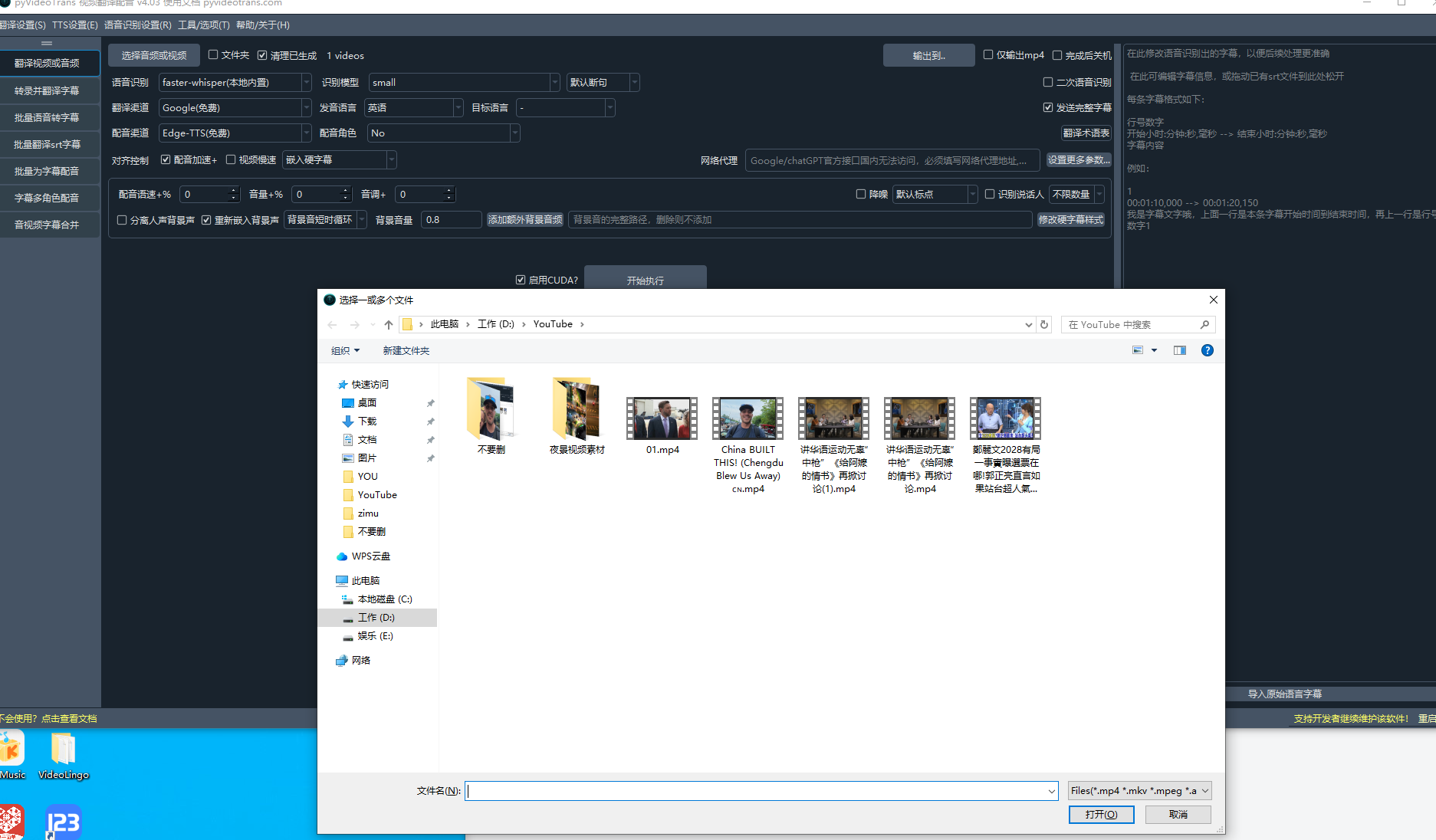
#5585 视频导入没反应

2409:8a55* Posted at: 13 hours ago

image
视频导入没反应

9 Replies

视频导入没反应,最常见的原因是软件被放在含有中文、空格或特殊符号的路径下,导致文件选择对话框无法正常触发。

请按以下步骤排查:

  1. 检查解压路径:确保 sp.exe 所在的路径不含中文、空格或特殊字符。例如 D:\pyVideoTrans,而不是 D:\软件\pyVideoTransC:\Program Files
  2. 关闭杀毒软件:腾讯管家、360、火绒或Windows Defender可能会拦截文件选择弹窗,请将整个目录加入白名单或临时关闭。
  3. 尝试管理员运行:右键 sp.exe → “以管理员身份运行”,排除权限问题。
  4. 确认文件格式:支持的视频格式为 mp4/mov/avi/mkv/webm/mpeg/ogg/mts/ts/wmv/flv,音频格式为 wav/mp3/m4a/flac/aac/wma/ogg

如果以上步骤仍无效,请提供 logs/ 目录下最新的日志文件(复制最后20-30行内容),以及软件左上角显示的版本号,以便进一步分析。


请查阅相关文档:

Processing 13 items: 100%|██████████| 13.0/13.0 [36:33

这条日志表示13个任务项已经处理完成(进度100%),耗时36分33秒。但仅凭这一行信息无法判断是否成功或是否卡在后续阶段。

请提供 logs/ 目录下对应时间的最新日志文件(复制最后30行内容),以及软件左上角的版本号,以便排查是否在后续环节(如字幕编辑、翻译、合成)出现问题。


Application started at 2026-07-02 10:11:32

1782958292:Loading resources...
1782958292:Loading main window...
1782958292:Initializing UI...
1782958293:SetupUI end...
1782958293:import recognition ...
1782958293:import tts ...
1782958293:import translate ...
1782958293:Get cache ...
1782958293:Set default value ...
1782958293:import voices list ...
1782958293:Set tts voice ...
[DEBUG] 上次缓存的角色:No,字幕嵌入类型:1,发音语言:en,目标语言:zh-cn,目标语言代码:None,模型:large-v3-turbo,TTS渠道[0]
1782958293:show main window ...
1782958293:Bind signal...
1782958293:set cursor...
1782958293:preload TTS win...
1782958293:preload STT win...
1782958293:preload translate srt win...
1782958293:end
[DEBUG] 返回缓存的编解码器 Windows-264: h264_nvenc
[DEBUG] 可用 Nvidia 显卡数: 1
[DEBUG] 找到 1 个 Nvidia GPUs, 耗时: 2s
[DEBUG] 返回缓存的编解码器 Windows-265: hevc_nvenc

[DEBUG] start 9 jobs
[DEBUG] app_cfg.proxy=''
[DEBUG] 无法连接 huggingface.co, 使用镜像替换: hf-mirror.com

根据你提供的日志,软件启动正常(检测到1张NVIDIA显卡,启动了9个工作线程),但未看到任何与“视频导入”相关的操作记录,说明在点击“Select A/V”选择文件时,文件选择对话框可能未能弹出或系统无响应。
请按以下步骤排查:

  1. 确认解压路径
    确保 sp.exe 所在的整个路径不含中文、空格或特殊符号
    ✅ 正确:D:\pyVideoTrans
    ❌ 错误:D:\视频\pyVideoTransC:\Program Files\pyVideoTransD:\my video
  2. 关闭/添加白名单
    腾讯管家、360、火绒、Windows Defender 等会拦截文件选择弹窗,请将整个软件目录加入杀毒软件白名单,或临时关闭所有安全软件后再试。
  3. 以管理员身份运行
    右键 sp.exe → “以管理员身份运行”,排除权限限制。
  4. 确认文件格式
    支持的视频格式:mp4/mov/avi/mkv/webm/mpeg/ogg/mts/ts/wmv/flv
    音频格式:wav/mp3/m4a/flac/aac/wma/ogg

如果以上步骤均无效,请提供软件左上角的版本号(例如 v4.03-0626),以及 logs/ 目录下最新的完整日志文件(日期格式 20260702.log),我们需要查看在尝试导入视频时是否产生了任何错误输出。

v4.03-0626

根据你提供的版本 v4.03-0626,软件启动日志正常。但视频导入无反应,可能是文件选择对话框未成功弹出或被系统拦截。请执行以下操作并观察:

  1. 尝试拖拽导入:将视频文件从文件夹直接拖入软件主窗口(软件支持拖拽导入)。
  2. 查看隐藏弹窗:检查任务栏是否有杀毒软件、UAC或系统弹窗被折叠,点击任务栏展开所有窗口。
  3. 测试小文件:将一个极小的 mp4 文件(如1MB)放到纯英文路径下,再次点击“Select A/V”,看是否能弹出选择框。
  4. 检查进程状态:打开任务管理器,查看 sp.exe 是否在持续占用CPU(可能无响应),如有则结束进程后重新打开。
  5. 如果以上步骤仍无效,请提供 你尝试点击“Select A/V”后logs/ 目录下对应日期的完整日志文件(复制全部内容),以便查看是否有后台报错被隐藏。


Application started at 2026-07-02 07:35:44

1782948944:Loading resources...
1782948944:Loading main window...
1782948945:Initializing UI...
1782948945:SetupUI end...
1782948945:import recognition ...
1782948945:import tts ...
1782948946:import translate ...
1782948946:Get cache ...
1782948946:Set default value ...
1782948946:import voices list ...
1782948946:Set tts voice ...
[DEBUG] 上次缓存的角色:No,字幕嵌入类型:1,发音语言:en,目标语言:zh-cn,目标语言代码:None,模型:large-v3-turbo,TTS渠道[0]
1782948946:show main window ...
1782948946:Bind signal...
1782949005:set cursor...
1782949005:preload TTS win...
1782949005:preload STT win...
1782949005:preload translate srt win...
1782949005:end
[DEBUG] 返回缓存的编解码器 Windows-264: h264_nvenc
[DEBUG] 可用 Nvidia 显卡数: 1
[DEBUG] 找到 1 个 Nvidia GPUs, 耗时: 66s
[DEBUG] 返回缓存的编解码器 Windows-265: hevc_nvenc

[DEBUG] start 9 jobs
[DEBUG] app_cfg.proxy=''
[DEBUG] 可
......
rans.translator._microsoft.Microsoft._item_task', this is the 1st time calling it.
[DEBUG] [Mircosoft]返回:response=
[INFO] Starting call to 'videotrans.translator._microsoft.Microsoft._item_task', this is the 1st time calling it.
[DEBUG] [Mircosoft]返回:response=
[INFO] Starting call to 'videotrans.translator._microsoft.Microsoft._item_task', this is the 1st time calling it.
[DEBUG] [Mircosoft]返回:response=
[INFO] Starting call to 'videotrans.translator._microsoft.Microsoft._item_task', this is the 1st time calling it.
[DEBUG] [Mircosoft]返回:response=
[INFO] Starting call to 'videotrans.translator._microsoft.Microsoft._item_task', this is the 1st time calling it.
[DEBUG] [Mircosoft]返回:response=
[INFO] Starting call to 'videotrans.translator._microsoft.Microsoft._item_task', this is the 1st time calling it.
[DEBUG] [Mircosoft]返回:response=
[INFO] Starting call to 'videotrans.translator._microsoft.Microsoft._item_task', this is the 1st time calling it.
[DEBUG] [Mircosoft]返回:response=
[INFO] Starting call to 'videotrans.translator._microsoft.Microsoft._item_task', this is the 1st time calling it.
[DEBUG] [Mircosoft]返回:response=
[INFO] Starting call to 'videotrans.translator._microsoft.Microsoft._item_task', this is the 1st time calling it.
[DEBUG] [Mircosoft]返回:response=
[INFO] Starting call to 'videotrans.translator._microsoft.Microsoft._item_task', this is the 1st time calling it.
[DEBUG] [Mircosoft]返回:response=
[INFO] Starting call to 'videotrans.translator._microsoft.Microsoft._item_task', this is the 1st time calling it.
[DEBUG] [Mircosoft]返回:response=
[INFO] Starting call to 'videotrans.translator._microsoft.Microsoft._item_task', this is the 1st time calling it.
[DEBUG] [Mircosoft]返回:response=
[DEBUG] 原始行数:318,翻译后行数:318
[DEBUG] 原始语言字幕和目标语言字幕行数一致,均为 source_len=318
[DEBUG] self.volume='+0%', self.rate='+0%', self.pitch='+0Hz'
[DEBUG] 当前使用配音渠道:Edge-TTS(免费)
[DEBUG] 本次EdgeTTS配音:重试延迟:5,出错将重试:4,并发:10, 代理:None
[DEBUG] 所有配音任务结束。
[DEBUG] 本次配音 1 个成功, 0 个失败
[DEBUG] self.volume='+0%', self.rate='+0%', self.pitch='+0Hz'
[DEBUG] 当前使用配音渠道:Edge-TTS(免费)
[DEBUG] 本次EdgeTTS配音:重试延迟:5,出错将重试:4,并发:10, 代理:None
[DEBUG] 所有配音任务结束。
[DEBUG] 本次配音 1 个成功, 0 个失败
[DEBUG] self.volume='+0%', self.rate='+0%', self.pitch='+0Hz'
[DEBUG] 当前使用配音渠道:Edge-TTS(免费)
[DEBUG] 本次EdgeTTS配音:重试延迟:5,出错将重试:4,并发:10, 代理:None
[DEBUG] 所有配音任务结束。
[DEBUG] 本次配音 1 个成功, 0 个失败
[DEBUG] self.volume='+0%', self.rate='+0%', self.pitch='+0Hz'
[DEBUG] 当前使用配音渠道:Edge-TTS(免费)
[DEBUG] 本次EdgeTTS配音:重试延迟:5,出错将重试:4,并发:10, 代理:None
[DEBUG] 所有配音任务结束。
[DEBUG] 本次配音 1 个成功, 0 个失败
[DEBUG] self.volume='+0%', self.rate='+0%', self.pitch='+0Hz'
[DEBUG] 当前使用配音渠道:Qwen3-TTS(本地内置)
[DEBUG] 获取到下载锁,开始从 ms 下载 Qwen/Qwen3-TTS-12Hz-1.7B-Base
Downloading Model from https://www.modelscope.cn to directory: D:\pyVideoTrans\models\models--Qwen--Qwen3-TTS-12Hz-1.7B-Base
2026-07-02 08:38:43,903 - modelscope - INFO - Got 13 files, start to download ...

Processing 13 items: 0%| | 0.00/13.0 [00:00

从你提供的 v4.03-0626 日志来看,软件实际上已经成功导入了视频并开始执行完整翻译流程。日志显示:

  • 接收到 13 个文件(Processing 13 items: 0%
  • 完成了语音识别、翻译(Microsoft 翻译 318 行字幕)
  • 正在进行 Edge-TTS 和 Qwen3-TTS 配音
  • 卡住的位置是在下载 Qwen3-TTS 本地模型(Qwen/Qwen3-TTS-12Hz-1.7B-Base),进度显示 0%,说明模型正在下载且可能下载速度慢或网络问题。

因此,视频导入本身没有问题,所谓的“没反应”是因为模型下载耗时较长,界面看起来像卡住。请按以下步骤处理:

  1. 等待模型下载完成:Qwen3-TTS 模型约 1.7GB,根据网络速度可能需要 10~30 分钟。请保持软件窗口打开,不要关闭。进度条会从 0% 开始增长,下载完成后任务会自动继续。
  2. 若长时间无进展(超过 30 分钟仍为 0%):

    • 关闭软件,清空 models/models--Qwen--Qwen3-TTS-12Hz-1.7B-Base 文件夹(如果已部分下载)。
    • 手动从国内镜像下载模型:访问 https://modelscope.cn/models/Qwen/Qwen3-TTS-12Hz-1.7B-Base 将所有文件下载后放入 D:\pyVideoTrans\models\models--Qwen--Qwen3-TTS-12Hz-1.7B-Base 目录。
    • 重新启动软件,再次执行任务,软件会直接使用已下载的模型。
  3. 后续建议:如果是首次使用 Qwen3-TTS 渠道,建议先切换到其他无需下载的配音渠道(如 Edge-TTS)完成当前任务,Qwen3-TTS 后续再单独测试。

    • 在主界面“Dubbing Channel”选择 “Edge-TTS(免费)” 即可跳过模型下载。

如果模型下载一直卡在 0%,可能是网络无法访问 huggingface.co 和 modelscope.cn,可尝试在软件根目录创建 edgetts-noproxy.txt 空文件(针对 Edge-TTS 代理问题),或配置系统代理(在软件主界面的“网络代理”框中填写 http://127.0.0.1:端口)。

Post Your Reply
Open source and free maintenance is not easy. If this project is helpful to you, please consider making a small donation to help the project continue to maintain and update. Dondate: ko-fi.com/jianchang512

Related resource