
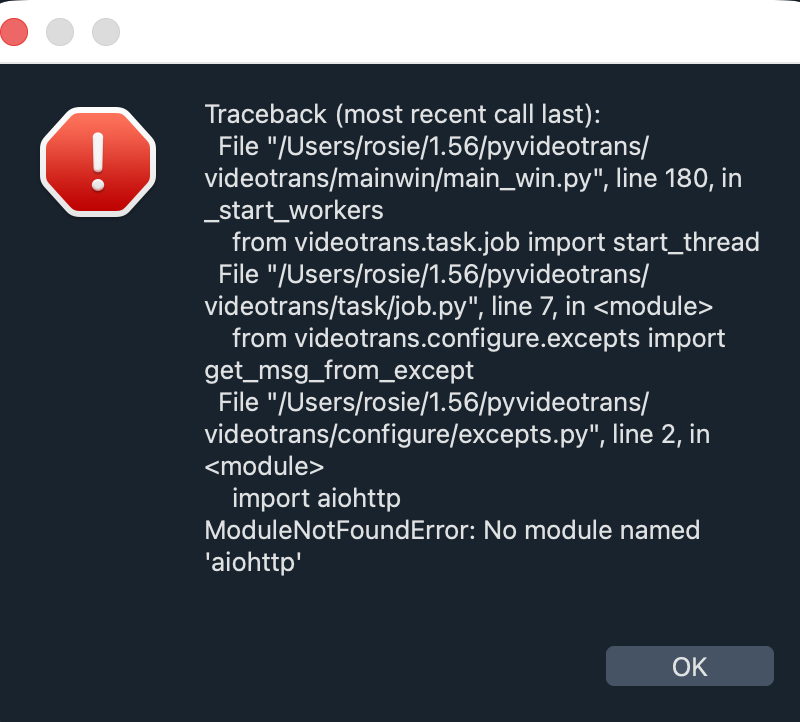
#5763 请问mac安装过程怎么出现第一张图和你们的安装的界面不一样,还有第二张图弹窗怎么办

111.33* Posted at: 3 days ago

image
image
请问mac安装过程怎么出现第一张图和你们的安装的界面不一样,还有第二张图弹窗怎么办

2 Replies

根据描述,macOS 不支持 Windows 绿色打包版(.exe),必须源码部署,且第一张图显示非标准界面通常是因为使用了错误的安装包或执行了错误的启动文件;第二张图弹窗很可能是缺少系统依赖(如 FFmpeg、libsndfile)或 Python 版本不匹配。

macOS 正确部署步骤:

  1. 安装前置依赖

    • FFmpeg:brew install ffmpeg
    • libsndfile:brew install libsndfile
    • Python 3.10:确保 python3 --version 输出为 3.10.x(可用 brew install [email protected] 安装)
    • 包管理器 uv:brew install uv
  2. 克隆仓库并安装依赖

    git clone https://github.com/jianchang512/pyvideotrans
    cd pyvideotrans
    uv sync
  3. 启动软件

    uv run sp.py

如果启动时弹出错误窗口或界面异常,请检查:

  • Python 版本是否正确(需 3.10,过高或过低都会报错)
  • FFmpeg 是否已添加至 PATH(which ffmpeg 应有输出)
  • 是否有 libsndfile 缺失提示(安装 brew install libsndfile
  • 不要双击 sp.py,必须用终端执行 uv run sp.py

由于无法看到图片内容,请提供软件目录下 logs/ 文件夹内最新的 .log 文件(复制末尾约30行报错信息),以便精确定位原因。

请查阅相关文档:

  1. 第一张是在检查是否有可用GPU,耐心等待几秒即可
  2. 第二个图缺失依赖,是否执行了uv sync , 或者再单独执行下 ·uv add aiohttp·
Post Your Reply
Open source and free maintenance is not easy. If this project is helpful to you, please consider making a small donation to help the project continue to maintain and update.

Dondate via ko-fi.com

Dondate via PayPal

Related resource