#6001 Whisper.net recognition failed: Method not found: 'System.TimeSpan System.TimeSpan.FromMilliseconds(Int64)'. at Whispe

240e:39c* Posted at: 1 day ago

Whisper.net recognition failed: Method not found: 'System.TimeSpan System.TimeSpan.FromMilliseconds(Int64)'.
at Whisper.net.WhisperProcessor.OnNewSegment(IntPtr state)
at Whisper.net.WhisperProcessor.OnNewSegmentStatic(IntPtr ctx, IntPtr state, Int32 nNew, IntPtr userData)
at Whisper.net.Internals.Native.Implementations.LibraryImportLibWhisper.whisper_full_with_state(IntPtr context, IntPtr state, WhisperFullParams parameters, IntPtr samples, Int32 nSamples)
at Whisper.net.WhisperProcessor.Process(ReadOnlySpan`1 samples)
at Whisper.net.WhisperProcessor.Process(Single[] samples)
at Whisper.net.WhisperProcessor.Process(Stream waveStream)
at System.RuntimeMethodHandle.InvokeMethod(Object target, Void** arguments, Signature sig, Boolean isConstructor)
at System.Reflection.MethodBaseInvoker.InvokeDirectByRefWithFewArgs(Object obj, Span`1 copyOfArgs, BindingFlags invokeAttr)
Traceback (most recent call last):
File "H:\pyvideotrans\videotrans\recognition\_wh
......
y", line 205, in run

return _cls(**kwargs).run()  # type:ignore
       ^^^^^^^^^^^^^^^^^^^^

File "H:\pyvideotrans\videotrans\recognition\_base.py", line 92, in run

res = self._exec()
      ^^^^^^^^^^^^

File "H:\pyvideotrans\videotrans\recognition\_whispernet.py", line 285, in _exec

raise SpeechToTextError(f"Whisper.net recognition failed: {str(e)}")

videotrans.configure.excepts.SpeechToTextError: Whisper.net recognition failed: Method not found: 'System.TimeSpan System.TimeSpan.FromMilliseconds(Int64)'.
at Whisper.net.WhisperProcessor.OnNewSegment(IntPtr state)
at Whisper.net.WhisperProcessor.OnNewSegmentStatic(IntPtr ctx, IntPtr state, Int32 nNew, IntPtr userData)
at Whisper.net.Internals.Native.Implementations.LibraryImportLibWhisper.whisper_full_with_state(IntPtr context, IntPtr state, WhisperFullParams parameters, IntPtr samples, Int32 nSamples)
at Whisper.net.WhisperProcessor.Process(ReadOnlySpan`1 samples)
at Whisper.net.WhisperProcessor.Process(Single[] samples)
at Whisper.net.WhisperProcessor.Process(Stream waveStream)
at System.RuntimeMethodHandle.InvokeMethod(Object target, Void** arguments, Signature sig, Boolean isConstructor)
at System.Reflection.MethodBaseInvoker.InvokeDirectByRefWithFewArgs(Object obj, Span`1 copyOfArgs, BindingFlags invokeAttr)

cfg=[TaskCfgVTT]当前工作模式: 翻译视频或音频 单视频模式
原始输入文件名: G:/1.mp4,
输出结果保存到文件夹: G:/_video_out/1-mp4,
临时文件夹: H:/pyvideotrans/tmp/27112/5c7d88d507
已选 清理已存在
未选 启用CUDA加速
未选 降噪
已选 识别说话人,最大说话人数量3
语音识别:Whisper.NET, model_name: ggml-large-v3-turbo.bin, 发音语言: 英语, 断句方式:默认断句
翻译渠道:微软(免费),原始语言:英语,目标语言:简体中文, 已选 发送完整字幕
配音渠道:Spark-TTS(本地API), 角色:clone, 配音语言:简体中文, 未选 二次语音识别
音量:+0%, 语速:+0%, 已选 音频加速, 未选 视频慢速
字幕: 嵌入硬字幕
已选 分离人声与背景声,存在分离后的纯净人声文件,存在分离后的背景声音文件
代理地址:


=
system:Windows-10-10.0.26100-SP0
version:v4.06
frozen:False
language:zh
root_dir:H:/pyvideotrans
Python: 3.11.7 (tags/v3.11.7:fa7a6f2, Dec 4 2023, 19:24:49) [MSC v.1937 64 bit (AMD64)]
3 Replies

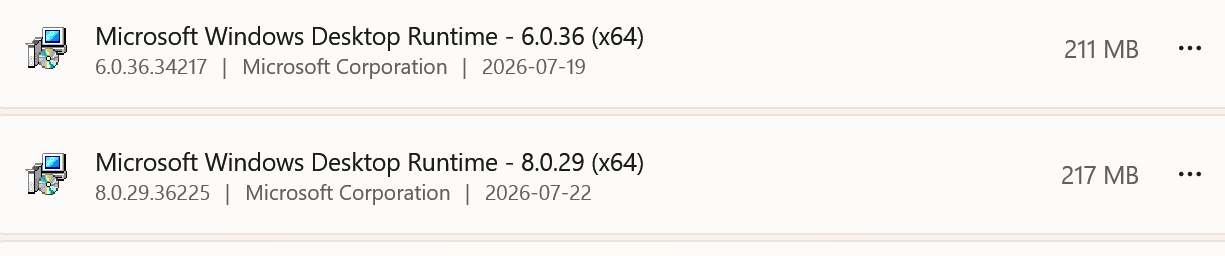
这个问题是由于 Whispter.net 依赖的 .NET 运行时环境方法缺失导致的,通常是因为系统中安装的 .NET 运行时版本与 Whispter.net 要求的版本不兼容(例如需要 .NET 6/8 但只装了低版本)。

解决办法

  1. 安装正确的 .NET 运行时
    下载并安装 .NET 8.0 Runtime(Windows x64):
    https://dotnet.microsoft.com/zh-cn/download/dotnet/8.0
    安装后请重启系统
  2. 重新安装 Whispter.net 依赖
    在源码目录下执行:

    uv sync --extra dotnet
  3. 临时替代方案
    如果急于使用,可以暂时切换到其他语音识别渠道(如 faster-whisper),在主界面语音识别渠道中选择 faster-whisper(本地内置),并下载 large-v3 模型即可正常使用。

若以上步骤后仍报错,请提供你系统中 dotnet --info 输出的 .NET 版本信息。

请查阅相关文档:

PS H:\pyvideotrans> uv sync --extra dotnet
Resolved 402 packages in 27ms
× Failed to build pynini==2.1.6.post1
├─▶ The build backend returned an error
╰─▶ Call to setuptools.build_meta:__legacy__.build_wheel failed (exit code: 1)

  [stdout]
  running bdist_wheel
  running build
  running build_py
  copying pynini\__init__.py -> build\lib.win-amd64-cpython-310\pynini
  copying pywrapfst\__init__.py -> build\lib.win-amd64-cpython-310\pywrapfst
  copying pynini\examples\case.py -> build\lib.win-amd64-cpython-310\pynini\examples
  copying pynini\examples\chatspeak.py -> build\lib.win-amd64-cpython-310\pynini\examples
  copying pynini\examples\chatspeak_model.py -> build\lib.win-amd64-cpython-310\pynini\examples
  copying pynini\examples\dates.py -> build\lib.win-amd64-cpython-310\pynini\examples
  copying pynini\examples\g2p.py -> build\lib.win-amd64-cpython-310\pynini\examples
  copying pyn

......
trator\AppData\Local\uv\cache\builds-v0.tmp74J7o2\lib\site-packages\setuptools\config\_apply_pyprojecttoml.py:61:

  SetuptoolsDeprecationWarning: License classifiers are deprecated.
  !!

          ********************************************************************************
          Please consider removing the following classifiers in favor of a SPDX license expression:

          License :: OSI Approved :: Apache Software License

          See https://packaging.python.org/en/latest/guides/writing-pyproject-toml/#license for details.
          ********************************************************************************

  !!
    dist._finalize_license_expression()
  C:\Users\Administrator\AppData\Local\uv\cache\builds-v0\.tmp74J7o2\lib\site-packages\setuptools\dist.py:765:
  SetuptoolsDeprecationWarning: License classifiers are deprecated.
  !!

          ********************************************************************************
          Please consider removing the following classifiers in favor of a SPDX license expression:

          License :: OSI Approved :: Apache Software License

          See https://packaging.python.org/en/latest/guides/writing-pyproject-toml/#license for details.
          ********************************************************************************

  !!
    self._finalize_license_expression()
  cl: ������ error D8021 :��Ч����ֵ������/Wno-register��
  error: command 'C:\\Program Files (x86)\\Microsoft Visual
  Studio\\2022\\BuildTools\\VC\\Tools\\MSVC\\14.44.35207\\bin\\HostX86\\x64\\cl.exe' failed with exit code 2

  hint: This usually indicates a problem with the package or the build environment.

help: pynini (v2.1.6.post1) was included because pyvideotrans (v4.5) depends on wetextprocessing (v1.2.0)

    which depends on `pynini`

image

pynini 构建失败是因为 MSVC 编译器不支持 GCC 风格的 /Wno-register 编译选项。问题出在 wetextprocessing 需要 pynini,而后者在 Windows 上需要特殊编译环境。

推荐方案:直接使用 Windows 预打包版。

官方提供的完整版压缩包(约 2.6 GB)已经包含了 Whisper.net 及其所有依赖(包括编译好的 pynini 二进制),无需源码编译即可直接使用。

  • 下载地址:pyVideoTrans 下载页
  • 下载后解压到英文路径(如 D:\pyVideoTrans),双击 sp.exe 即可运行,然后在语音识别渠道中选择 Whisper.NET

如果坚持用源码部署,可尝试以下步骤绕过 pynini 编译:

  1. 从 conda-forge 安装预编译的 pynini(需要先安装 miniconda/Anaconda):

    conda install -c conda-forge pynini

    然后再执行 uv sync --extra dotnet(但 uv 可能仍会尝试编译,需先手动安装到环境中)。

  2. 修改 pyproject.toml(不推荐,可能影响其他依赖):
    打开 pyvideotrans/pyproject.toml,在 [project.optional-dependencies] 下的 dotnet 列表中移除 "wetextprocessing",然后重新执行 uv sync --extra dotnet
  3. 安装 Microsoft C++ Build Tools 并设置环境变量(不一定有效):
    安装 Visual Studio Build Tools 2022,选择“使用 C++ 的桌面开发”工作负载。然后在控制台执行:

    set CL=/wd"nnnn"

    /Wno-register 是 GCC 独有的选项,MSVC 无法忽略,修改 pynini 源码更麻烦。


总结:除非有特殊原因必须用源码,否则强烈建议直接使用预打包版,省时省力且功能完整。

Post Your Reply
Open source and free maintenance is not easy. If this project is helpful to you, please consider making a small donation to help the project continue to maintain and update.

Dondate via ko-fi.com

Dondate via PayPal

Related resource