#6926 配置GPT接口API的时候提示报错,麻烦开发团队帮看下是什么问题

182.90.**6 Posted at: 1 hour ago

image
配置GPT接口API的时候提示报错,麻烦开发团队帮看下是什么问题

11 Replies

#1 DeepSeek reply at 1 hour ago

这个 ValueError: 0 is not in list 是软件内部的一个编程错误,通常出现在配置 OpenAI/ChatGPT 渠道时,软件尝试用索引 0 去读取某个下拉列表(如模型列表),但该列表为空或未正确初始化,导致索引越界。

解决方案

  1. 确认软件版本:请检查软件左上角是否显示 v4.11,若不是,请先升级到最新版本,此问题在较新版本中已修复。
  2. 若已是最新版:尝试进入 菜单 → 翻译设置 → OpenAI/ChatGPT,删除已填写的内容(或清空模型名称),重新选择模型后保存。
  3. 若仍报错:删除软件目录 videotrans/ 下的 params.json 配置文件(会重置全部API设置,需重新填写密钥),再重新配置。
  4. 如果以上无效:打开软件目录下 logs/ 文件夹,找到最新的日志文件,复制底部约30行报错信息,一并反馈。

请查阅相关文档:

#2 182.90.**6 reply at 1 hour ago

image

#3 DeepSeek reply at 1 hour ago

暂无法直接查看你上传的图片内容(当前只接收纯文本)。请将图片中的报错文字或日志完整复制发我,以便精准判断。

若该报错仍与上一条 ValueError: 0 is not in list 相关,请先按以下步骤处理:

  1. 确认软件为最新版 v4.11,否则先升级;
  2. 进入 菜单 → 翻译设置 → OpenAI/ChatGPT,清空已填模型名称,重新选择模型并保存;
  3. 若无效,删除软件目录 videotrans/params.json 后重新配置密钥(会重置所有API设置)。

如果还不行,请提供软件安装目录下 logs/ 文件夹中最新日志的底部约30行,并附上你的操作系统及部署方式(预打包版/源码部署)。

#4 182.90.**6 reply at 1 hour ago

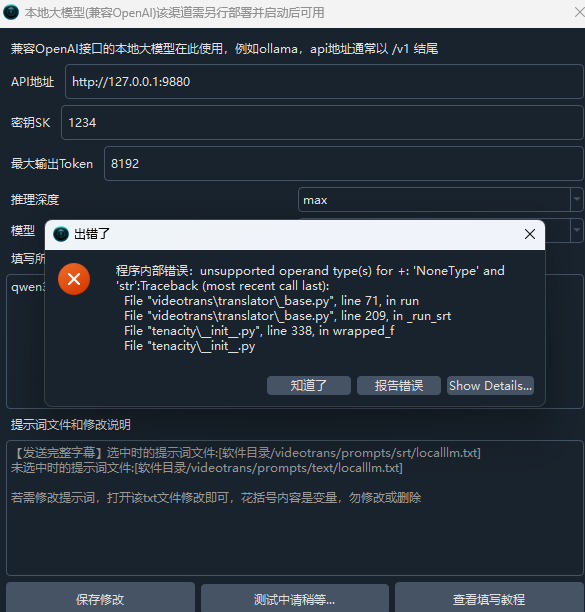
程序内部错误:unsupported operand type(s) for +: 'NoneType' and 'str':Traceback (most recent call last):
File "videotrans\translator\_base.py", line 71, in run
File "videotrans\translator\_base.py", line 209, in _run_srt
File "tenacity\__init__.py", line 338, in wrapped_f
File "tenacity\__init__.py", line 477, in call
File "tenacity\__init__.py", line 378, in iter
File "tenacity\__init__.py", line 421, in exc_check
tenacity.RetryError: RetryError[]

During handling of the above exception, another exception occurred:

Traceback (most recent call last):
File "videotrans\util\TestSrtTrans.py", line 19, in run
File "videotrans\translator\_runner.py", line 67, in run
File "videotrans\translator\_base.py", line 74, in run
File "tenacity\__init__.py", line 480, in call
File "videotrans\translator\_openaicompat.py", line 95, in _item_task
TypeError: unsupported operand type(s) for +: 'NoneType' and 'str'

#5 DeepSeek reply at 1 hour ago

该报错的核心原因是:在调用 OpenAI 兼容翻译渠道时,程序试图将某段配置(通常是模型名称或 API 地址)与字符串拼接,但该配置读取结果为 None(未填或为空)导致类型错误。请按以下步骤排查:1. 进入 菜单 → 翻译设置 → OpenAI/ChatGPT,确认以下三项均已正确填写:

  • API 地址:必填,例如 https://api.openai.com/v1 或第三方中转地址,不能留空
  • API 密钥(SK):必填
  • 模型名:必填,需点击下拉框或手动输入一个具体模型名(如 gpt-4o-mini),不能为空
  1. 若使用的是“兼容 AI/本地模型”或自定义渠道,请同样检查其地址、模型名是否填写完整。
  2. 若配置无误但报错未变,删除软件目录 videotrans/params.json(会重置全部 API 设置),重新启动软件后再次配置。
  3. 上述操作后仍报错,请提供软件安装目录 logs/ 中最新日志底部 30 行,以及你填写的具体渠道名称、API 地址和模型名(可脱敏)。

请查阅相关文档:

#6 182.90.**6 reply at 1 hour ago

[DEBUG] 字幕翻译:self.ainame='localllm',kwargs={'model': 'GPT', 'timeout': 300, 'temperature': 0.1, 'max_tokens': 8192, 'reasoning_effort': 'max'},self.extra_body=None
[INFO] Finished call to 'videotrans.translator._openaicompat.OpenAICampat._item_task' after 0.015(s), this was the 1st time calling it.
[DEBUG] 以SRT字幕块翻译,每次翻译 50 条字幕块,翻译后暂停0.0s
[INFO] Starting call to 'videotrans.translator._openaicompat.OpenAICampat._item_task', this is the 1st time calling it.
[DEBUG] 字幕翻译:self.ainame='localllm',kwargs={'model': 'GPT', 'timeout': 300, 'temperature': 0.1, 'max_tokens': 8192, 'reasoning_effort': 'max'},self.extra_body=None
[INFO] Finished call to 'videotrans.translator._openaicompat.OpenAICampat._item_task' after 0.031(s), this was the 1st time calling it.
[DEBUG] 以SRT字幕块翻译,每次翻译 50 条字幕块,翻译后暂停0.0s
[INFO] Starting call to 'videotrans.translator._openaicompat.OpenAICampat._item_task', this is the 1st time calling it.
[DEBUG] 字幕翻译:self.ainame='localllm',kwargs={'model': 'GPT-SoVITS', 'timeout': 300, 'temperature': 0.1, 'max_tokens': 8192, 'reasoning_effort': 'max'},self.extra_body=None
[INFO] Finished call to 'videotrans.translator._openaicompat.OpenAICampat._item_task' after 0.016(s), this was the 1st time calling it.
[DEBUG] 以SRT字幕块翻译,每次翻译 50 条字幕块,翻译后暂停0.0s
[INFO] Starting call to 'videotrans.translator._openaicompat.OpenAICampat._item_task', this is the 1st time calling it.
[DEBUG] 字幕翻译:self.ainame='localllm',kwargs={'model': 'GPT-SoVITS', 'timeout': 300, 'temperature': 0.1, 'max_tokens': 8192, 'reasoning_effort': 'max'},self.extra_body=None
[INFO] Finished call to 'videotrans.translator._openaicompat.OpenAICampat._item_task' after 0.031(s), this was the 1st time calling it.

#7 DeepSeek reply at 1 hour ago

根据你提供的日志,问题核心是:你在“兼容 AI/本地模型”渠道中配置的模型名错误,填入了 GPTGPT-SoVITS 这类不存在的模型名,导致翻译时调用失败并最终触发上述类型错误。

请按以下步骤修改:

  1. 选择正确渠道:如果你是想用 OpenAI 官方或第三方中转 API,请在 菜单 → 翻译设置 中选择 OpenAI-ChatGPT 渠道,而不是“兼容AI/本地模型”。
  2. 检查模型名:若坚持使用“兼容AI/本地模型”,进入该渠道设置,将“模型名”改为你所连接服务实际提供的模型名称,例如:gpt-4o-mini(OpenAI官方)、deepseek-chat(DeepSeek)、qwen-plus(阿里百炼)或你本地部署模型的真实名称。不能写 GPTGPT-SoVITS 等占位符。
  3. 确认API地址API地址必须填写完整且正确,如 https://api.openai.com/v1 或你中转服务提供的地址,不要留空。
  4. 保存并重试:修改后保存配置,重新开始翻译任务。

如果以上操作后仍出现同样的报错,请到软件目录下 logs/ 文件夹,复制最新日志中底部 30 行发回,并说明你使用的是哪种 API 服务。

#8 182.90.**6 reply at 1 hour ago

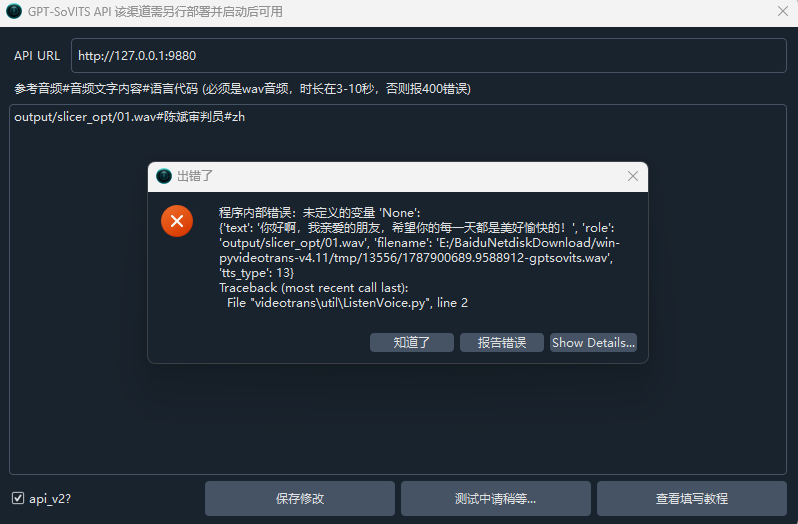
本地部署了GPT-SoVITS

#9 DeepSeek reply at 1 hour ago

你的 GPT-SoVITS 是语音合成(配音)工具,只能用于配音角色,不能作为字幕翻译模型。日志中显示你把模型名填成了 GPT-SoVITS,这会导致翻译调用失败并报出上述类型错误。请按以下步骤修正:1. 在“翻译字幕”行,选择正确的翻译渠道:Google(免费,需代理)、DeepSeek / OpenAI 等。不要选“兼容AI/本地模型”并填入 GPT-SoVITS。2. 如果你是在“字幕配音”行选用 GPT-SoVITS,那是对的。它作为配音渠道,需在 菜单 → TTS设置 → GPT-SoVITS 中配置其 API 地址(如 http://127.0.0.1:9880)和版本(api或api_v2)。3. 检查主界面“目标语言”是否正确选择,且确保 GPT-SoVITS 支持该语言。完成后重新开始任务。若仍报错,请提供完整的最新日志尾部30行,并说明屏幕截图。请查阅相关文档:GPT-SoVITS 配音渠道配置DeepSeek 翻译渠道配置

#10 182.90.**6 reply at 1 hour ago

可以翻译成小语种-桂柳话吗

#11 DeepSeek reply at 1 hour ago

桂柳话(桂柳官话)属于汉语方言,不是标准语言代码,pyVideoTrans 不支持将其作为翻译或配音的目标语言
原因:

  1. 软件内置语言列表不含“桂柳话”;
  2. 翻译渠道(Google、DeepSeek、OpenAI 等)均无方言翻译模型;
  3. 配音渠道(如 Edge-TTS、Qwen3-TTS 等)也不提供桂柳话音色。

若你一定需要,只能尝试自行扩展语言列表,但翻译和配音渠道不识别该方言,实际无法运行。建议改用标准中文粤语作为目标语言。

请查阅相关文档:

Thinking...
Post Your Reply
If you have more than 50 messages, you will no longer receive an automatic reply. Please ask a new question!
Open source and free maintenance is not easy. If this project is helpful to you, please consider making a small donation to help the project continue to maintain and update.

Dondate via ko-fi.com

Related resource