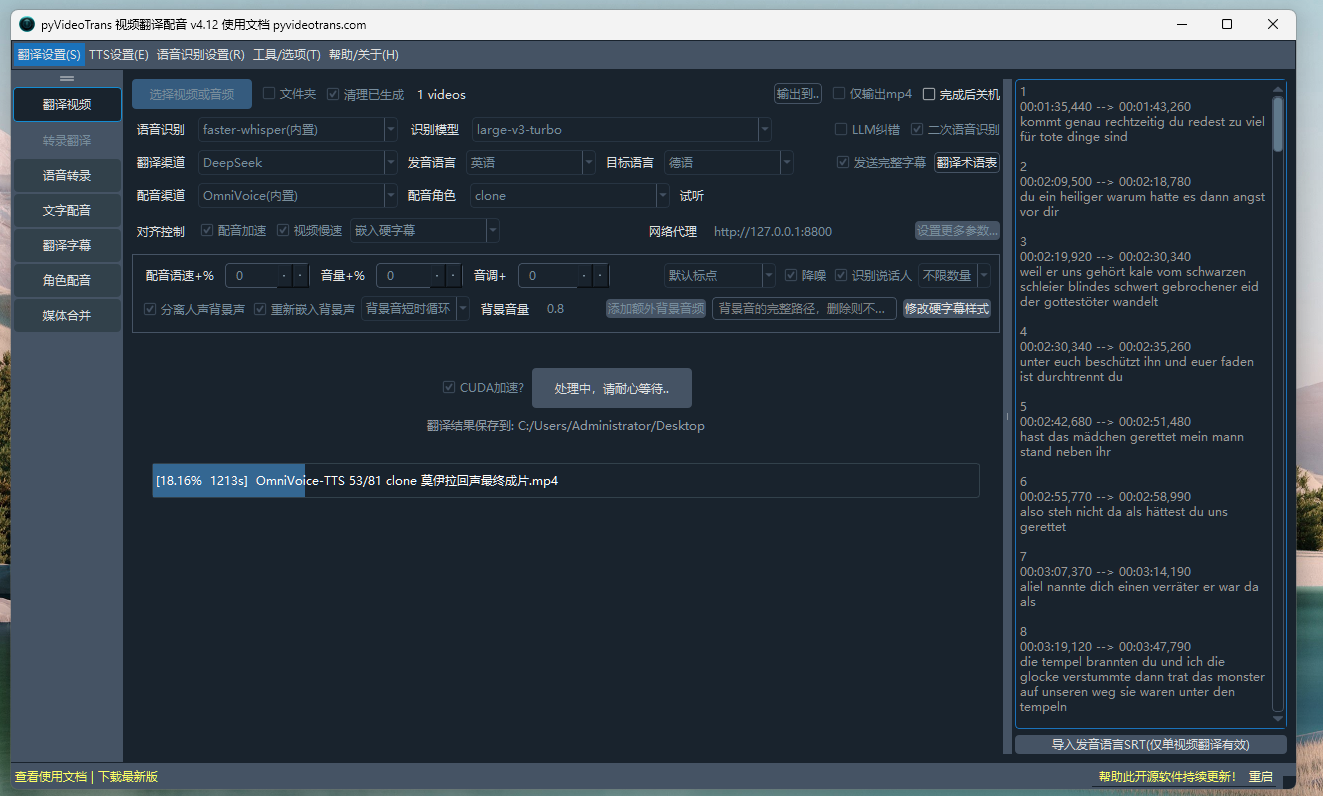
#7917 jin进度条长时间卡住

149.7**7 Posted at: 1 hour ago

jinimage
进度条长时间卡住

5 Replies

#1 DeepSeek reply at 1 hour ago

进度条长时间卡住,需判断是模型下载卡住还是某个处理阶段卡住,仅凭截图无法确定具体原因。

常见原因及排查方向:

  1. 模型下载卡住(最常见)

    • 本地模型首次使用需在线下载(几百MB~10G+),从 huggingface.co 下载时国内可能极慢或卡死。
    • 若卡在语音识别、配音等首次使用某模型的阶段,大概率是此原因。
    • 可查看软件目录 logs/ 下当天日志文件,看是否停在下载进度。
  2. VRAM/显存不足导致进程挂起

    • 本地 ASR/TTS 模型显存不足时会静默崩溃或挂起。
    • 可尝试降低模型尺寸、将计算数据类型改为 int8 或 float16。
  3. 在线 API 请求无响应

    • 翻译/配音渠道为在线 API 时,若网络或代理异常,会一直等待。
    • 检查主界面是否填写了错误代理(对齐控制行右侧代理文本框)。
  4. 杀毒软件拦截或路径含中文/特殊符号也可能造成假死。

请提供以下信息以便准确定位:

  • 软件版本号(左上角)
  • 操作系统、是否使用预打包版 sp.exe
  • 卡在哪个阶段(可看界面下方文字提示)
  • 软件安装目录 logs/ 文件夹中最新日志文件底部约 30 行内容

请查阅相关文档:

#2 149.7**7 reply at 1 hour ago

是处理到53/81的时候卡出

#3 DeepSeek reply at 1 hour ago

卡在 53/81 且长时间无变化,说明已进入某个具体处理阶段(不是模型下载),最可能是 在线 API 请求无响应或 单条任务阻塞。

请先确认两点:

  1. 53/81 对应的是哪个阶段:是字幕识别、字幕翻译、还是配音?界面进度条上方或下方文字通常会显示当前阶段(如"翻译字幕"、"配音")。
  2. 使用的渠道:

    • 若为在线 API(Google翻译、Edge-TTS、DeepSeek等):某条请求可能被限流或网络超时挂起。
    • 若为本地模型(faster-whisper、Qwen-TTS等):某条音频处理时显存/内存不足导致子进程挂起。

排查建议:

  1. 查看软件目录 logs/ 下当天日志,看最后一条输出停在哪一步、有无超时或报错。
  2. 若为在线渠道,检查主界面对齐控制行右侧的代理文本框是否填写了错误代理,清空后重试。
  3. 若 Edge-TTS 卡住,进入 高级选项 → 字幕配音,将 并发数设为 1,暂停秒数设为 5~10,避免限流挂起。
  4. 若为本地模型渠道,进入 高级选项 → 语音识别参数,将计算数据类型改为 int8 或 float16,避免显存溢出挂起。

请补充:软件版本号、卡住的阶段名称、所用渠道、logs 目录最新日志底部约 30 行内容,以便进一步定位。

请查阅相关文档:

#4 149.7**7 reply at 1 hour ago

[DEBUG] 裁切对应片段为参考音频:00:33:16,620->00:33:27,960
当前it={'text': 'sie aufhören, mich zu brauchen, um für sie zu antworten, also wirst du nicht', 'line': 76, 'start_time': 1996620, 'end_time': 2007960, 'startraw': '00:33:16,620', 'endraw': '00:33:27,960', 'ref_text': "they stop needing me to answer for them so you don't get", 'start_time_source': 1996620, 'end_time_source': 2007960, 'role': 'clone', 'rate': '+0%', 'volume': '+0%', 'pitch': '+0Hz', 'tts_type': 3, 'filename': 'D:/workplace/pyvideotrans/tmp/10068/5df7e9259f/75-32c900e6d05ab55a95173c5f07c32c20.wav', 'ref_wav': 'D:/workplace/pyvideotrans/tmp/10068/5df7e9259f/clone-75.wav', 'ref_language': 'en'}
[DEBUG] 裁切对应片段为参考音频:00:33:27,960->00:33:35,190
当前it={'text': 'verloren, Lust von Lynn, Kites raus seine Freiheit', 'line': 77, 'start_time': 2007960, 'end_time': 2015190, 'startraw': '00:33:27,960', 'endraw': '00:33:35,190', 'ref_text': 'lost lust of lynn kites out his freedom', 'start_time_source': 2007960, 'end_time_source': 20
......
r letzte, das ist der Webstuhl war nur der letzte, das ist der Webstuhl war nur der letzte, das ist der', 'line': 81, 'start_time': 2084480, 'end_time': 2087540, 'startraw': '00:34:44,480', 'endraw': '00:34:47,540', 'ref_text': 'says the loom was only the first knot and to more the tale of enmouth that is the loom was only the last one that is the loom was only the last one that is the loom was only the last one that is the loom was only the last one that is the loom was only the last one that is the loom was only the last one that is the loom was only the last one that is the loom was only the last one that is the loom was only the last one that is the loom was only the last one that is the loom was only the last one that is the loom was only the last one that is the loom was only the last one that is the loom was only the last one that is the loom was only the last one that is the loom was only the last one that is the loom was only the last one that is the loom was only the last one that is the loom was only the last one that is the loom was only the last one that is the loom was only the last one that is the', 'start_time_source': 2084480, 'end_time_source': 2087540, 'role': 'clone', 'rate': '+0%', 'volume': '+0%', 'pitch': '+0Hz', 'tts_type': 3, 'filename': 'D:/workplace/pyvideotrans/tmp/10068/5df7e9259f/80-feb7132c00e0983a73842be3377843ef.wav', 'ref_wav': 'D:/workplace/pyvideotrans/tmp/10068/5df7e9259f/clone-80.wav', 'ref_language': 'en'}
[DEBUG] self.volume='+0%', self.rate='+0%', self.pitch='+0Hz'
[DEBUG] 当前使用配音渠道:OmniVoice(内置)
[DEBUG] [新进程任务 开始:title='OmniVoice-TTS dubbing...']
[DEBUG] 新进程任务 参数:kwargs={'queue_tts_file': 'D:/workplace/pyvideotrans/tmp/10068/5df7e9259f/omnivoice-1791623525.8351064.json', 'logs_file': 'D:/workplace/pyvideotrans/tmp/10068/5df7e9259f/omnivoice-1791623525.8351064.log', 'is_cuda': True, 'speed': 1.0, 'is_redubb': False, 'language': 'de', 'device_index': 0, 'device_name': 'auto'}
[DEBUG] OmniVoice-TTS本地内置渠道,running on cuda:0

#5 DeepSeek reply at 1 hour ago

从日志可明确判断:卡住原因是字幕第 81 行(line 81)的原文存在大量重复文字,导致 OmniVoice 配音子进程对该超长重复文本处理时陷入长时间循环或挂起。

日志中可见第 81 行 ref_text 出现连续重复的 the loom was only the last one that is 数十次,这正是典型的识别幻觉/重复文本问题。你当前的管线是:语音识别(en)→ 翻译为德语 → OmniVoice 克隆配音(tts_type:3),第 81 行德语 text 也已出现相同的重复。

解决办法(按顺序尝试):

  1. 终止当前任务,进入软件目录 tmp/10068/5df7e9259f/ 或直接查看该视频对应的 en.srt,找到第 81 行,手动删除其中的大量重复文字,保留正常内容后保存。然后用外部已修正的字幕重新走翻译+配音流程(不要勾选"清理已生成"会清空,这里是修改原始字幕,需重新生成)。
  2. 若不想手动改,可在高级选项的 VAD/识别参数中调整以减少重复:

    • 高级选项 → 语音识别参数,增大 重复惩罚(repetition penalty),减小 文本压缩率(compression ratio threshold),减少模型输出幻觉重复的概率。
  3. 配音渠道方面,OmniVoice 属于本地大模型,遇到超长重复文本会显著变慢甚至看似卡死,属预期行为——根因仍是文本本身异常。
  4. 关于代理:此问题与网络代理无关(本地渠道 cuda:0)。

请查阅相关文档:

Thinking...
Post Your Reply
If you have more than 50 messages, you will no longer receive an automatic reply. Please ask a new question!
Open source and free maintenance is not easy. If this project is helpful to you, please consider making a small donation to help the project continue to maintain and update.

Dondate via ko-fi.com

Related resource