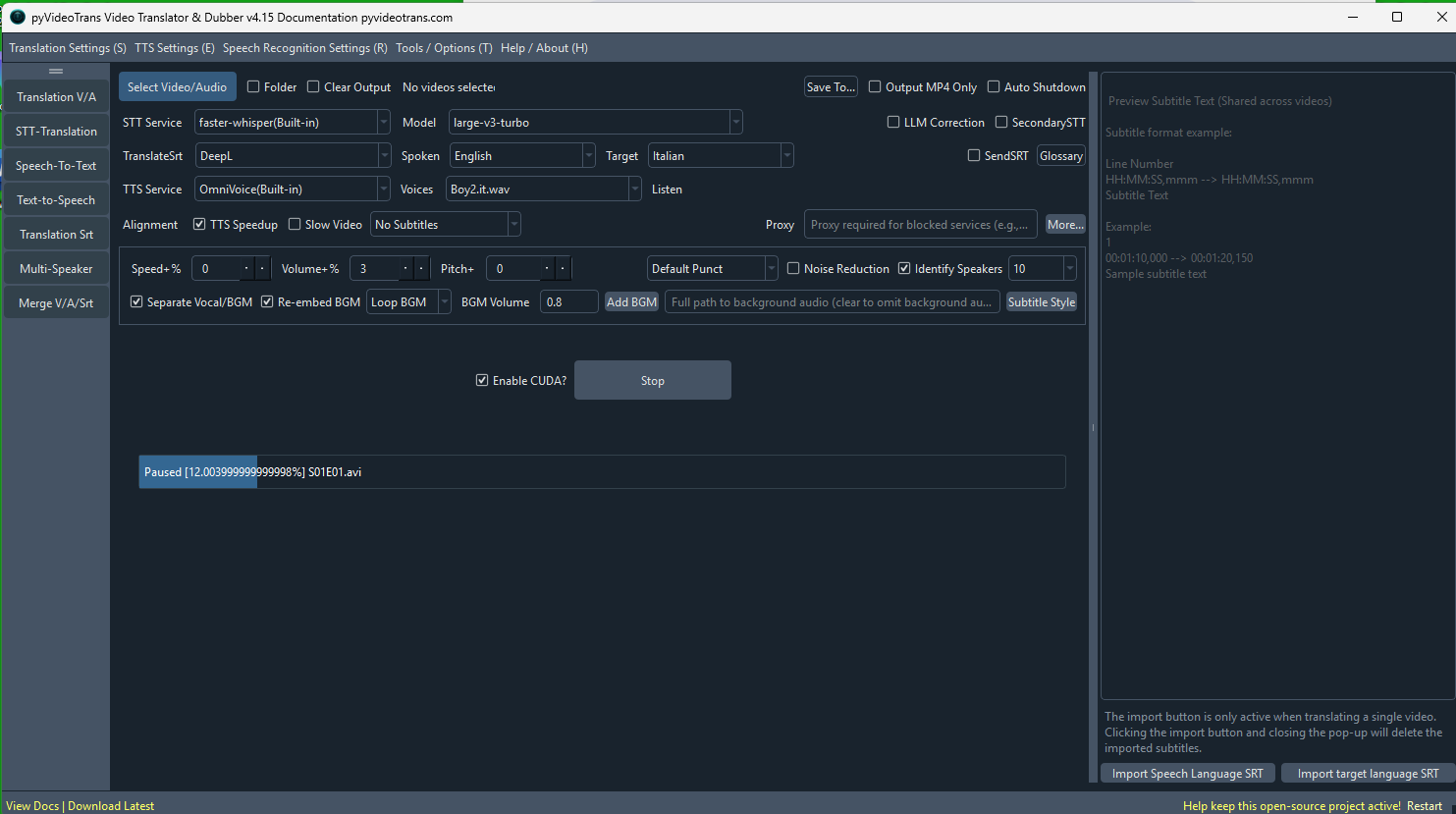
#7957 come mai la versione 4.15 fa frasi lunghissime anche con valori bassi

79.22**1 Posted at: 20 days ago

come mai la versione 4.15 fa frasi lunghissime anche con valori bassi image
22 Replies

#1 DeepSeek reply at 20 days ago

Core reason: In v4.15 the sentence-splitting (VAD re-segmentation) stage was rewritten, and there is a known v4.15 bug where the re-split of subtitles does not strictly respect your 最长语音持续 / max speech duration and 最短语音持续 / min speech duration values — so subtitles come out far longer than the numbers you set. A corrected v4.15 patch build is already published for this, and the patch must be re-downloaded and overwritten even if you already have the v4.15 full package.

Do the following, in order:

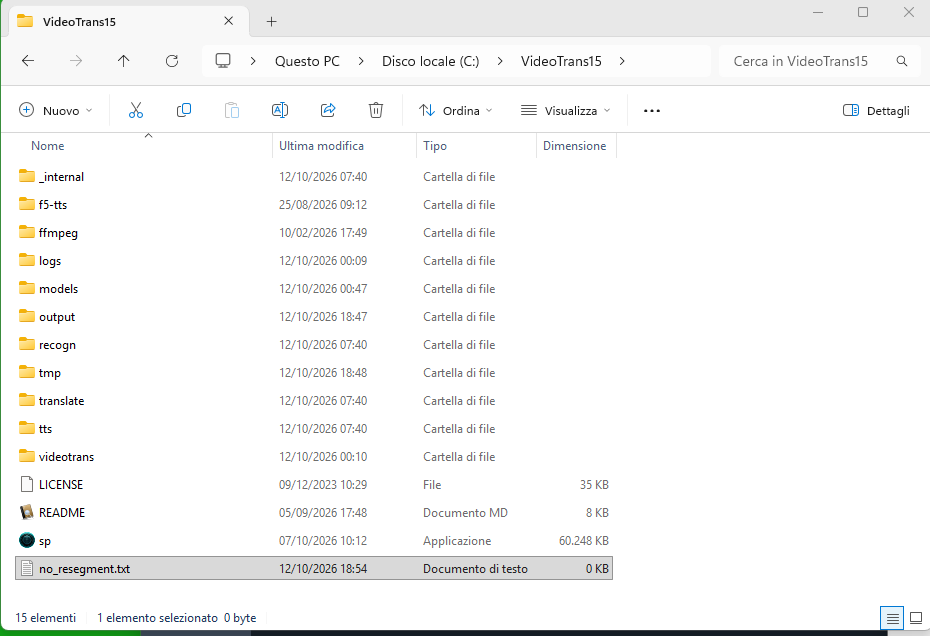
1. Check for a no_resegment.txt file in the software root folder (same folder as sp.exe)
If that file exists, it disables re-splitting by word-level timestamps for faster-whisper / openai-whisper, and the app then uses the model's own long sentences directly — which cannot follow your max/min duration settings. Delete it (or rename it).

2. Re-download the latest v4.15 patch package and overwrite it into the v4.15 directory again
Overwrite all files and folders of the patch (not only sp.exe), especially sp.exe, videotrans/ and _internal/. If after overwriting you still get behaviour from the old code, search for every __pycache__ folder inside _internal/, delete them, then overwrite the patch again.

3. Verify your parameter combination is legal

  • 最长语音持续(秒) × 1000 must be greater than 最短语音持续(毫秒). E.g. max = 2 s (2000 ms) with min = 3000 ms creates a conflict and unpredictable splitting.
  • The engine allows roughly a 1.5× buffer, so max = 5 s can still produce ~7.5–8 s subtitles. To force short lines, set max to 2–3 s.
  • Lower 静音分割持续(ms) (e.g. 300) so it cuts on shorter pauses.

4. Re-run with 清理已生成 / Clear Output checked
Otherwise the previously generated SRT in the output folder is reused and it looks like your changes had no effect.

5. Note on the recognition channel
Fine-grained splitting depends on word-level timestamps; the whisper-family channels (faster-whisper, openai-whisper) give the finest control. Some other channels do not support this level of splitting.

If after the patch overwrite the sentences are still extremely long, please send the bottom ~30 lines of the newest log file in the software's logs/ folder, plus your exact values for 最长语音持续/最短语音持续/静音分割持续 and the STT channel used.

请查阅相关文档:

#2 79.22**1 reply at 20 days ago

17
00:01:36,340 --> 00:01:40,200
Who says so? Kid Curry. Animal Hayes.

18
00:01:51,310 --> 00:01:54,450
We found them. Let's go, move it. Let's

19
00:02:02,860 --> 00:02:07,920
come with that safe. She's gonna blow sky up.

20
00:02:28,080 --> 00:02:32,120
You used, Kyle. Every last stick of it. For one little old safe?

21
00:02:32,120 --> 00:03:34,910
This ain't no little old safe. This is a Brooker 202. Well

22
00:03:34,930 --> 00:03:38,550
I'm sure I don't know, man. Better go check your fuse

23
00:03:38,650 --> 00:03:43,640
Kyle. I ain't going in there. Listen

24
00:03:43,880 --> 00:03:47,160
when the leader of the gang tells them to do something, don't he have to do it?

25
00:03:48,200 --> 00:03:53,560
Yeah, that's my understanding. But what makes you such a great leader

26
00:03:53,700 --> 00:03:58,260
Hayes, is that you never tell no man to do a thing you wouldn't do yourself.

27
00:04:00,020 --> 00:04:03,360
You wanna be leader? After you. I'll

28
00:04:53,860 --> 00:04:58,460
gotta go ahead. Well, whose fault is that? I warned you not to ford that river

29
00:04:58,580 --> 00:05:02,440
didn't I? Huh? I don't know. Now you and your short cuts.

30
00:05:02,700 --> 00:05:05,980
Don't get proddy, weep. Hey

31
00:05:05,980 --> 00:05:09,920
Folks getting restless. They're starting to mutter. Mutter what?

32
00:05:11,320 --> 00:05:17,320
Oh, like maybe you two don't know what you're doing. Like we can't even blow up a safe.

33
00:05:17,720 --> 00:05:22,200
Maybe you oughta get in some other line of work. That kind of talk could ruin us.

34
00:05:24,100 --> 00:05:30,480
Well, I happen to agree with him. Wheat. What an offense

35
00:05:30,660 --> 00:05:35,940
man, kid. None taking wheat. Now, I want to remind you boys that we don't exactly have a lot of time

36
00:05:36,000 --> 00:05:41,240
so if you'll just let Hayes here have a few quiet minutes to work. Oh, sure, sure. Come on, Kyle.

37
00:05:51,570 --> 00:05:57,170
I suppose you boys are wondering what a little old lady from Boston is doing way out here in the Wild West.

#3 79.22**1 reply at 20 days ago

image

#4 DeepSeek reply at 20 days ago

The screenshot shows the raw recognition result still containing multi-sentence lines (e.g. "Who says so? Kid Curry. Animal Hayes.") and one line spanning 62 seconds (2100 00:02:32,120 --> 00:03:34,910). This means the re-splitting stage is not being applied at all — your 最长语音持续 / max speech duration and 最短语音持续 / min speech duration values are being ignored, not merely refined.

The double spaces between sentences are Whisper's own segment boundaries; those get cut by the re-split step. If that step is skipped or broken, you get exactly this output.

Causes, in order of likelihood:

  1. A file named no_resegment.txt exists in the software root folder (next to sp.exe). It disables re-splitting for faster-whisper / openai-whisper, forcing the model's own sentences — which by definition cannot respect max/min duration. Delete it and start the task again.
  2. The known v4.15 re-split bug. Even with the v4.15 full package you must re-download the v4.15 patch package and overwrite it again. Overwrite everything (sp.exe, videotrans/, _internal/ — not only sp.exe).
  3. Stale compiled code. Before overwriting the patch, search inside _internal/ for every __pycache__ folder, delete them all, then overwrite the patch again. Otherwise the old splitting code keeps running.
  4. You imported an external SRT (导入发音语言字幕 / Import spoken-language subtitles). Imported subtitles are used as-is; no VAD splitting is performed on them.
  5. You re-ran without 清理已生成 / Clear Output. The previous long SRT in the output folder is then reused, so your changed values appear to have no effect.

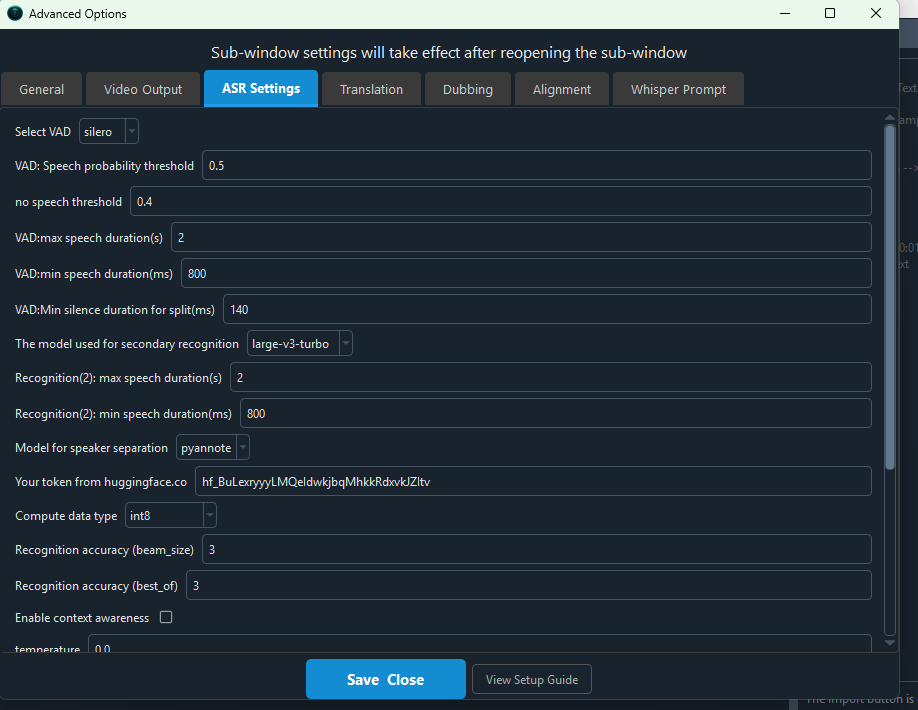
Parameter check (高级选项 → 语音识别参数):

  • 最长语音持续(秒) × 1000 must be greater than 最短语音持续(毫秒). E.g. max = 2 s (2000 ms) with min = 3000 ms is an illegal combination and produces unpredictable splitting.
  • The engine tolerates roughly 1.5× buffer, so max = 5 s can still yield ~7.5–8 s lines. To force short lines set max = 2–3 s, min = 1000–1500 ms, 静音分割持续 = 300 ms.
  • Splitting is finest on the whisper-family channels (faster-whisper, openai-whisper), which provide word-level timestamps.

About the 62-second line (index 21): that is beyond any max-duration setting and usually indicates either the same re-split failure, or a hallucination/repeat region. Disable 启用上下文感知 (Enable context awareness), and increase 重复惩罚 (repetition penalty) / lower 文本压缩率 (compression ratio threshold).

If after the patch overwrite the long lines persist, send the bottom ~30 lines of the newest log file in the logs/ folder together with your exact values for 最长语音持续 / 最短语音持续 / 静音分割持续 and the STT channel and model used.

请查阅相关文档:

#5 79.22**1 reply at 20 days ago

pycache non lo trovo

#6 DeepSeek reply at 20 days ago

That is normal and it is not the problem: __pycache__ folders only exist in a source deployment (uv run sp.py). In the Windows pre-packaged build (sp.exe) there are almost no __pycache__ folders, so there is nothing to delete — skip that step. It only matters for source installs.

What matters instead is verifying that the patch was really applied. Do these checks:

  1. Confirm how you run the software
  2. If you double-click sp.exe → pre-packaged build → ignore the __pycache__ step.
  3. If you run uv run sp.py → source deployment → then search with the exact name __pycache__ inside the project folder, including subfolders (videotrans/, videotrans/task/, videotrans/recognition/).
  4. Verify the patch actually replaced the files
  5. Right-click sp.exe → Properties → check the "Date modified" matches the patch release date. If it is an older date, the patch was not applied.
  6. Most common mistake: extracting the .7z into a new folder next to the program instead of overwriting (merging) into the existing folder. You must extract directly into the folder containing sp.exe and confirm "Overwrite / Replace files in destination".
  7. Also verify there is no nested folder such as pyVideoTrans/pyVideoTrans/sp.exe.
  8. Re-download the v4.15 patch package and overwrite again, even if you already have the v4.15 full package — the fix for the overly long sentences was published as a re-issued v4.15 patch.
  9. Check for the file that disables splitting
  10. Look in the folder containing sp.exe for a file named no_resegment.txt. If it exists, delete it. While it exists, faster-whisper / openai-whisper do not re-split by word timestamps and the model's own long sentences are used, ignoring 最长语音持续 / max speech duration and 最短语音持续 / min speech duration.
  11. Re-run properly
  12. Tick 清理已生成 / Clear Output, otherwise the previously generated long SRT in the output folder is reused and it looks like nothing changed.
  13. Do not use 导入发音语言字幕 / Import spoken-language subtitles — imported subtitles bypass all VAD splitting.
  14. Check the version number shown at the top-left of the window; it should read v4.15.
  15. Parallel test to isolate the issue
  16. Run the same file on the openai-whisper(内置) channel with large-v3, 最长语音持续 = 3, 最短语音持续 = 1000, 静音分割持续 = 300. If lines are still extremely long there too, the re-split stage is genuinely inactive in your installation.

If after all this the lines are still long, reply with:

  • whether you use the pre-packaged sp.exe or source deployment,
  • the version number shown at the top-left,
  • the "Date modified" of sp.exe,
  • the bottom ~30 lines of the newest file in the logs/ folder.

请查阅相关文档:

#7 79.22**1 reply at 20 days ago

image
ho fatto tutto quello che hai detto ma il risultato non cambia

#8 DeepSeek reply at 20 days ago

I cannot read the content of that screenshot, and "did everything" is not enough to pinpoint it — the same visual result can come from 3 different root causes. Give me the facts below, and run the decisive test in step 3.

Please reply with these exact values (in text, not screenshots):

  1. Version number shown at the top-left of the window (must literally read v4.15).
  2. Do you run the pre-packaged sp.exe or uv run sp.py (source)?
  3. The STT channel and model currently selected in row 2 (语音识别), e.g. faster-whisper(内置) + large-v3.
  4. sp.exe → right-click → Properties → "Date modified". It must match the re-issued v4.15 patch date.
  5. Confirm in the folder containing sp.exe that no file named no_resegment.txt exists.
  6. Your three actual numbers: 最长语音持续(秒) / 最短语音持续(毫秒) / 静音分割持续(毫秒).

Decisive test — proves whether the splitting stage runs at all:

Open the left-side panel 语音转录(Speech-to-Text), load the same video, channel faster-whisper(内置) + large-v3, 最长语音持续 = 3, 最短语音持续 = 1000, 静音分割持续 = 300, and run.

  • If that output is ALSO long, unsplit lines → the re-split code is genuinely not running in your installation (patch not really applied, or a channel without word timestamps).
  • If that output is correct, short lines → the code works, and your video-translation run is simply reusing an old cached SRT. In that case you did not really clear the cache, or the old en.srt / zh-cn.srt is still sitting in the output folder _video_out//.

Verify the settings were actually saved:

Open videotrans/params.json with a text editor and search for the duration keys. If your numbers (3 / 1000 / 300) are not there, the advanced-options dialog never saved — reopen 高级选项, set them, click the save/OK button, and restart the software.

Also, if your channel in row 2 is any of Whisper.cpp, VibeVoice-ASR, FunASR, Dolphin, Moss-Diarize, Omnilingual, or an online API, fine re-splitting is limited or unavailable — switch to faster-whisper(内置) or openai-whisper(内置) for this test, since those provide word-level timestamps.

Common causes of "patch applied but nothing changed":

  • The .7z was extracted into a NEW folder next to the program instead of merged into the existing folder. You must extract into the folder containing sp.exe and confirm "overwrite/replace existing files". Verify there is no path like D:/pyVideoTrans/pyVideoTrans/sp.exe.
  • Only sp.exe was replaced, while videotrans/ and _internal/ still hold the old code. Replace all of them.
  • The task was re-run with 清理已生成 unticked, so the already-generated SRT is reused and your new values never take effect.
  • You used 导入发音语言字幕 — imported subtitles bypass all splitting logic entirely.

If it still fails, send the bottom ~30 lines of the newest file in the logs/ folder together with items 1–6 above.请查阅相关文档:优化断句效果调节VAD精确控制语音识别语音转录功能Windows版下载

#9 79.22**1 reply at 19 days ago

purtroppo ho fatto tutto quello che hai consigliato ma il problema rimane

#10 DeepSeek reply at 19 days ago

暂无法确定具体原因。仅凭“问题仍然存在”无法定位:同样的表现可能来自不同原因(补丁未真正覆盖、旧字幕被复用、导入字幕跳过切分、渠道不支持字级时间戳、参数未保存等)。

请逐项提供以下信息,并附上日志,我才能继续分析:

  1. 软件左上角显示的版本号是否是 v4.15?
  2. 你运行的是 sp.exe 预打包版,还是 uv run sp.py 源码部署?
  3. 第二行“语音识别/STT Service”中,当前选的是哪个渠道和哪个模型?(例如 faster-whisper(内置) + large-v3)
  4. 右键 sp.exe → 属性 → 查看“修改日期”,是否与最新 v4.15 补丁包日期一致?
  5. 软件根目录下是否存在 no_resegment.txt 文件?存在则必须删除。
  6. 请写明你设置的三个值:

    • 最长语音持续(秒)
    • 最短语音持续(毫秒)
    • 静音分割持续(毫秒)
  7. 重新执行任务时,是否勾选了 清理已生成 (Clear Output)?
  8. 是否使用了 导入发音语言字幕 / Import spoken-language subtitles?若使用,则会跳过 VAD 切分,显示长句是正常的。

请打开软件目录下的 logs/ 文件夹,把最新的日志文件底部约 30 行内容复制发给我。只有拿到日志后,才能判断是切分阶段未执行、参数未生效、还是旧字幕被复用。

请查阅相关文档:

#11 79.22**1 reply at 19 days ago

dove trovo la funzione "Importa sottotitoli in lingua parlata"?

#12 DeepSeek reply at 19 days ago

The “导入发音语言字幕 / Import spoken-language subtitles” button is at the bottom of the right-side subtitle preview area in the main translation window (翻译视频 / Translation V/A).
It appears only when you have selected exactly one video (single-video mode). If you select multiple videos or check the batch folder option, that button is not usable.

Important: if you import an existing spoken-language subtitle, the software skips the speech-recognition/VAD splitting stage, so any long lines in that file remain as-is. That may already explain why your subtitles are still long.

#13 79.22**1 reply at 19 days ago

image
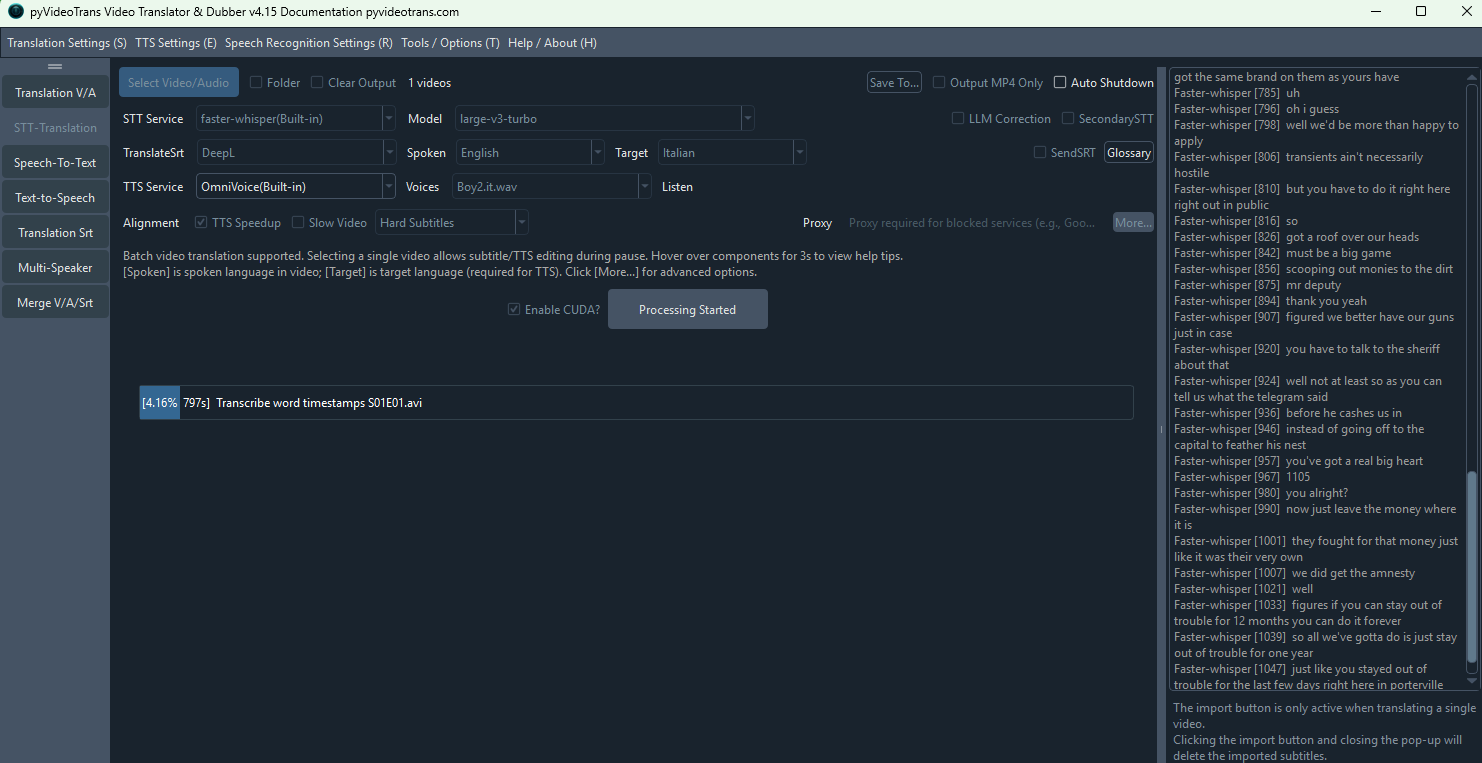
subito crea piu di mille file poi image
li riduce arbitrariamente a 500 non si puo bloccare l'unione dei file?

#14 DeepSeek reply at 19 days ago

Il comportamento che vedi è normale: il VAD produce molti segmenti di parlato (anche >1000), poi l’algoritmo di riallineamento unisce quelli più corti della soglia minima (最短语音持续) fino ad arrivare a un numero finale (es. 500).
Non esiste un interruttore “blocca unione”, ma puoi ridurre al minimo l’unione regolando tre parametri. Ecco come.

Passi per ridurre l’unione (ottenere più file e frasi più corte)

  1. Apri 菜单 → 工具/选项 → 高级选项 → 语音识别参数.
  2. Modifica così:

    • 最短语音持续(毫秒) → 300–500 (valore basso = i frammenti corti non vengono quasi mai uniti)
    • 最长语音持续(秒) → 3–5 (limite massimo per ogni segmento)
    • 静音分割持续(毫秒) → 200–300 (taglia su pause brevi, producendo più segmenti)
  3. Esegui il task spuntando 清理已生成 / Clear Output, altrimenti il vecchio SRT viene riusato.
  4. Se vuoi davvero disattivare completamente il riallineamento/unione: crea un file vuoto chiamato no_resegment.txt nella cartella principale del software (dove c’è sp.exe).
    ⚠️ Attenzione: così vengono usati i segmenti grezzi di Whisper senza rispettare min/max. Se i segmenti grezzi sono lunghi, tornerai al problema precedente delle frasi lunghissime.

Nota importante

  • Se usi il ruolo clone (clonazione vocale), non scendere sotto 3000 ms per 最短语音持续, altrimenti la clonazione potrebbe fallire o produrre audio distorto.
  • Avere più file non significa automaticamente più qualità: l’unione serve proprio a evitare frammenti di 0,2 secondi e a creare frasi leggibili.

Se dopo questi passaggi il numero non cambia o il problema persiste, invia l’ultima parte del log (cartella logs/, file più recente, ultime ~30 righe) con i valori esatti impostati.

请查阅相关文档:

#15 79.22**1 reply at 19 days ago

image
cosi va bene?

#16 DeepSeek reply at 19 days ago

非 riesco a vedere il contenuto dell'immagine, quindi non posso confermare se i valori sono corretti. Scrivi qui i tre numeri che hai impostato (最长语音持续/秒, 最短语音持续/毫秒, 静音分割持续/毫秒). Nel frattempo, questa è la regola generale da seguire:

  • 最短语音持续: 300–500 ms (più basso = meno unioni, più file)
  • 最长语音持续: 3–5 s (limite massimo per frase)
  • 静音分割持续: 200–300 ms (taglia su pause brevi)

Devi anche:

  1. Spuntare 清理已生成 / Clear Output prima di rilanciare, altrimenti il vecchio SRT viene riusato.
  2. Se usi il ruolo clone per la clonazione vocale, NON mettere 最短语音持续 sotto 3000 ms, altrimenti la clonazione può fallire.

Il passaggio da 1000 a 500 file è normale: il sistema unisce i frammenti troppo corti per raggiungere la durata minima. Per ridurre le unioni, abbassa 最短语音持续.

Scrivimi i valori esatti e ti confermo subito se vanno bene.

#17 79.22**1 reply at 19 days ago

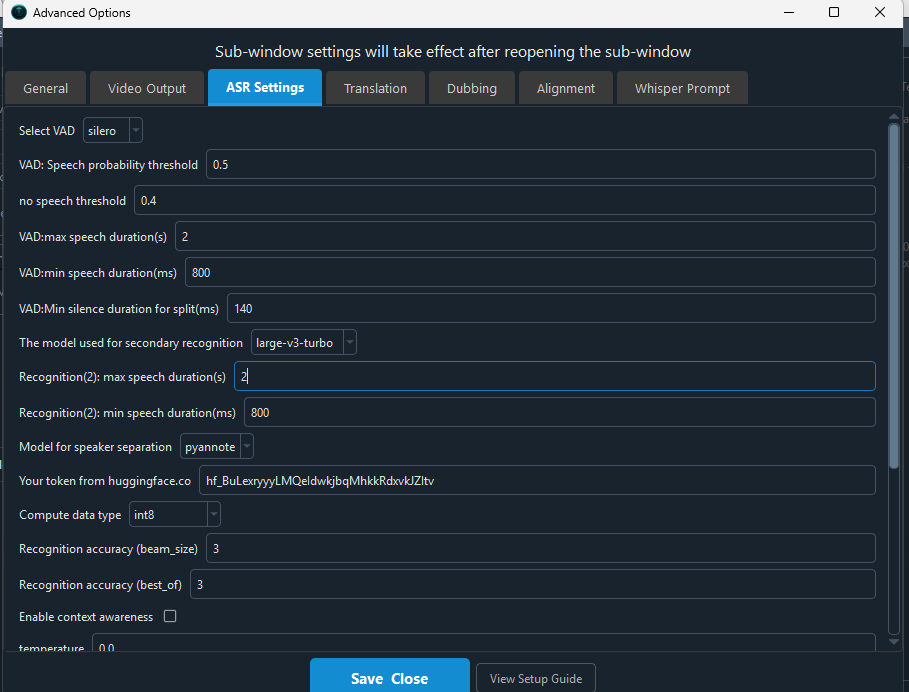
max 1 s ,min 0.5 s , pausa 0.14 s

#18 DeepSeek reply at 19 days ago

I tre valori sono validi: 最长语音持续 1 s (1000 ms) è maggiore di 最短语音持续 0,5 s (500 ms), quindi non crea conflitto. La pausa di 140 ms è molto aggressiva e produrrà tanti frammenti corti, che è esattamente ciò che vuoi per evitare frasi lunghe.

Però tieni presente:

  • Max 1 s è molto basso: può spezzare frasi in modo innaturale. Se vuoi frasi corte ma ancora leggibili, prova max 2–3 s, min 500 ms, pause 200–300 ms.
  • Min 500 ms: spingerà il sistema a unire qualsiasi frammento più corto di mezzo secondo. Se vuoi meno unioni, puoi scendere a 300 ms.
  • Prima di rilanciare, spunta sempre 清理已生成 / Clear Output, altrimenti il vecchio SRT viene riusato e i nuovi valori non avranno effetto.
  • Se usi il ruolo clone per la clonazione vocale, non scendere sotto 3000 ms per 最短语音持续, altrimenti la clonazione fallisce.

In sintesi: i numeri non sono sbagliati, ma sono molto estremi. Prova e verifica il risultato. Se il problema delle frasi lunghissime persiste, il problema non è nei valori: inviami l'ultima parte del log (cartella logs/, file più recente, ultime ~30 righe).

#19 79.22**1 reply at 19 days ago

image
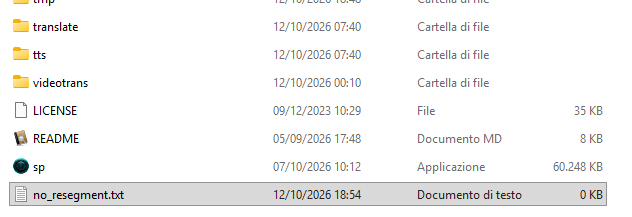
no_resegment va bene

#20 DeepSeek reply at 19 days ago

No, delete it. The no_resegment.txt file disables the re-splitting logic for faster-whisper / openai-whisper. When it exists, your 最长语音持续 / max speech duration and 最短语音持续 / min speech duration values are ignored, and the model's raw long sentences are kept — exactly the problem you are seeing.

Do this:

  1. Delete no_resegment.txt from the software root folder (where sp.exe is).
  2. Tick 清理已生成 / Clear Output before re-running, otherwise the old SRT is reused.
  3. Do not use 导入发音语言字幕 / Import spoken-language subtitles, because imported subtitles also bypass splitting.

If long sentences persist after deleting that file, the cause is something else — send the newest log file from the logs/ folder (bottom ~30 lines), and also confirm whether you imported an existing SRT.

请查阅相关文档:

#21 79.22**1 reply at 19 days ago

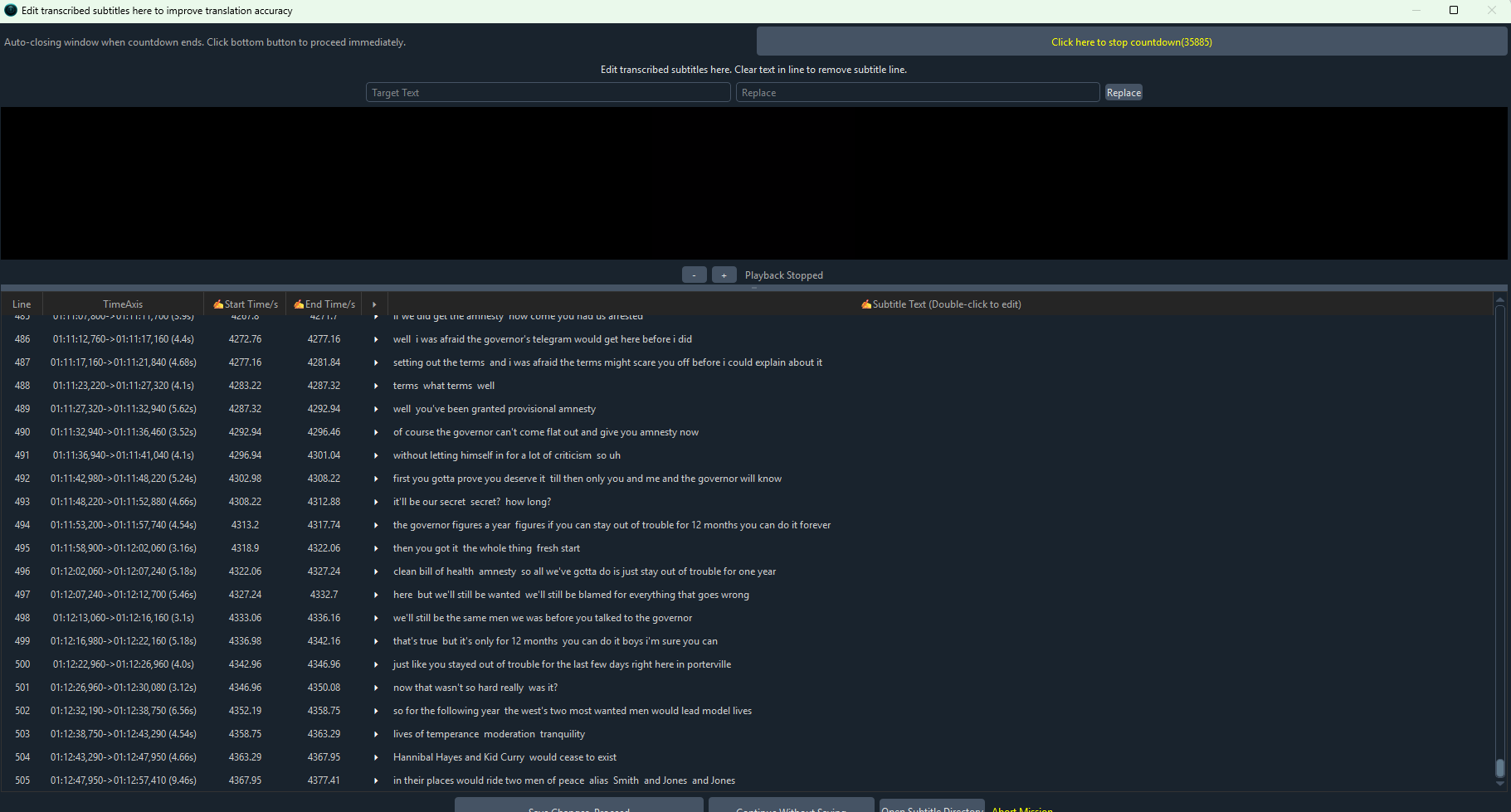
479
01:10:28,350 --> 01:10:33,870
put that down they said that doesn't belong to you they fought for that money just like it was their very own

480
01:10:35,070 --> 01:10:39,870
uh huh well i think even the governor might be interested in what they did

481
01:10:41,310 --> 01:10:46,930
i'd like to discuss that boys you wouldn't mind stepping into my office for a moment

482
01:10:54,060 --> 01:10:57,400
yahoo we got it we did get the amnesty yes uh huh

483
01:10:57,880 --> 01:11:01,880
but please please don't tell me anything about what happened here tonight

484
01:11:04,260 --> 01:11:07,800
hey lon uh one thing though

485
01:11:07,800 --> 01:11:11,700
if we did get the amnesty how come you had us arrested

486
01:11:12,760 --> 01:11:17,160
well i was afraid the governor's telegram would get here before i did

487
01:11:17,160 --> 01:11:21,840
setting out the terms and i was afraid the terms might scare you off
......
ore i could explain about it

488
01:11:23,220 --> 01:11:27,320
terms what terms well

489
01:11:27,320 --> 01:11:32,940
well you've been granted provisional amnesty

490
01:11:32,940 --> 01:11:36,460
of course the governor can't come flat out and give you amnesty now

491
01:11:36,940 --> 01:11:41,040
without letting himself in for a lot of criticism so uh

492
01:11:42,980 --> 01:11:48,220
first you gotta prove you deserve it till then only you and me and the governor will know

493
01:11:48,220 --> 01:11:52,880
it'll be our secret secret? how long?

494
01:11:53,200 --> 01:11:57,740
the governor figures a year figures if you can stay out of trouble for 12 months you can do it forever

495
01:11:58,900 --> 01:12:02,060
then you got it the whole thing fresh start

496
01:12:02,060 --> 01:12:07,240
clean bill of health amnesty so all we've gotta do is just stay out of trouble for one year

497
01:12:07,240 --> 01:12:12,700
here but we'll still be wanted we'll still be blamed for everything that goes wrong

498
01:12:13,060 --> 01:12:16,160
we'll still be the same men we was before you talked to the governor

499
01:12:16,980 --> 01:12:22,160
that's true but it's only for 12 months you can do it boys i'm sure you can

500
01:12:22,960 --> 01:12:26,960
just like you stayed out of trouble for the last few days right here in porterville

501
01:12:26,960 --> 01:12:30,080
now that wasn't so hard really was it?

502
01:12:32,190 --> 01:12:38,750
so for the following year the west's two most wanted men would lead model lives

503
01:12:38,750 --> 01:12:43,290
lives of temperance moderation tranquility

504
01:12:43,290 --> 01:12:47,950
Hannibal Hayes and Kid Curry would cease to exist

505
01:12:47,950 --> 01:12:57,410
in their places would ride two men of peace alias Smith and Jones and Jones

il programma è precompilato

#22 DeepSeek reply at 19 days ago

Il problema di base è che la fase di ri-segmentazione non viene eseguita: i valori di 最长语音持续 / 最短语音持续 / 静音分割持续 vengono ignorati. Il fatto che il programma sia precompilato (sp.exe) non impedisce l’applicazione della patch: devi verificare che la patch v4.15 sia davvero stata applicata.

Segui questi passi in ordine:

  1. Elimina definitivamente no_resegment.txt

    • Apri la cartella dove c’è sp.exe.
    • Attiva la visualizzazione delle estensioni: in Esplora file → Visualizza → spunta “Estensioni file”.
    • Se il file no_resegment.txt esiste ancora, cancellalo. Non basta rinominarlo.
  2. Riapplica la patch v4.15 correttamente

    • Scarica di nuovo il pacchetto patch v4.15.
    • Estrai direttamente dentro la cartella che contiene sp.exe, confermando la sovrascrittura di tutti i file e cartelle (sp.exe, videotrans/, _internal/).
    • Controlla che non esista un percorso annidato tipo D:/pyVideoTrans/pyVideoTrans/sp.exe.
    • Verifica la data di modifica di sp.exe e della cartella videotrans/: deve corrispondere alla data della patch.
  3. Riesegui il task spuntando 清理已生成 / Clear Output

    • Altrimenti il vecchio file SRT già generato viene riusato e i nuovi parametri non hanno alcun effetto.
  4. Non usare “Importa sottotitoli in lingua parlata”

    • Se importi un SRT esistente, il software salta completamente la fase di segmentazione.
  5. Usa un canale che supporta la ri-segmentazione fine

    • Scegli faster-whisper(内置) oppure openai-whisper(内置). Altri canali (es. Whisper.cpp, VibeVoice, FunASR, API online) potrebbero non avere i timestamp a livello di parola e quindi ignorare i limiti di durata.
  6. Test decisivo per capire dove si blocca

    • Apri il pannello laterale 语音转录 / Speech-to-Text.
    • Carica lo stesso file, stesso modello large-v3, stessi parametri (max 1 s, min 0,5 s, pausa 0,14 s) e avvia.
    • Se anche lì le righe restano lunghe e non spezzate → la ri-segmentazione non è attiva nel tuo programma (patch non applicata o file no_resegment.txt presente).
    • Se lì le righe sono corte → il problema è nel video translation che riusa il vecchio SRT: pulisci la cartella di output _video_out/... e riprova con 清理已生成.

Se dopo questo test il problema persiste, inviami:

  • la versione esatta in alto a sinistra (deve leggere v4.15),
  • il canale STT e modello usato,
  • le ultime ~30 righe del file di log più recente nella cartella logs/.

请查阅相关文档:

Thinking...
Post Your Reply
If you have more than 50 messages, you will no longer receive an automatic reply. Please ask a new question!
Open source and free maintenance is not easy. If this project is helpful to you, please consider making a small donation to help the project continue to maintain and update.

Dondate via ko-fi.com

Related resource