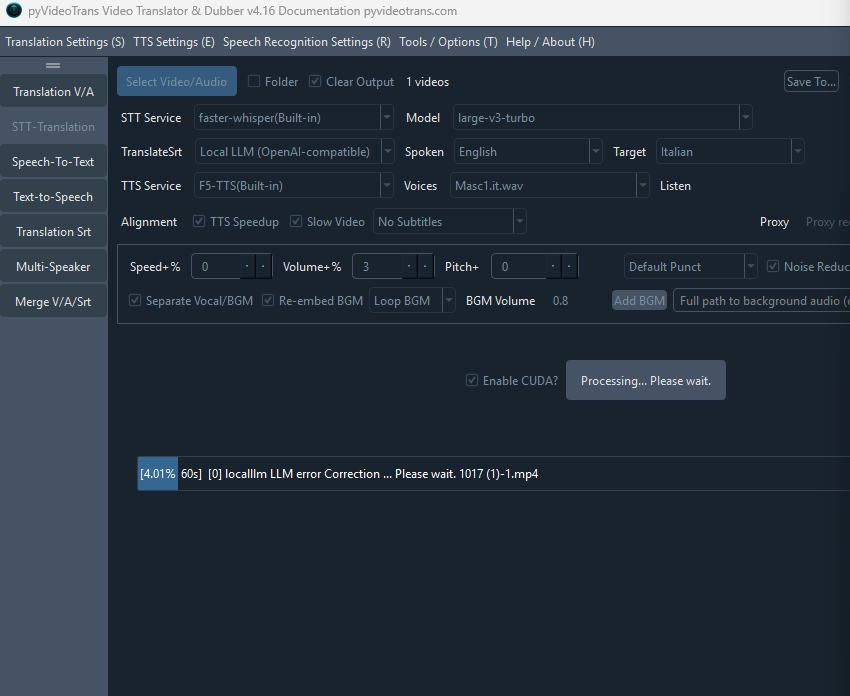
#8247 come mai llm va subito in errore

79.22**1 Posted at: 1 hour ago

image
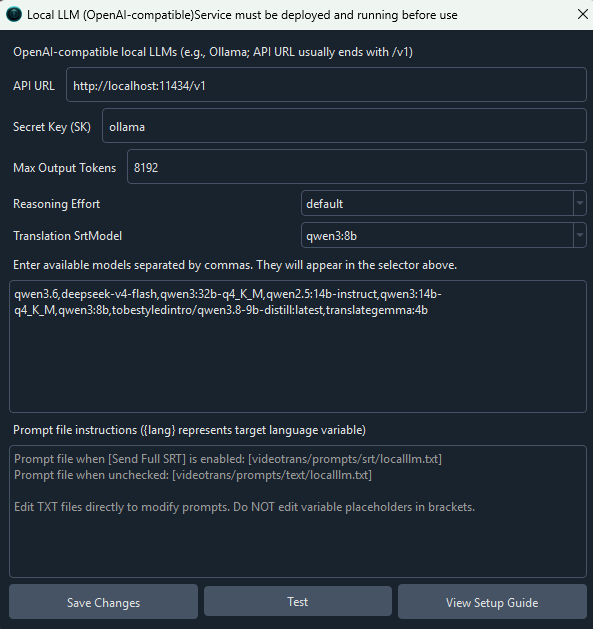
come mai llm va subito in errore

15 Replies

#1 DeepSeek reply at 1 hour ago

I cannot read the exact error text in the screenshot, so the following are the most common causes of an LLM step failing immediately (on the very first request), in order of likelihood:

  1. The LLM channel used for correction is separate from your main translation channel. LLM纠错 (LLM Correction) uses the channel defined in Menu → Tools/Options → Advanced Options → 字幕翻译 → LLM纠错所用AI渠道, which defaults to DeepSeek. If no valid API key/balance is configured for that channel, the task fails instantly — even if your main translation channel (Google, etc.) works fine.

    • Fix: Menu → 翻译设置 (Translation Settings) → DeepSeek, fill in a valid SK, confirm the account has balance, and test. Or switch the correction channel to one you already have configured.
  2. Error contains API URL is error: → known bug introduced in v4.14. Fix: download the latest patch package (or full package) and overwrite.
  3. Error says the model does not support disabling thinking → in that channel's settings window, tick Thinking (thinking is disabled by default).
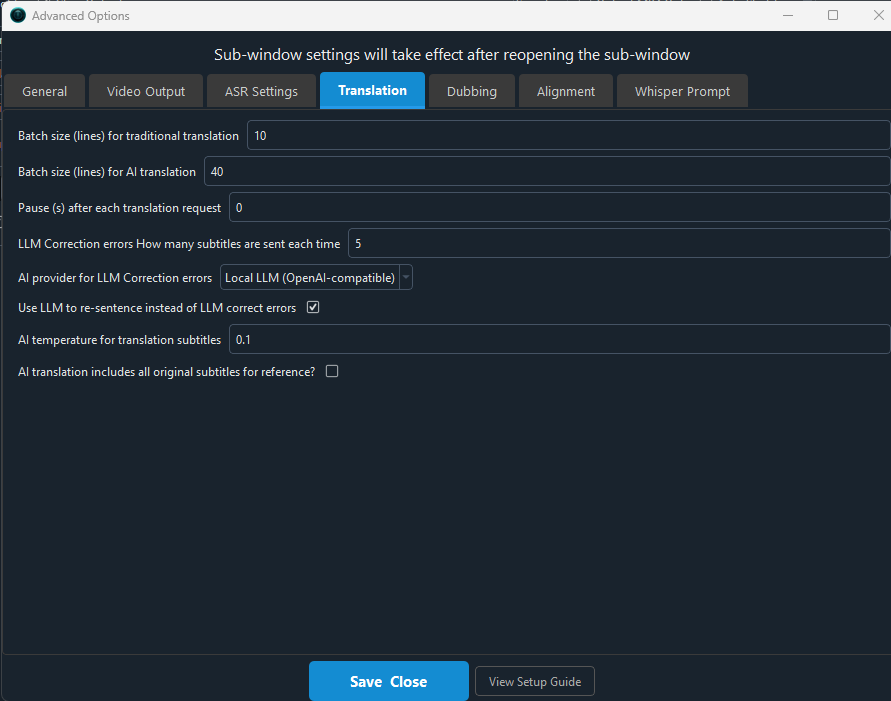
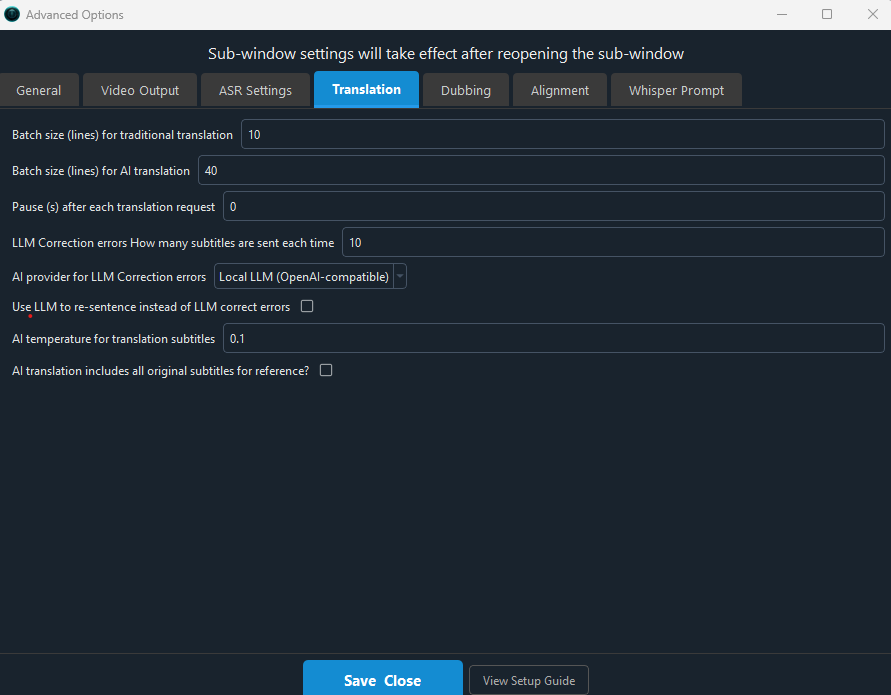
  4. Error contains Could not parse response content as the length limit was reached → too many subtitle lines per request or max_tokens too small. Set 高级选项 → 字幕翻译 → LLM纠错每批字幕行数 to 10–20 (or raise max_tokens).
  5. Proxy/address problems → API address must never be 0.0.0.0 (use 127.0.0.1); an invalid proxy filled in the main window will make every request fail immediately. Clear the proxy box and retry.
  6. Selected 使用LLM重新断句替代LLM纠错 → same channel/key dependency as item 1; also incompatible with bilingual subtitle embedding.

To confirm which of these applies, please provide the last ~30 lines of the error from logs/YYYYMMDD.log in the software installation directory (or paste the full popup error text).

请查阅相关文档:

#2 79.22**1 reply at 1 hour ago

[DEBUG] 开始加载 faster-whisper模型large-v3-turbo,数据类型:int8
[DEBUG] [faster_whisper]加载模型large-v3-turbo: running on cuda,_compute_type='int8'
[DEBUG] 直接传递完整音频,由faster-whisper内部VAD处理,返回字级时间戳数据
[DEBUG] faster-whisper模式下,对large-v3-turbo模型返回的字级时间戳进行断句
[DEBUG] 由字级时间戳重新断句完毕
[DEBUG] faster-whisper下已临时保存识别结果到 C:/VideoTrans16/tmp/faster-20261017-19_15_35.srt,防止进程崩溃后永久等待
[DEBUG] [新进程任务 title='Model: large-v3-turbo'] 已返回
[DEBUG] [新进程任务 结束:title='Model: large-v3-turbo'],耗时38.254926919937134s
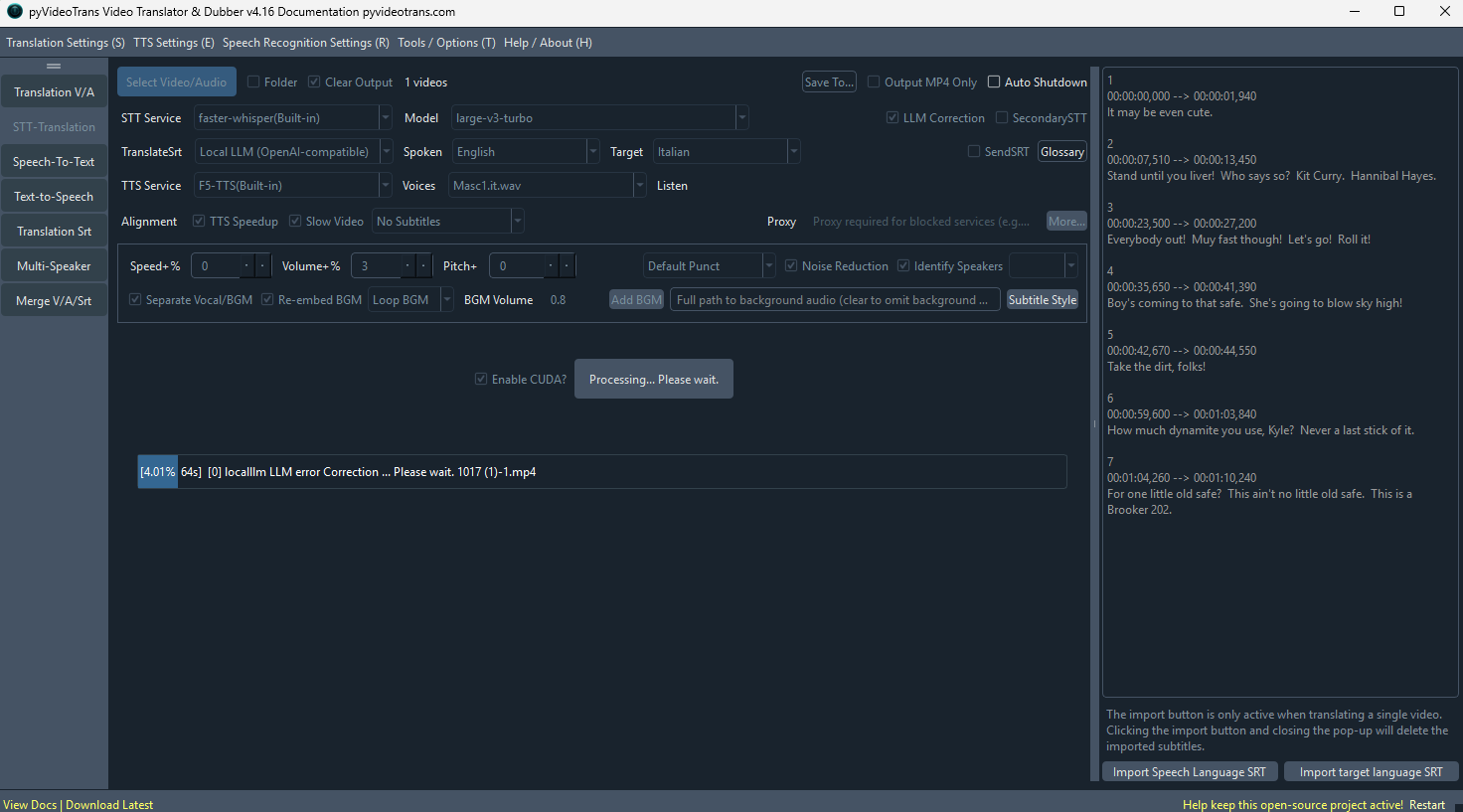
[DEBUG] LLM Re-segmenting:self.ainame='localllm',kwargs={'model': 'qwen3:8b', 'temperature': 0.1, 'timeout': 600, 'reasoning_effort': 'medium', 'max_tokens': 8192},self.model_name='qwen3:8b',self.api_url='http://localhost:11434/v1',step=''
[DEBUG] LLM纠错前:srt_list=[SrtItem(text='It may be even cute. ', start_time=0, end_time=1940, startraw='00:00:00,000', endraw='00:00:01,940', line=1, time='00:00:00,000 --> 00:00:01,940', spk='', filename=''), SrtItem(text='Stand until you liver! Who says so? Kit Curry.
......
yle? Never a last stick of it. ', start_time=59600, end_time=63840, startraw='00:00:59,600', endraw='00:01:03,840', line=6, time='00:00:59,600 --> 00:01:03,840', spk='', filename=''), SrtItem(text="For one little old safe? This ain't no little old safe. This is a Brooker 202. ", start_time=64260, end_time=70240, startraw='00:01:04,260', endraw='00:01:10,240', line=7, time='00:01:04,260 --> 00:01:10,240', spk='', filename='')]
[INFO] Starting call to 'videotrans.translator._openaicompat.OpenAICampat.llm_segment.._send', this is the 1st time calling it.


Application started at 2026-10-17 19:19:20

Loading resources...
Loading main window...
Initializing UI...
SetupUI end...
import recognition ...
import tts ...
import translate ...
Get cache ...
Set default value ...
import voices list ...
Set tts voice ...
[DEBUG] Version: v4.16, Frozen:True, OS: win32
上次缓存的角色:Masc1.it.wav,字幕嵌入类型:0,发音语言:English,目标语言:Italian,目标语言代码:it,模型:large-v3-turbo,TTS渠道[2]
show main window ...
Bind signal...
set cursor...
end
[DEBUG] app_cfg.proxy=''
[DEBUG] 可以使用 huggingface.co
[DEBUG] 可用 Nvidia 显卡数: 1
[DEBUG] 平台: Windows。正在按优先级检测最佳的 'h264' 编码器: ['nvenc', 'qsv', 'amf']
[DEBUG] 正在测试编码器是否可用: h264_nvenc...
[DEBUG] 找到 1 个 Nvidia GPUs, 耗时: 1s
[DEBUG] cpu_count=20,app_cfg.MAX_GPU_PROCESS=1, app_cfg.MAX_CPU_PROCESS=8, task_nums=4
[DEBUG] start 33 jobs
[WARNING] 硬件编码器 'h264_nvenc' 不可用
[DEBUG] 正在测试编码器是否可用: h264_qsv...
[WARNING] 硬件编码器 'h264_qsv' 不可用
[DEBUG] 正在测试编码器是否可用: h264_amf...
[WARNING] 硬件编码器 'h264_amf' 不可用
[DEBUG] 所有硬件加速器均未通过测试。将使用软件编码器: libx264
[DEBUG] 最终确定使用的编码器: libx264
[DEBUG] 平台: Windows。正在按优先级检测最佳的 'hevc' 编码器: ['nvenc', 'qsv', 'amf']
[DEBUG] 正在测试编码器是否可用: hevc_nvenc...
[WARNING] 硬件编码器 'hevc_nvenc' 不可用
[DEBUG] 正在测试编码器是否可用: hevc_qsv...
[WARNING] 硬件编码器 'hevc_qsv' 不可用
[DEBUG] 正在测试编码器是否可用: hevc_amf...
[WARNING] 硬件编码器 'hevc_amf' 不可用
[DEBUG] 所有硬件加速器均未通过测试。将使用软件编码器: libx265
[DEBUG] 最终确定使用的编码器: libx265
questo è il log dell errore in parte

#3 DeepSeek reply at 1 hour ago

The log stops right before the actual exception, but it already shows the decisive fact: your LLM纠错 (LLM Correction) is not using a cloud API — it is calling a local Ollama model (localllm channel, model qwen3:8b, api_url=http://localhost:11434/v1). The failure occurs on the very first _send call, so it is a connection/parameter rejection, not a subtitle-length problem.

Most likely causes, in order:

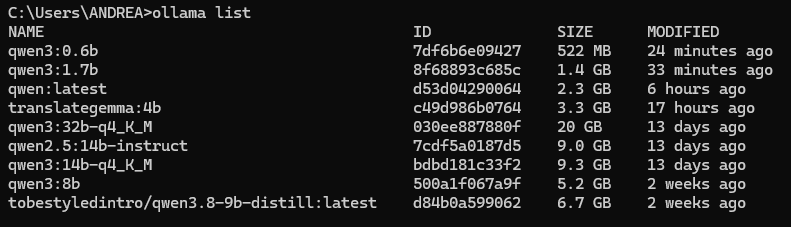
  1. Ollama not running, or the model is not pulled. Open CMD and run ollama list — qwen3:8b must appear. Then run ollama serve (or keep the Ollama app running) and verify curl http://localhost:11434/v1/models returns JSON. If Ollama is stopped, the request fails instantly.
  2. Qwen3 thinking-mode rejection. Qwen3 is a hybrid reasoning model, and the software disables thinking by default (your log passes reasoning_effort: 'medium'). If the endpoint rejects this, the call fails immediately. Fix: Menu → 翻译设置 → 兼容AI/本地模型 (localllm), and tick Thinking to enable thinking mode.
  3. API URL format. It must be exactly http://localhost:11434/v1 (with /v1, no trailing path). Do not use 0.0.0.0 — the software will refuse it.
  4. VRAM/context too large. max_tokens=8192 plus an 8B model can exceed available VRAM on a small card, causing an immediate Ollama error. Lower max_tokens to 2048–4096 and set 高级选项 → 字幕翻译 → LLM纠错每批字幕行数 to 10.
  5. Unparseable output. Local 8B models have weak instruction-following and often return prose or tags that cannot be parsed into SRT, which surfaces as an instant error. This is a known limitation of local small models.

Fastest workaround (recommended): stop using the local model for correction. Go to 菜单 → 工具/选项 → 高级选项 → 字幕翻译 → LLM纠错所用AI渠道, switch back to DeepSeek (or any configured cloud AI), or simply uncheck LLM纠错 in the main window. Your ASR (large-v3-turbo on CUDA) already completed successfully in ~38s, so this only affects the correction step.

If you want to keep the local model, the definitive answer requires the traceback itself — your log ends at Starting call to ... _send. Please paste the lines after that entry (the exception text, e.g. connection refused / 400 / model not found / parse error).

请查阅相关文档:

#4 79.22**1 reply at 1 hour ago

[DEBUG] LLM纠错前:srt_list=[SrtItem(text='It may be even cute. ', start_time=0, end_time=1940, startraw='00:00:00,000', endraw='00:00:01,940', line=1, time='00:00:00,000 --> 00:00:01,940', spk='', filename=''), SrtItem(text='Stand until you liver! Who says so? Kit Curry. Hannibal Hayes. ', start_time=7510, end_time=13450, startraw='00:00:07,510', endraw='00:00:13,450', line=2, time='00:00:07,510 --> 00:00:13,450', spk='', filename=''), SrtItem(text="Everybody out! Muy fast though! Let's go! Roll it! ", start_time=23500, end_time=27200, startraw='00:00:23,500', endraw='00:00:27,200', line=3, time='00:00:23,500 --> 00:00:27,200', spk='', filename=''), SrtItem(text="Boy's coming to that safe. She's going to blow sky high! ", start_time=35650, end_time=41390, startraw='00:00:35,650', endraw='00:00:41,390', line=4, time='00:00:35,650 --> 00:00:41,390', spk='', filename=''), SrtItem(text='Take the dirt, folks! ', start_time=42670, end_time=44550, startraw='00:00:42,670', endraw='00:00:44,550', line=5, time='00:00:42,670 --> 00:00:44,550', spk='', filename=''), SrtItem(text='How much dynamite you use, Kyle? Never a last stick of it. ', start_time=59600, end_time=63840, startraw='00:00:59,600', endraw='00:01:03,840', line=6, time='00:00:59,600 --> 00:01:03,840', spk='', filename=''), SrtItem(text="For one little old safe? This ain't no little old safe. This is a Brooker 202. ", start_time=64260, end_time=70240, startraw='00:01:04,260', endraw='00:01:10,240', line=7, time='00:01:04,260 --> 00:01:10,240', spk='', filename='')]
[INFO] Starting call to 'videotrans.translator._openaicompat.OpenAICampat.llm_segment.._send', this is the 1st time calling it.
io attivo llm perche' faster crea frasi troppo lunghe

#5 DeepSeek reply at 1 hour ago

The log still cuts off at Starting call to ... _send — the exception itself is not included. Without those following lines the exact cause cannot be confirmed. However, two things are already clear from your setup, and one of them is the more important problem.

1. LLM纠错 will NOT shorten your sentences.

Your stated goal is that faster-whisper produces sentences that are too long. LLM纠错 (LLM Correction) only fixes typos and restores punctuation — since v4.12 it deliberately does not re-segment. To actually re-split sentences you must additionally tick:

菜单 → 工具/选项 → 高级选项 → 字幕翻译 → 使用LLM重新断句替代LLM纠错

Note: once ticked, do not embed bilingual subtitles (re-segmentation changes the line count, so original/translated lines can no longer be matched).

2. The real, more reliable fix for long subtitles is VAD, not an LLM.

菜单 → 工具/选项 → 高级选项 → 语音识别参数:

  • 最长语音持续(秒) → 3 (or 2 for fast dialogue)
  • 最短语音持续(毫秒) → 1000–1500
  • 静音分割持续(毫秒) → 140–400

This directly controls segment length. Your subtitles above (1940 ms, 5940 ms, 3700 ms…) come from these parameters, not from the ASR model. Note: if you use the clone voice role, keep 最短语音持续 ≥ 3000 ms.

3. Why the local Ollama call fails immediately.

Your config is localllm / qwen3:8b / http://localhost:11434/v1 / reasoning_effort: medium / max_tokens: 8192. Likely causes:

  1. Ollama context too small — Ollama defaults to a 2048-token context. With qwen3:8b in thinking mode, the reasoning output consumes the whole budget and the reply comes back empty or truncated, which surfaces as an instant parse failure. Fix: raise it, e.g. set environment variable OLLAMA_CONTEXT_LENGTH=8192 and restart Ollama, or create a Modelfile with PARAMETER num_ctx 8192.
  2. Thinking mode — Qwen3 is a hybrid reasoning model and the software disables thinking by default. Open 菜单 → 翻译设置 → 兼容AI/本地模型 and tick Thinking, otherwise the endpoint may reject the request.
  3. Ollama not running / model not pulled — run ollama list (qwen3:8b must be present) and curl http://localhost:11434/v1/models from CMD.
  4. VRAM insufficient — 8B + 8192 max_tokens can exceed available VRAM, producing an immediate Ollama error. Lower max_tokens to 2048–4096 and set LLM纠错每批字幕行数 to 10.
  5. URL must be exactly http://localhost:11434/v1 (with /v1, never 0.0.0.0).
  6. Small local models follow instructions poorly and often return prose or XML tags that cannot be parsed into SRT lines — a known limitation of 8B-class local models.

Fastest path: either uncheck LLM纠错 and fix sentence length via the VAD parameters in item 2, or switch LLM纠错所用AI渠道 back to DeepSeek / another configured cloud AI, which handles re-segmentation far more reliably than a local 8B model.

To pinpoint the exact failure, please paste the log lines after Starting call to 'videotrans.translator._openaicompat.OpenAICampat.llm_segment.._send' from C:/VideoTrans16/logs/.

请查阅相关文档:

#6 79.22**1 reply at 1 hour ago

[INFO] Starting call to 'videotrans.translator._openaicompat.OpenAICampat.llm_segment.._send', this is the 1st time calling it.
[INFO] Starting call to 'videotrans.translator._openaicompat.OpenAICampat.llm_segment.._send', this is the 1st time calling it.
[INFO] Starting call to 'videotrans.translator._openaicompat.OpenAICampat.llm_segment.._send', this is the 1st time calling it.
[INFO] Starting call to 'videotrans.translator._openaicompat.OpenAICampat.llm_segment.._send', this is the 1st time calling it.
[INFO] Starting call to 'videotrans.translator._openaicompat.OpenAICampat.llm_segment.._send', this is the 1st time calling it.
[INFO] Starting call to 'videotrans.translator._openaicompat.OpenAICampat.llm_segment.._send', this is the 1st time calling it.
[INFO] Starting call to 'videotrans.translator._openaicompat.OpenAICampat.llm_segment.._send', this is the 1st time calling it.
[INFO] Starting call to 'videotrans.translator._openaicompat.OpenAICampat.llm_segment.._send', th
......
هوشمندتر می شدند. و ارتباطات مدرن، تنها زمان را برای دستگیری آنها تعیین می کرد.\n\n14\n00:01:24,130 --> 00:01:28,710\nآنها را به دام می انداخت.\n\n15\n00:01:36,190 --> 00:01:40,190\nچه کسی می گوید؟ کید کاری، هانیبال هی.\n\n16\n00:01:52,810 --> 00:02:07,960\nبیایید، سریعتر. او در حال انفجار است.\n\n17\n00:02:27,670 --> 00:02:32,170\nچه چیزی می توانید استفاده کنید، کیل؟ همه چیز را. یک قفل کوچک؟\n\n18\n00:02:32,370 --> 00:03:34,900\nاین یک قفل کوچک نیست. این یک قفل Brooker 202 است. خب،\n\n19\n00:03:34,900 --> 00:03:38,540\nمطمئناً من نمی دانم، مرد. بهتر است که بررسی کنید.\n\n20\n00:03:38,660 --> 00:03:43,630\nمن نمی خواهم واردش شوم، کیل. گوش دهید،\n\n21\n00:03:43,990 --> 00:03:47,170\nوقتی رهبر گروه از آنها می خواهد کاری را انجام دهند، آیا آنها باید آن را انجام دهند؟\n\n22\n00:03:48,210 --> 00:03:53,570\nبله، این درک من است. اما چه چیزی باعث می شود که شما یک رهبر باشید،\n\n23\n00:03:53,710 --> 00:03:58,290\nهیس، این است که شما هرگز از کسی نمی خواهید کاری را انجام دهد که خودتان انجام نمی دهید.\n\n24\n00:03:59,990 --> 00:04:03,370\nاگر می خواهید رهبر باشید، پس از من. من\n\n25\n00:04:53,870 --> 00:04:58', '`srt\n1\n00:07:24,070 --> 00:07:28,070\nI said, "Posse, gonna be real grateful to Hayes," ain\'t they? How\'d you do it, Wee?\n\n2\n00:07:28,170 --> 00:07:34,070\nSmarter, but how that\'s for me to know and you to find out when I\'m the leader of this game, I...\n\n3\n00:08:17,100 --> 00:08:22,940\nHope you\'re right, Hayes. The way I figure it, we got the short end of an hour left. Gotta be here, someplace, keep looking, fellas. I mean, you know it\'s gotta be here. We\'ll find her. Don\'t worry. We...\n\n4\n00:08:22,940 --> 00:08:29,870\n...gotta be here.\n\n5\n00:08:29,870 --> 00:08:35,289\n...don\'t worry.\n\n6\n00:08:42,350 --> 00:08:44,990\n...we\'ll find her.\n\n7\n00:08:50,180 --> 00:08:53,720\nThe way I figured, Hayes, you owe me and the boys about $50,000.\n\n8\n00:08:54,980 --> 00:08:58,800\nNow,

#7 DeepSeek reply at 1 hour ago

Your log now shows the real failure: the local model is returning unparseable output, and the software is retrying the same call repeatedly (十几 identical Starting call to ... _send entries) until it gives up.

The evidence is inside the returned text itself:

  • Output wrapped in markdown fences ( `srt` ... ), which the parser cannot read.
  • Multiple separate SRT blocks concatenated in one reply (two different numbering sequences, one starting at 14, another restarting at 1).
  • Content in Persian mixed with English, although your target language is Italian — the model is hallucinating, not correcting.
  • Timestamps repeated/overlapping (00:03:34,900 appears both as end and start).

qwen3:8b on Ollama at default context is too weak for this job. It ignores the prompt format, merges batches, and switches languages. No setting will make an 8B local model reliable for re-segmenting subtitles.

Solution (in order of effectiveness)

  1. Don't use the local model for LLM纠错. Go to 菜单 → 工具/选项 → 高级选项 → 字幕翻译 → LLM纠错所用AI渠道 and switch to DeepSeek (or another configured cloud AI). This is the only reliable fix.
  2. If you must keep Ollama, all of the following are required:

    • Raise context: set environment variable OLLAMA_CONTEXT_LENGTH=8192 and restart Ollama (default 2048 is far too small; your max_tokens: 8192 alone exceeds it).
    • Tick Thinking in 菜单 → 翻译设置 → 兼容AI/本地模型, otherwise Qwen3's hybrid reasoning mode may be rejected.
    • Lower max_tokens to 2048–4096 and set LLM纠错每批字幕行数 to 10.
    • Verify Ollama is reachable: curl http://localhost:11434/v1/models in CMD.
    • Reduce 失败后重试次数 in 高级选项 → 通用设置 to 1–2, so garbage output doesn't loop for minutes.
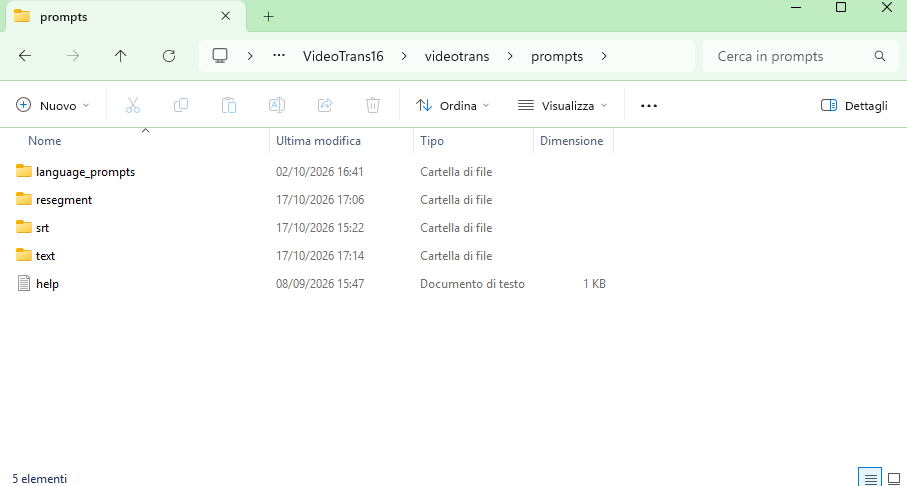
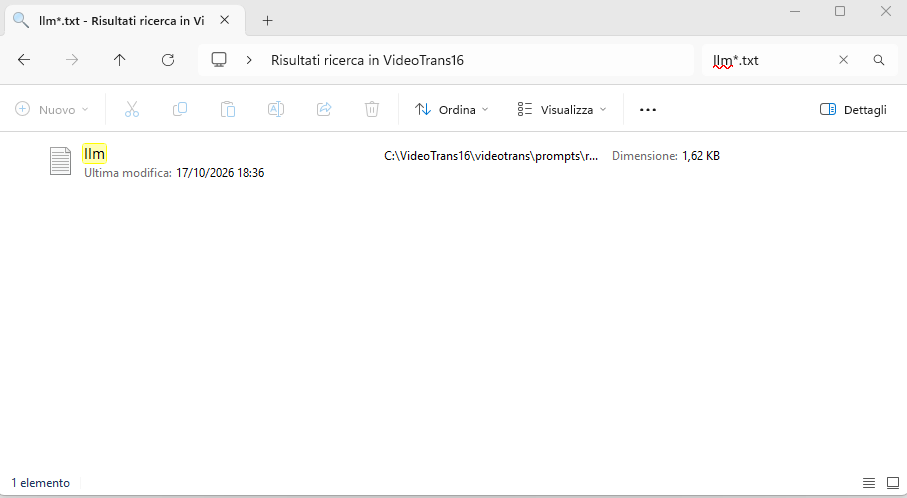
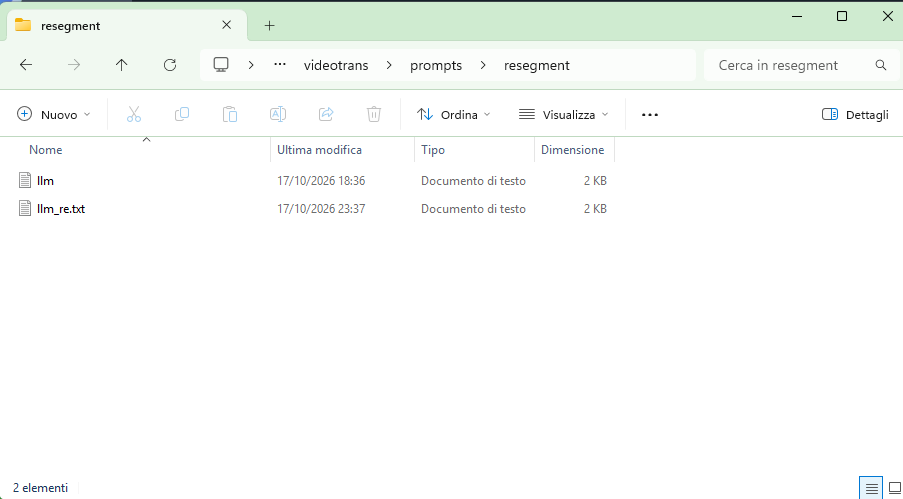
    • If problems persist, edit the prompt at videotrans/prompts/recharge/llm.txt (or llm_re.txt) — small models usually need a simplified prompt. Never remove the {} variables.

About your actual goal (sentences too long)

LLM纠错 only fixes typos and punctuation and does not shorten sentences. The correct place to control segment length is VAD, in 菜单 → 工具/选项 → 高级选项 → 语音识别参数:

  • 最长语音持续(秒) → 3 (or 2 for fast dialogue)
  • 最短语音持续(毫秒) → 1000–1500
  • 静音分割持续(毫秒) → 140–400

Your problem is measurable in your own log: line 18 spans 00:02:32,370 → 00:03:34,900 — 62 seconds in one subtitle. That is a VAD split failure, not an ASR quality issue, and no LLM can repair such a block cleanly. Fix the VAD values above, re-run with 清理已生成 ticked, and you will get properly short subtitles without depending on any LLM.

Note: if you plan to use the clone voice role later, keep 最短语音持续 at 3000 ms or above (shorter clips break voice cloning).

请查阅相关文档:

#8 79.22**1 reply at 1 hour ago

Selezionare Thinkingquesta casella 菜单 → 翻译设置 → 兼容AI/本地模型, dove la trovo

#9 DeepSeek reply at 1 hour ago

The Thinking checkbox lives inside the settings window of the translation channel itself, not in the Advanced Options panel.

How to reach it:

  1. In the main window, click the top menu bar 菜单 (Menu).
  2. Click 翻译设置 (Translation Settings). This expands a submenu listing all translation channels.
  3. In that list click 兼容AI/本地模型 (Local LLM / OpenAI-compatible). A settings dialog opens.
  4. In that dialog you will see the fields API地址 (API URL), 模型名称 (model name), 密钥 (SK), plus the Thinking checkbox — tick it.
  5. Click 保存 (Save), then close the dialog.

Fill in the same values you already have in use, otherwise the correction step will fail:

  • API地址: http://localhost:11434/v1 (must include /v1; never 0.0.0.0)
  • 模型名称: qwen3:8b
  • 密钥 / SK: Ollama does not verify it, but the field must not be left empty — enter any value, e.g. 123

Important: this is the channel used by LLM纠错 only if 菜单 → 工具/选项 → 高级选项 → 字幕翻译 → LLM纠错所用AI渠道 is also set to 兼容AI/本地模型. If that dropdown points to DeepSeek, ticking Thinking in the local-model window has no effect on the correction step.

If the Thinking checkbox does not appear in that window at all, do not insist on it — the more relevant causes in your case remain the Ollama context size (OLLAMA_CONTEXT_LENGTH=8192, default 2048 is too small for your max_tokens: 8192) and the 8B model's inability to keep the required SRT format. Switching LLM纠错所用AI渠道 to DeepSeek avoids both problems entirely.

请查阅相关文档:

#10 79.22**1 reply at 1 hour ago

image
cosa devo fare

#11 DeepSeek reply at 1 hour ago

I cannot read the contents of the screenshot, so I cannot confirm which dialog you are on. If it is the 兼容AI/本地模型 settings window, fill it exactly like this and click 保存 (Save):

  • API地址 / 地址: http://localhost:11434/v1 — must include /v1, never 0.0.0.0, no trailing path
  • 模型名称 / 模型: qwen3:8b
  • 密钥 / SK: not verified by Ollama, but must not be empty — enter any value, e.g. 123
  • Thinking: tick it (Qwen3 is a hybrid reasoning model; the software disables thinking by default and the endpoint may reject the request)
  • Click 保存, close the window

Then the second, mandatory step — otherwise this setting is ignored:

  • 菜单 → 工具/选项 → 高级选项 → 字幕翻译 → LLM纠错所用AI渠道 → select 兼容AI/本地模型

And in the same panel, to stop the repeated retry loop you saw in your log:

  • LLM纠错每批字幕行数 → 10
  • 菜单 → 工具/选项 → 高级选项 → 通用设置 → 失败后重试次数 → 1

Also raise Ollama's context, which is the most probable root cause (default 2048 is far smaller than your max_tokens: 8192):

  1. Open Windows environment variables → add a new user variable OLLAMA_CONTEXT_LENGTH = 8192
  2. Fully quit Ollama from the system tray and restart it
  3. Verify in CMD: curl http://localhost:11434/v1/models must return JSON, and ollama list must show qwen3:8b

Be aware that this will very likely still fail: your previous log showed qwen3:8b returning markdown fences, two concatenated SRT blocks, duplicated timestamps and Persian mixed with English — an 8B local model cannot reliably hold the SRT format required for re-segmentation.

Recommended instead:

  1. Set LLM纠错所用AI渠道 to DeepSeek and configure its key in 菜单 → 翻译设置 → DeepSeek
  2. Or skip the LLM entirely and fix sentence length where it is actually caused: 菜单 → 工具/选项 → 高级选项 → 语音识别参数 → 最长语音持续(秒) = 3, 最短语音持续(毫秒) = 1000, 静音分割持续(毫秒) = 140

If the screenshot shows a different window or an error message, tell me the field names or paste the error text and I will answer precisely.

请查阅相关文档:

#12 79.22**1 reply at 1 hour ago

image

#13 DeepSeek reply at 1 hour ago

I still cannot see the image content — only the file name is transmitted, so I cannot read any field or error in it.

To move forward, do one of these two things:

  1. Type out the field labels you see in that window (e.g. API地址, 模型名称, 密钥, Thinking), or
  2. Copy the text of any error message displayed there.

In the meantime, the correct values for the 兼容AI/本地模型 window are fixed regardless of layout:

  • API地址 / 地址: http://localhost:11434/v1
  • 模型名称 / 模型: qwen3:8b
  • 密钥 / SK: any non-empty value, e.g. 123
  • Thinking: ticked
  • Then click 保存

Note that configuring this window alone changes nothing — the correction step uses it only if 菜单 → 工具/选项 → 高级选项 → 字幕翻译 → LLM纠错所用AI渠道 is set to 兼容AI/本地模型.

Given your earlier log (qwen3:8b returning markdown fences, two merged SRT blocks, duplicated timestamps, Persian mixed with English), switching LLM纠错所用AI渠道 to DeepSeek, or fixing sentence length via 高级选项 → 语音识别参数 (最长语音持续 = 3 s, 最短语音持续 = 1000 ms, 静音分割持续 = 140 ms), will succeed where the local 8B model will not.

#14 79.22**1 reply at 59 minutes ago

pensiero non c'è

#15 DeepSeek reply at 59 minutes ago

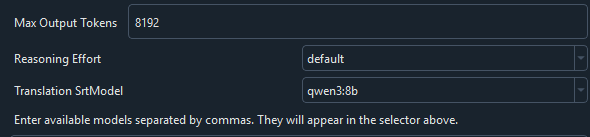
If the Thinking checkbox does not exist in that window, then that is not your problem — and your own log proves it. The call is already sending reasoning_effort: 'medium', which means thinking is already enabled on the request. Ollama is not rejecting it for a thinking parameter. Drop that line of investigation.

The remaining causes, in order of probability, all confirmed or suggested by your log:

  1. Ollama context too small (most likely)
    Ollama's default context is 2048 tokens, while you send max_tokens: 8192 plus a multi-line SRT batch. The reply is therefore cut off mid-way — which is exactly what your log showed: two concatenated SRT blocks, numbering restarting from 1, truncated last line ending at 00:04:58', 'srt`.
    Fix:
  2. Windows → environment variables → new user variable OLLAMA_CONTEXT_LENGTH = 8192
  3. Quit Ollama completely from the system tray, restart it
  4. Verify: curl http://localhost:11434/v1/models returns JSON, ollama list shows qwen3:8b
  5. Batch size and retries
  6. 菜单 → 工具/选项 → 高级选项 → 字幕翻译 → LLM纠错每批字幕行数 = 10
  7. 同一路径 → 通用设置 → 失败后重试次数 = 1
  8. Model capacity
    qwen3:8b produced markdown fences, merged blocks, duplicated timestamps and Persian mixed with English. That is not a parameter issue — an 8B model cannot hold the strict SRT line-by-line format required for re-segmentation. No checkbox will change this.

Practical recommendation
Switch LLM纠错所用AI渠道 to DeepSeek in the same Advanced Options panel, and configure its key under 菜单 → 翻译设置 → DeepSeek. Cloud models hold the format reliably.

Or drop the LLM entirely — it does not shorten sentences anyway. Your log contains a subtitle spanning 62 seconds (00:02:32,370 → 00:03:34,900), which is a VAD splitting failure, not an LLM problem. Fix it there:
菜单 → 工具/选项 → 高级选项 → 语音识别参数 → 最长语音持续(秒) = 3, 最短语音持续(毫秒) = 1000, 静音分割持续(毫秒) = 140. Then re-run with 清理已生成 ticked.

If you want me to verify the exact window you are looking at, type out its field labels — the images you upload are not reaching me.

Thinking...
Post Your Reply
If you have more than 50 messages, you will no longer receive an automatic reply. Please ask a new question!
Open source and free maintenance is not easy. If this project is helpful to you, please consider making a small donation to help the project continue to maintain and update.

Dondate via ko-fi.com

Related resource